Running Powershell script

Hi,
After a little help and understanding, not very experienced with scripts using them in RDM.
We have a simple PowerShell script to disable or enable alarms on ESXi hosts.
Outside of RDM works great, added into RDM and used the parameter feature and got it to load the prompt for vcenter and creds. Worked great also!
Decided to up the ante and try to work out how I can make it so you can run it against any vcenter entry and it would pass through the host, username and password of the entry to the param fields and then run the script..
Won't lie.. Chatgpt has been asked..
Here is the PowerShell script
param (
    [string]$vcenter,
    [string]$username,
    [string]$password
)

# Load PowerCLI
Import-Module VMware.PowerCLI

# Suppress cert warnings
Set-PowerCLIConfiguration -InvalidCertificateAction Ignore -Confirm:$false | Out-Null

# Convert plain text password to secure string
$securePassword = ConvertTo-SecureString $password -AsPlainText -Force
$cred = New-Object System.Management.Automation.PSCredential ($username, $securePassword)

# Connect to vCenter using credentials
try {
    Connect-VIServer -Server $vcenter -Credential $cred -ErrorAction Stop
    Write-Host "Connected to $vcenter successfully."
} catch {
    Write-Warning "Failed to connect to $vcenter. Exiting script."
    exit
}

# Get AlarmManager view
$alarmMgr = Get-View AlarmManager

# Get all clusters
$clusters = Get-Cluster

foreach ($cluster in $clusters) {
    Write-Host "`nCluster: $($cluster.Name)"

    $choice = Read-Host "Enable or disable alarm actions for this cluster and its hosts? (enable/disable)"

    switch ($choice.ToLower()) {
        "enable" { $actionState = $true }
        "disable" { $actionState = $false }
        default {
            Write-Host "Invalid input. Skipping cluster $($cluster.Name)."
            continue
        }
    }

    # Enable/Disable alarm actions on the cluster
    $alarmMgr.EnableAlarmActions($cluster.ExtensionData.MoRef, $actionState)
    Write-Host "Cluster '$($cluster.Name)' alarm actions set to $actionState."

    # Apply to each host in the cluster
    $vmhosts = Get-VMHost -Location $cluster
    foreach ($vmhost in $vmhosts) {
        $alarmMgr.EnableAlarmActions($vmhost.ExtensionData.MoRef, $actionState)
        Write-Host "  Host '$($vmhost.Name)' alarm actions set to $actionState."
    }
}

Write-Host "`nDone."
Here are my parameters with values set: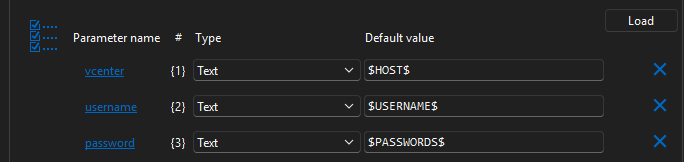
It appears to partly work.. as I see the vcenter host name pull through, however I then get several errors:
Clearly a lack of understanding on my part!
Thanks
Iain
Version 2025.3.23.0 64-bit
Data Source SQL
4881e80b-14e7-44e0-9c8e-92514ac733fb.png
a2d594ae-7086-4544-bb1b-b6ba98f3e438.png
fc0c4adc-b3a7-4cdb-a676-49bdd6514198.png
All Comments (5)
Hello Iain,
Thank you for reaching out to the Devolutions support team.
Which version of RDM and which version of the module are installed?
Based on my preliminary tests, the ps-session is established. The only expected error I encounter is the $password$ variable. This is due to a security feature that can be disabled.
What entry type are you using to execute the script? How exactly do you execute it?
Best regards,
Patrick Ouimet
Hi Patrick,
RDM Version 2025.1.41.0 64-bit
power shell module (appears I have a few for RDM!) latest one is 2025.1.5
I have the vcenters saved as host sessions so I can have several templates assigned to session.
I tried to launch the script like so: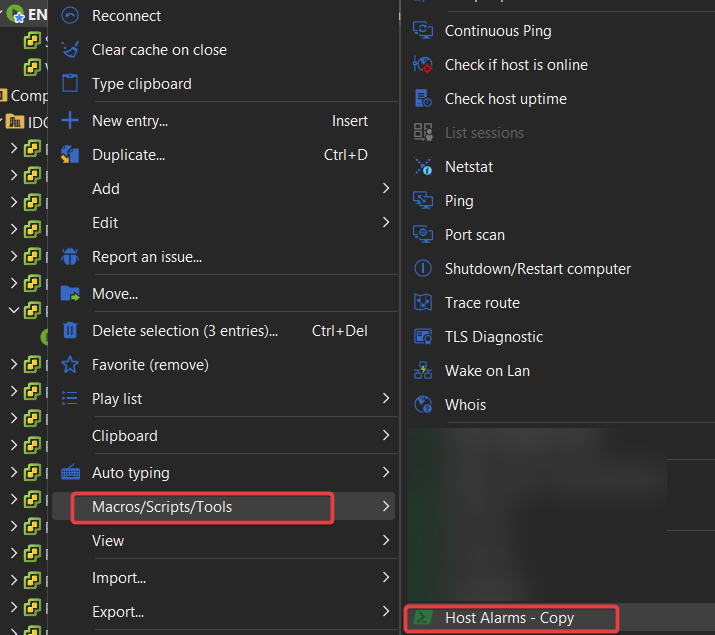
Thanks
Iain
Version 2025.3.23.0 64-bit
Data Source SQL
68303b15-cad3-4d28-a35b-f5c0d458e041.png
Hello Iain,
I might have found something interesting.
Could you execute it to get the error, and then execute:
Get-ExecutionPolicy
Do you also have a restricted policy in RDM?
If so, the Set-ExecutionPolicy -Scope CurrentUser -ExecutionPolicy Bypass might also fix this issue in RDM.
Let me know.
Best regards,
Patrick Ouimet
Hi Patrick No dice!
Thanks
Iain
Version 2025.3.23.0 64-bit
Data Source SQL
c75dfa4a-6e9c-4f35-a5e6-5d4e65d03df8.png
Hello Iain,
I found an open ticket with the same behaviour.
I have forwarded your information to the internal ticket.
We will notify you when it’s fixed.
Best regards
Patrick Ouimet