Authentication and Session Idle Timeout
1 vote

Hello.
We are using Entra ID authentication with DUO 2FA.
The goal that want to achieve, is to use our standard authentication method (Entra ID) with additional security. We need our most valued data to be the most secure. It's also part of our ISO 27001 certification that we achieve that.
The plan to add DUO was in thinking that we do not want to restrict Entra ID sessions to short session idle timeouts. But we need Devolutions Server to have something like 4 hours session idle timeout. We set that in the server, but it seems that's not the goal of that setting.
We would like to achieve that a user who is idle over 4 hours, gets his session disconnected by the server, and that he needs to login again. Entra ID will have his session open, so it will seamlessly go to the 2FA step with DUO.
This is not the case today, and we feel it's against our certification to have sessions that are kept alive over 60 hours.
Thank you and best regards.
Devolutions Server, RDM and GW admin.
Recommended Answer
Hello Marcel,
Good news on this one: the "On close" and "On idle" disconnection options for the Password Manager browser extension have been implemented in a recent version.
You can configure them here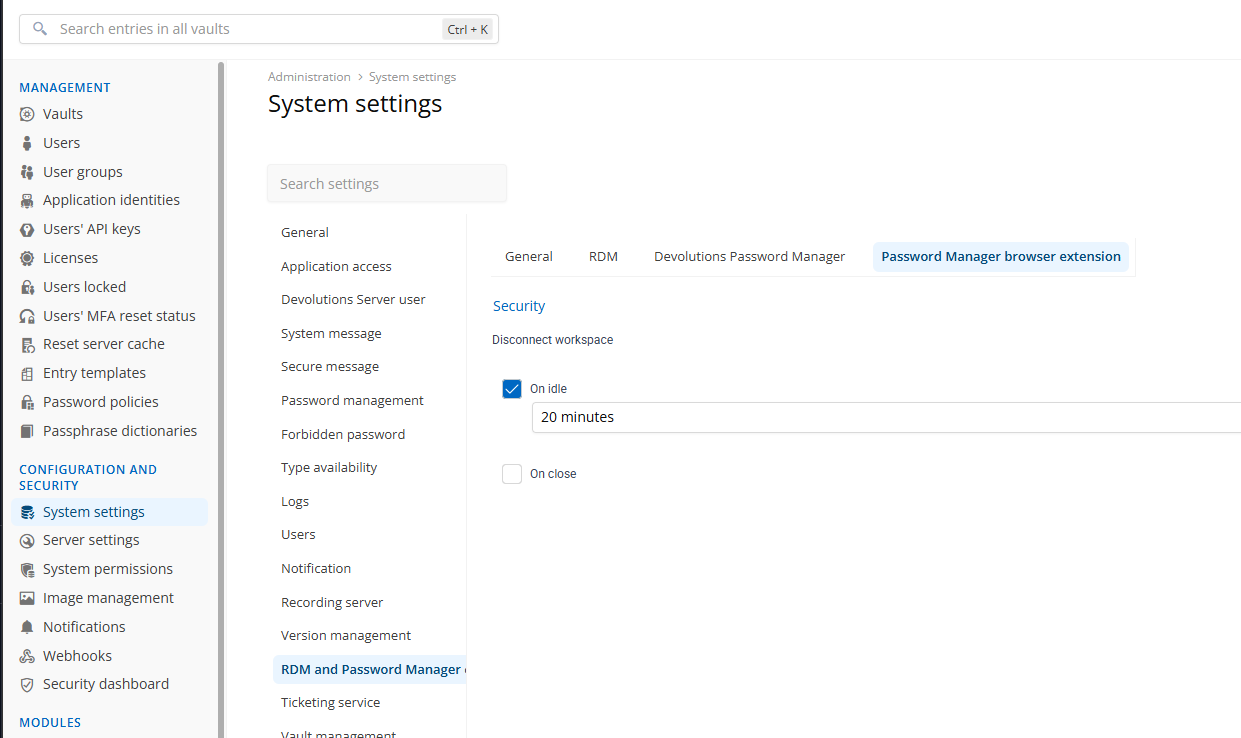
Apologies for not coming back to update this topic once it shipped. Don't hesitate to let me know if the behavior matches what you were looking for.
Best regards,
François Dubois
d9cc9273-9391-4534-999d-d5a333b1a863.png
All Comments (11)
Hello,
Thank you for your request. Could you send me exaclty which setting that you set that doesn't work ? What was your expectation ?
We have this setting that could help I think, I don't know if you were talking about that setting : 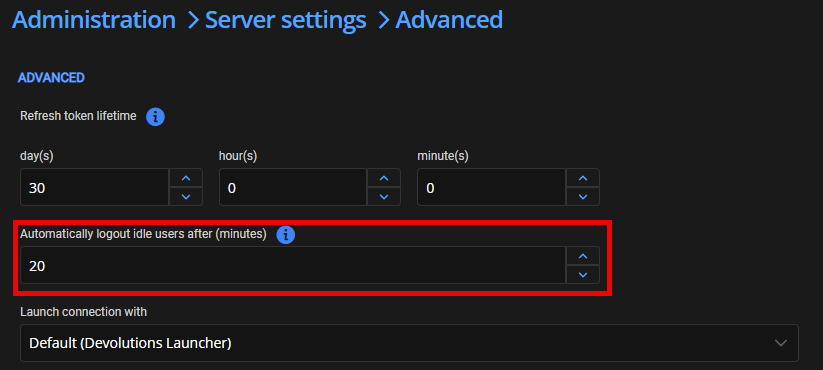
After that period of time, the web interface will be disconnected and redirect to the login page.
You wrote
We would like to achieve that a user who is idle over 4 hours, gets his session disconnected by the server, and that he needs to login again
If you set that setting to 240 minutes (4 hours), your session should be disconnected by the server after 4 hours for an idle session. It should be the behavior with that setting. Is it what you got ?
Best regards,
François Dubois
f12f6b03-5a1f-4275-817e-61500b33e4ee.png
Hello François.
Yes that's the setting.
Maybe it does for the web session iself. But why are the browser extension and RDM sessions handled differently ?
Our browser extensions switched from randomly disconnecting to staying connected forever. Both are not good, as you can imagine.
That setting should work for ALL sessions, not just the "user using the web interface" type sessions.
Best regards,
Marcel
Devolutions Server, RDM and GW admin.
Hello François.
For us, this is a critical state.
As you might know we are also ISO 27001 certified. We defined the Devolutions ecosystem at highest levels for confidentiality, integrity, availability and non-repudiation classifications because this solution contains data without which our business would not be able to operate.
With this in mind, we need to ensure that the security to access this ecosystem is relevant.
Having a session that survives browser closing, rebooting and long periods of time is a non-confirmity and we need to address it as soon as possible.
We would like to know if you will address this and if you can provide an estimated roadmap or timeframe.
Thank you and best regards.
Marcel
Devolutions Server, RDM and GW admin.
Hello Marcel,
Thank you for your feedback. You're right, the setting that I showed you is only used in the web interface. And it is only valid if your browser is open. As soon as you close your browser, it is not considered. The only parameter considered when you close the browser is the Refresh token lifetime.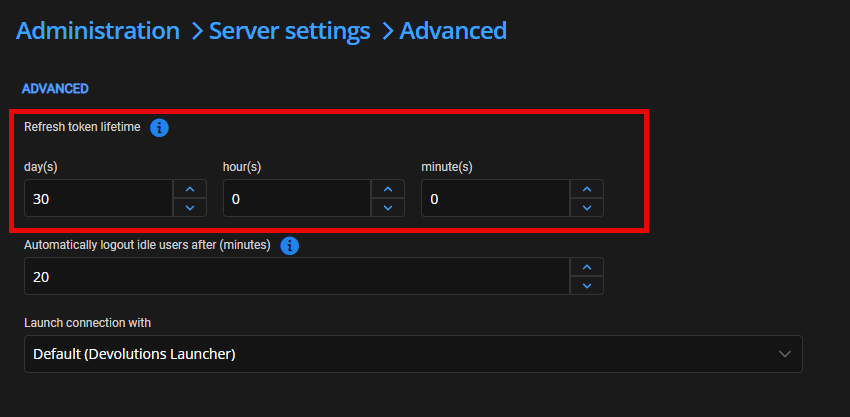
But even that parameter, I'm not sure it is what you want. If you close your browser, do you want to stay connected, or do you want to force a login when you go back to the website?
The refresh token lifetime is used to determine if your token is still valid. So, as long as you reach the server once before the end of the lifetime, your token will stay valid. If you set that parameter to 4 hours, close your browser, and wait 4 hours, you will have to log in again. But if you close and open it after 1 hour, you will be connected. This parameter will be valid for all clients. So, if you use RDM and close it, if you open it before 4 hours, you will be logged in; after 4 hours, you will have to log in again. Is this the behavior you are looking for?
The main question is : If you close the browser, do you expect your user to login again or is it ok to be logged in if they worked with DVLS in the last 4 hours ?
Best regards,
François Dubois
b0cab2a4-a7bc-47bf-9b79-31ec643f472d.png
Hello François.
Thank you for your feedback.
This is already better.
I have set it like this for now, we will see what's going to happen.
I will let you know if it suits our needs. But as you explained it, it probably will.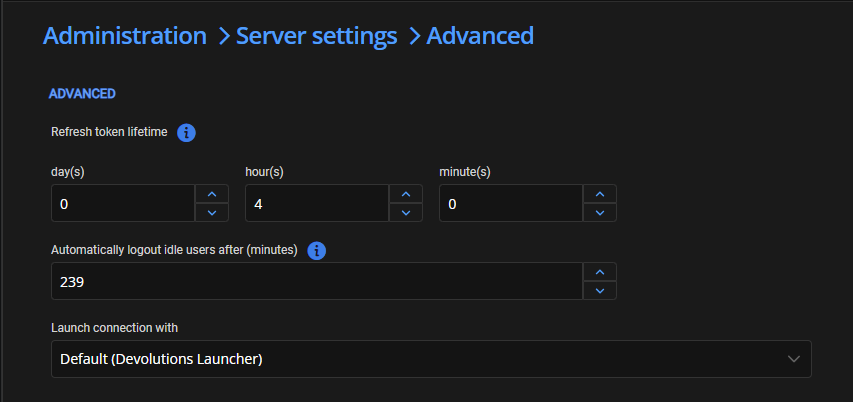
Regarding browser close etc, there is the following setting page for RDM.
Would there be a possibility to implement something like that for the browser extension, which is centrally managed (in Server or by GPO) ?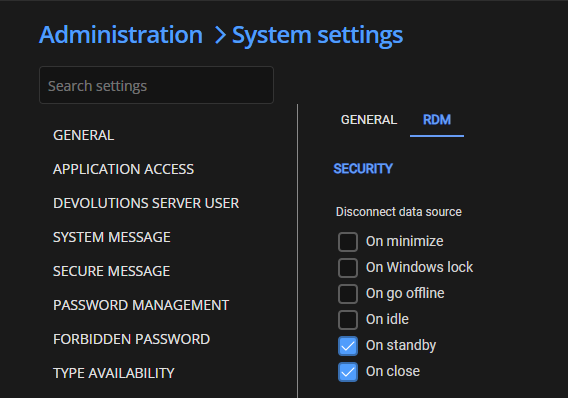
Best regards.
Marcel
Devolutions Server, RDM and GW admin.
d5349166-2cb8-485c-a6ce-f2ff2d7846f0.png
84f2e3a5-d2e5-43e4-9af9-335897f8f421.png
Hello Marcel,
Thank you for your answer. I created a ticket to support browser extension disconnection if you close the browser and/or after an idle period. We will post back here once we have an update.
Best regards,
François Dubois
Hello François.
The "refresh token lifetime" settings seem to work as expected (we didn't time it, but we definitely have to reconnect on the following day).
We're looking forward to news of potential improvments regarding browser close etc.
Best regards.
Marcel
Devolutions Server, RDM and GW admin.
Hello Marcel,
Just to confirm that we can meet your needs, RDM can be disconnected during various events (on close, on standby, on idle, on go offline, on Windows lock, on minimize). For our browser extension, we plan to support "on close" and "on idle" for now. We are unsure how easy it would be to implement others and we are not sure they make sense for a browser extension. Would this work for you, or do you already know that you would like other events supported?
Best regards,
François Dubois
Hello François.
OnClose and OnIdle are enough for me.
I don't see any other use cases either or how you would be able to implement OnWindowsLock.
Thank you and best regards.
Marcel
Devolutions Server, RDM and GW admin.
Hello.
Do you have any news about this request ?
Thank you and best regards.
Marcel
Devolutions Server, RDM and GW admin.
Hello Marcel,
Good news on this one: the "On close" and "On idle" disconnection options for the Password Manager browser extension have been implemented in a recent version.
You can configure them here
Apologies for not coming back to update this topic once it shipped. Don't hesitate to let me know if the behavior matches what you were looking for.
Best regards,
François Dubois
d9cc9273-9391-4534-999d-d5a333b1a863.png