rdm powershell with sql connection, sql connection does not show

we have rdm with sql connection however i can only connect to the local connection. The sql database is not shown at all using the powershell commandlets.How can i connect to the correct SQL connection ?
We use powershell 5.1
PS D:\Beheer\Alex> Get-RDMInstance

ApplicationVersion OptionFilename
------------------ --------------
2022.3.1.8         C:\Users\TEMP.DF0.010\AppData\Roaming\Devolutions\RemoteDesktopManager\RemoteDesktopManager.cfg


PS D:\Beheer\Alex> Get-RDMDiagnostic

Serial LicenseType IsLicenseValid IsLicenseExpired
------ ----------- -------------- ----------------
                            False             True

PS D:\Beheer\Alex> Get-RDMSession
Get-RDMSession : Connection not found.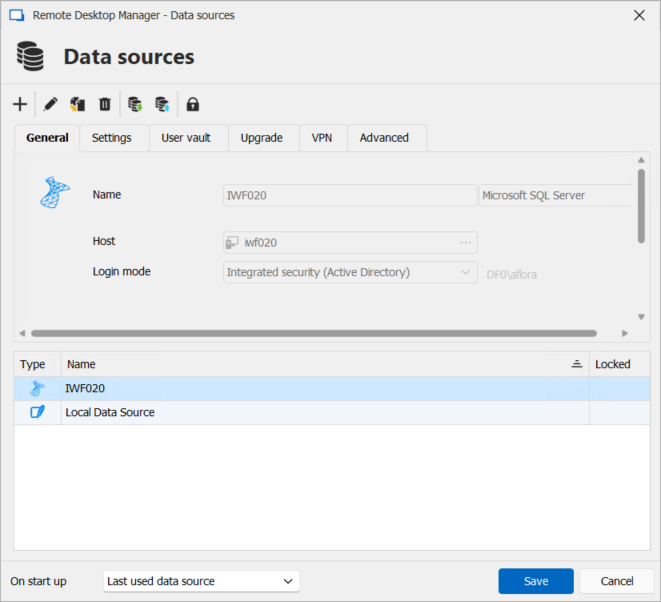
86707a23-ae76-4e05-ae71-6b65ee6ea0fe.png
All Comments (1)
Hello,
It looks like you're using an older version of the module, which may be causing an error when reading the configuration. As a result, it’s likely defaulting to a local data source.
To avoid compatibility issues, we recommend using a module version that matches the major version of your RDM instance. Starting with version 2023.1, the module has been renamed Devolutions.PowerShell. Please note that this version requires PowerShell 7.5 or higher. Would you be able to test with a more recent version?
Alternatively, you could try using a portable version. Please see the documentation here: Use an Override Configuration (Portable)
Keep in mind that you'd need to recreate the data source. Also, if there’s a major version mismatch, you might still run into additional issues.
Best regards,
Maxime