Windows 11 RDP TLS 1.3 Cipher suite not found when connecting via gateway
Windows 11 RDP TLS 1.3 Cipher suite not found when connecting via gateway

Hello,
When attempting to connect to a Windows 11 (24H2) machine via Devolutions gateway (2025.1.4) installed on Windows server 2022, the connection fails. The gateway log file reports "An existing connection was forcibly closed by the remote host. (os error 10054)", and the event log on the Win11 computer reports "An TLS 1.3 connection request was received from a remote client application, but none of the cipher suites supported by the client application are supported by the server. The TLS connection request has failed. The SSPI client process is svchost[TermService] (PID: 1400)."
Opening an RDP connection on the Gateway server and connecting to the same Win11 machine works fine.
Wondering if there is a TLS 1.3 cipher suite required by Win11 RDP that is currently unsupported by the Gateway software?
TLS Cipher Suites in Windows 11 v22H2 and later. - Win32 apps | Microsoft Learn
System requirements for Devolutions Server - Devolutions Documentation
Also noticed that there is a 'maximum TLS version' property on the RDP entry in RDM, but it is greyed out unless the FreeRDP protocol is selected. However when I tried changing to FreeRDP and setting max TLS version to 1.2, when launching the connection it says unable to connect to the gateway so not sure if FreeRDP is compatible with gateway connections.
Please let me know if you would like any additional info.
Thanks
Joe
All Comments (4)
Hi,
We are aware of weird issues with TLS 1.3 that appeared in recent weeks, with very inconsistent results. It really looks like Microsoft broke something in a recent update - it results in TLS 1.3 being negotiated with compatible cipher suites, but the server aborts the handshake anyway, exactly like you've described. The only workaround is to disable TLS 1.3 in the server or the client in SChannel, I have attached .reg files to this response for this.
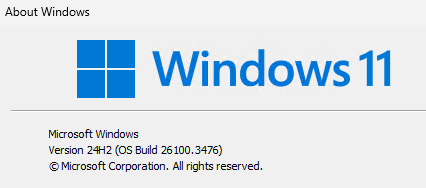
Can you run "winver" on the client and server such that we can know the specific OS builds? We haven't been able to identify specific conditions in which this problem occurs yet. There have been reports of this issue even affecting .NET (and PowerShell) in Windows 11 24H2 with TLS 1.3 provided by SChannel, so this isn't specific to RDP, but can be observed with RDP.
Best regards,
Marc-André Moreau
DisableTLS13Client.reg
DisableTLS13Server.reg
Hi Marc-André,
Thanks for the quick response. I used the DisableTLS13Server.reg on the Win11 machine, and I can now connect via gateway.
Screenshots of winver are attached below.
Please let me know if you would like any additional info.
Joe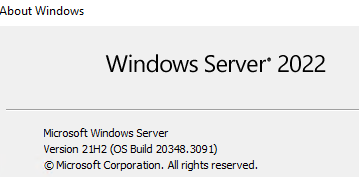
c66c92fa-ad07-4ed2-a5fb-0139a40e33f0.png
1d615702-59b3-4944-8a7f-07ec652766be.png
Thanks for the update. Can you clarify which version of Windows with the OS build (winver) is used on the machine running RDM Windows? My understanding is the server is a Windows 11 24H2 machine, and that Devolutions Gateway is running on Windows Server 2022, but I would need to know the version information for the client running RDM as well
Marc-André Moreau
Hi Marc-André,
Running RDM 2025.1.29 on the following version of Windows 11, which is same as the destination 'server' machine.
Please let me know if you would like any additional info.
Joe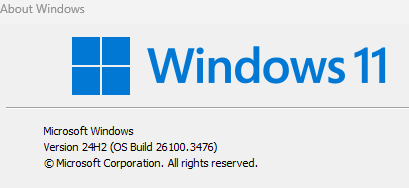
f5ec4d83-74b9-429b-8072-eeb7c771f898.png