SSH Session using SSH Gateway

Hello,
I'm trying to connect to an SSH session using SSH Gateway (as I assume this is the way to connect with SSH the way I do with ProxyJump ssh option in my config file)
I have configured the SSH Gateway with corresponding SSH key: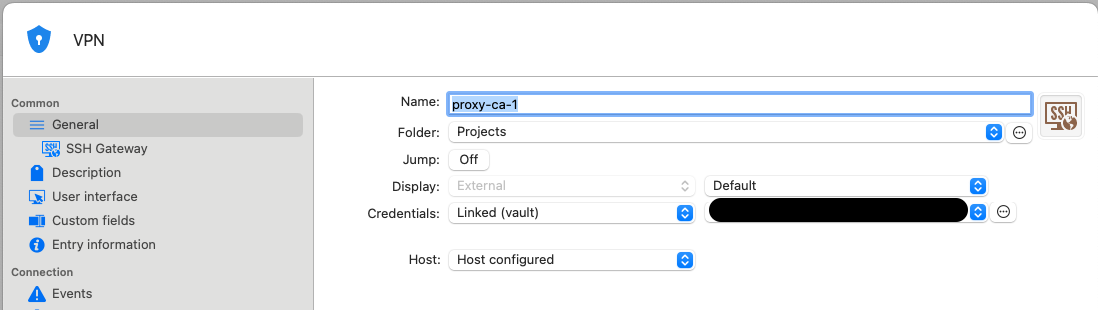
And then I fill the host in SSH Gateway section:
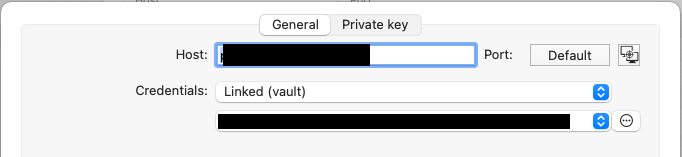 I have put in credentials the same SSH key as in general tab (is that the way or I have to choose SameAsManagement?)
Then I create an SSH session with its corresponding SSH key as follow: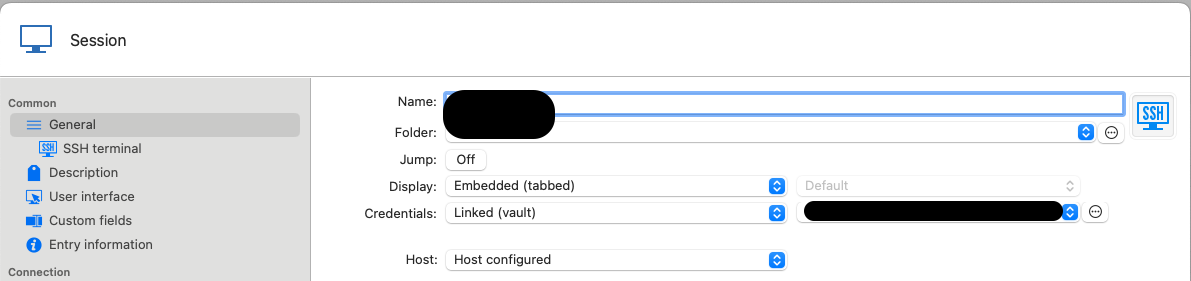 And attached gateway in SSH terminal section:
Is that the right way to connect to an SSH session using the gateway host as a Jump server?
This config is not working for me as I'm receiving a Permission denied with incorrect credentials. This same config is working perfectly through ssh config file.
I'm using RDM for MAC version 2025.1.13.3
Thank in advance and best regards,
8cf7b41b-af63-406c-a0d8-43e7f609986f.png
4b03faf2-435d-47eb-b69d-ce96baddec10.png
ce21e6cb-ba4f-4357-9ee7-453bbbdcac50.png
8d2fcb38-7aee-47fa-a666-41e684691049.png
2bee6ae6-b685-497a-9cba-11971a7658cc.png
Recommended Answer
Hi, yes I have tested the following configs with no luck:
- SSH Gateway Credentials set to "Username and password" and Host Credentials set to "Linked (vault)"
- SSH Gateway Credentials set to "None" and Host Credentials set to "Linked (vault)"
- SSH Gateway Credentials set to "Linked (vault)" and Host Credentials set to "Linked (vault)"
Playing around with the options I've been able to make it work with the following options (in SSH-Jump-box-SSHGateway):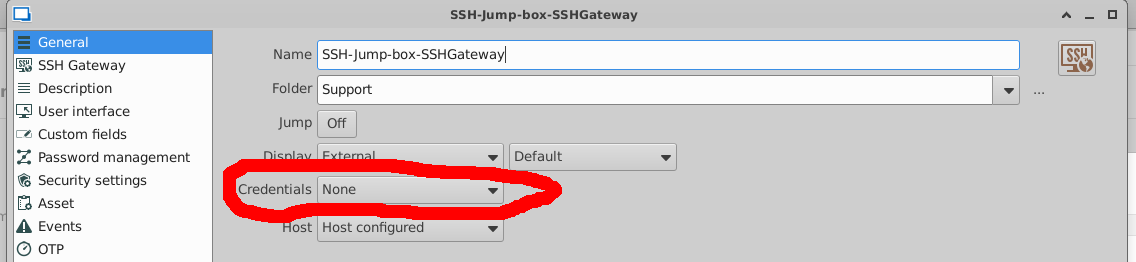
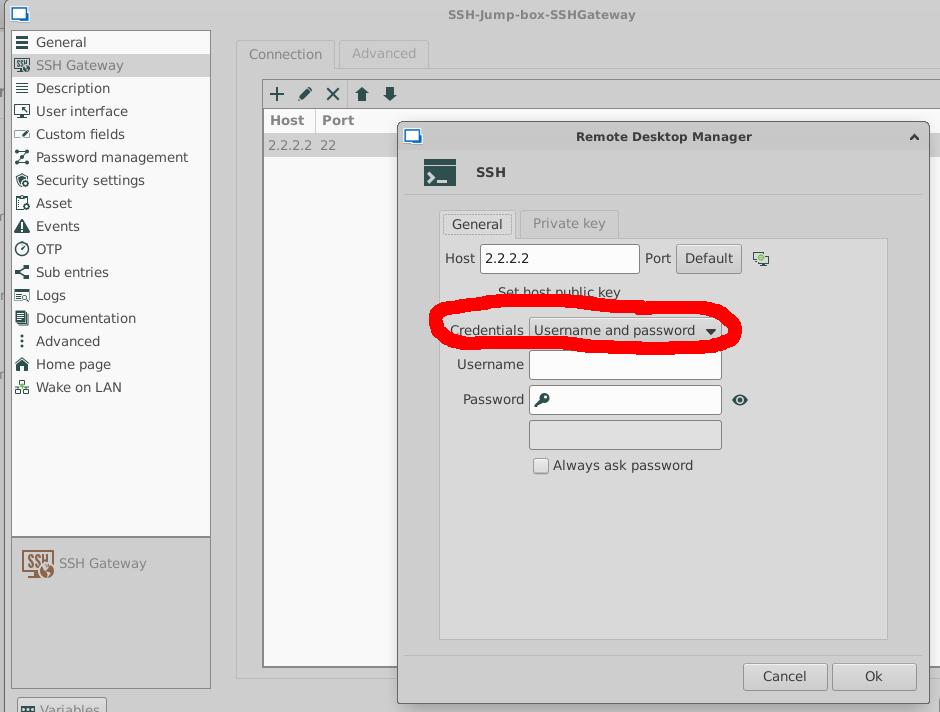
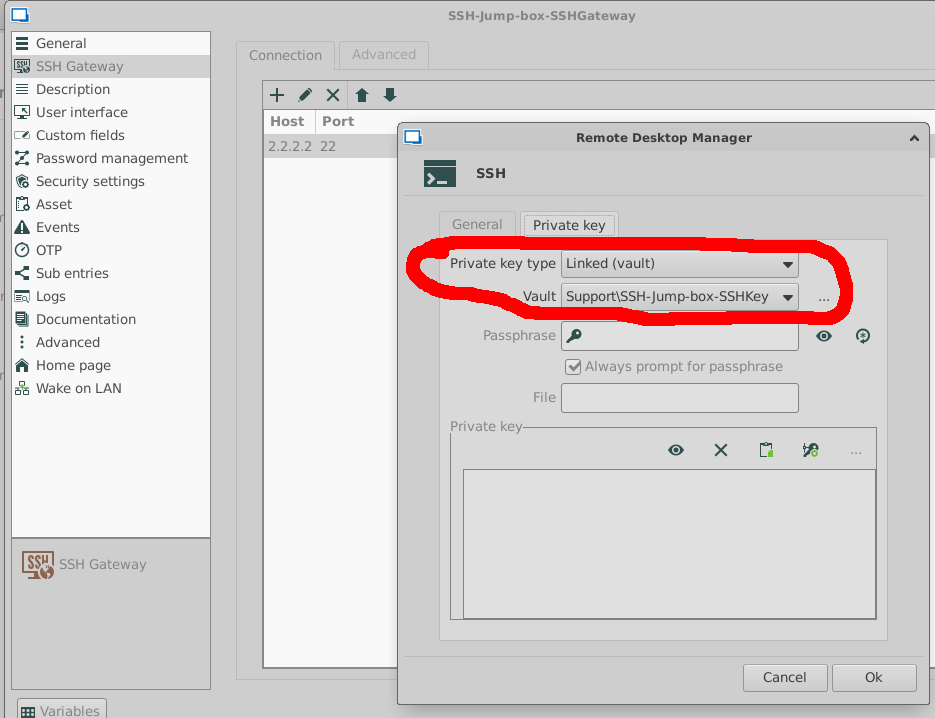
I think that the credential fields are not useful here, you have to put the SSH credential in "Private Key" tab for SSH Gateway --> Host definition.
Thanks for the support, but the way of working is not very intuitive and I haven't found any doc related to this feature.
Regards,
9b03c903-e2b9-4d64-bfb8-a2dbd6878c2b.png
6aa85627-07fa-4b73-ab22-8b5564f52e59.png
1358fb44-8763-4fda-8799-a3f5d2d7c119.png
All Comments (15)
No one can help on this?
Hello,
Sorry for the delay of my response.
Do you have something relevant in Help -> Application Logs?
Best regards,
Jeff Dagenais
Hi @jeff,
these are the logs I get:
Regards,
9cd4f8a9-c6dd-4e3c-b807-a105e0c99c5f.png
Hi, I have changed RDM from MAc to Linux and the error I received is: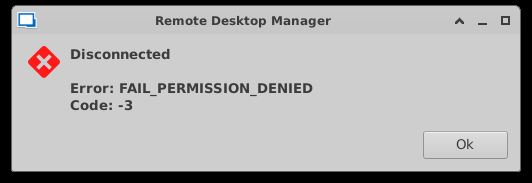
And no logs in Help-Application Logs
Is the way I'm configuring the connection (and the SSH Gateway) the right way to use the gateway as a jump host for the SSH session?
Regarsd,
48e28062-f653-4a8f-a667-e2ae520e2fe5.png
Hello,
Thank you for your patience.
Would it be possible to double-check all configurations once more, just to ensure the issue isn’t caused by a misconfiguration?
Additionally, could you test whether the issue occurs on a Windows machine as well?
Best regards,
Carl Marien
Hi Carl,
i'll try to explain the stuff I have created based on this diagram: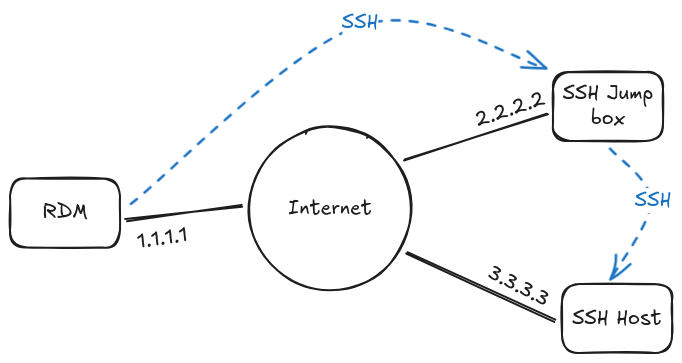
I have created the following items:
- SSH Credentials:
- SSH-Jump-box-SSHKey: Key for connecting to SSH Jump box to be used as a Jump Box
- SSH-Host-SSHKey: key for connecting to SSH Host (the final server to be managed)
- SSH Gateway:
- SSH-Jump-box-SSHGateway
- SSH Session:
- SSH-Host-SSHSession
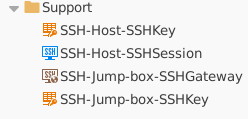
Details (not for SSHKeys as they're RSA standard keys):
- SSH-Jump-box-SSHGateway:
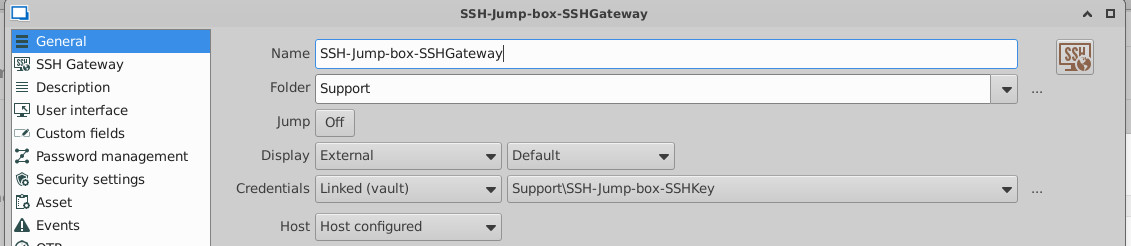

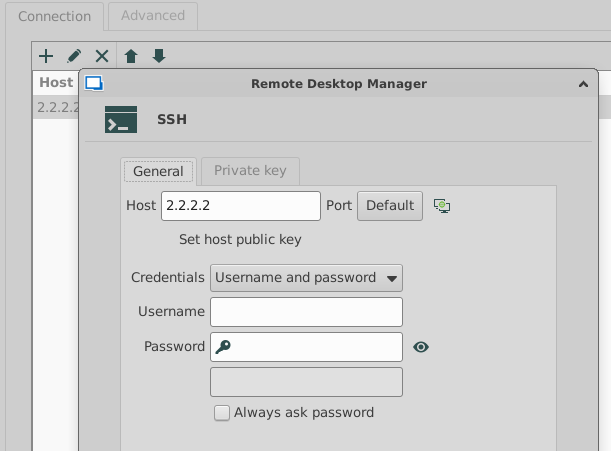
- SSH-Host-Session
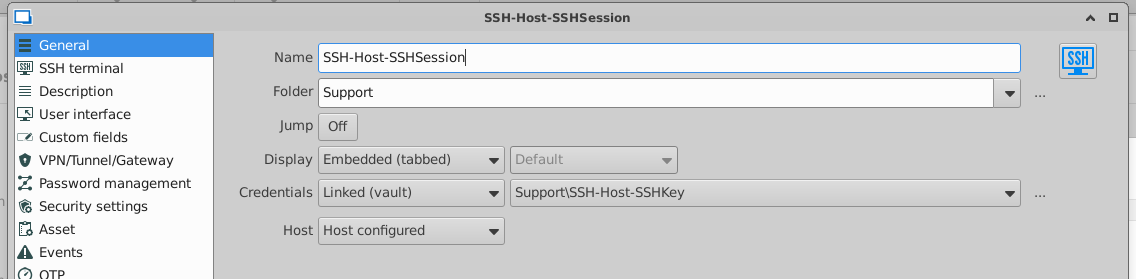
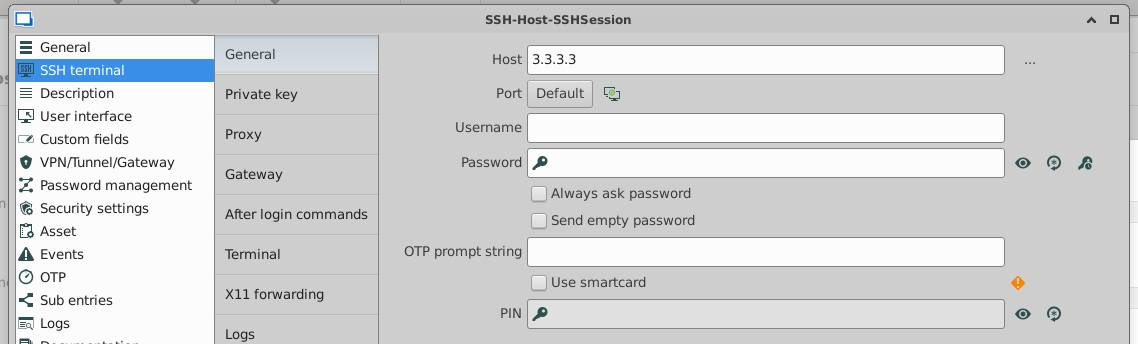
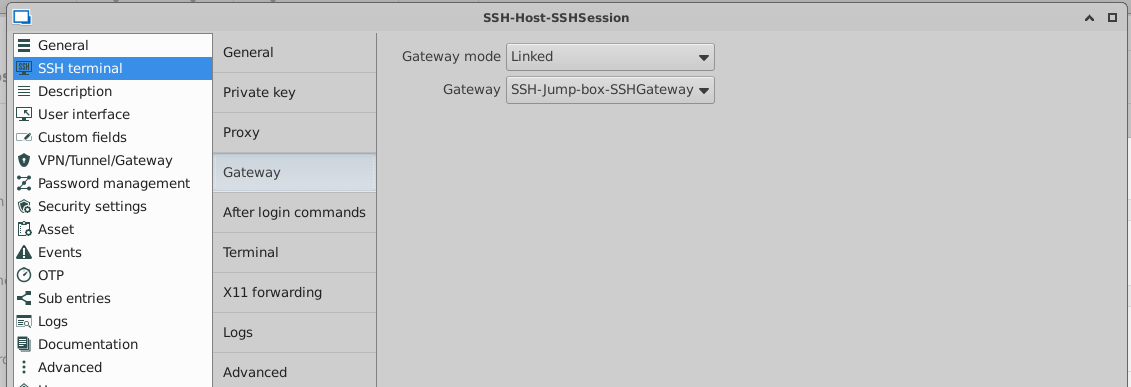
With that configuration the connection doesn't success with error FAIL_PERMISSION_DENIED. I don't exactly know if this is the process in RDM to "emulate" ProxyJump directive in SSH Config file. If I configure SSH config file in this way the connection success:# PROXIESHost ssh-jump-box HostName 2.2.2.2 User testusr IdentityFile ~/.ssh/SSH-Jump-box-SSHKey# HOSTSHost ssh-host HostName 3.3.3.3 User ubuntu ProxyJump ssh-jump-box IdentityFile ~/.ssh/SSH-Host-SSHKey
With that config, executing 'ssh ssh-host' connects to final host using ssh-jump-box as a gateway.
I can't test now in Windows, maybe I can do it in a few days.
Regards,
49382afb-f673-4aad-8177-c1230f6ad38d.png
995cf992-e61e-4723-85fc-1874dc617f23.png
60e99abc-9132-4583-a97f-d6bedadd5daa.png
ccb9e104-b3c4-4e02-a4e3-c4f44c1d9602.png
cc718ad6-91ca-4b19-a8a9-4620f1df68fe.png
1d52ccff-40a6-4ba4-b2ff-c7c01f088ed0.png
80ddd626-faf3-4ac1-a958-e48f7c950cac.png
bfa41438-dfd2-491d-9760-6c1fe7e308ca.png
Hello,
Thank you for the screenshot and explanation. I’ll need to try and recreate your exact setup to identify where the issue might be coming from. Could you please let me know which version you currently have installed and what data source you’re using?
Best regards,
Carl Marien
Hi Carl, I'm using RDM v2025.1.0.15 in Linux with local datasource but with datasource in Hub Cloud happens the same.
Regards and thanks,
Hello,
Apologies for the confusion — I hadn’t realized the issue was related to a Linux installation rather than macOS. I’ve gone ahead and moved the forum post to the Linux support section instead.
Would it be possible for you to send us a screenshot of the output from the `neofetch` command? This will help us better understand your setup.
Best regards,
Carl Marien
Here you have: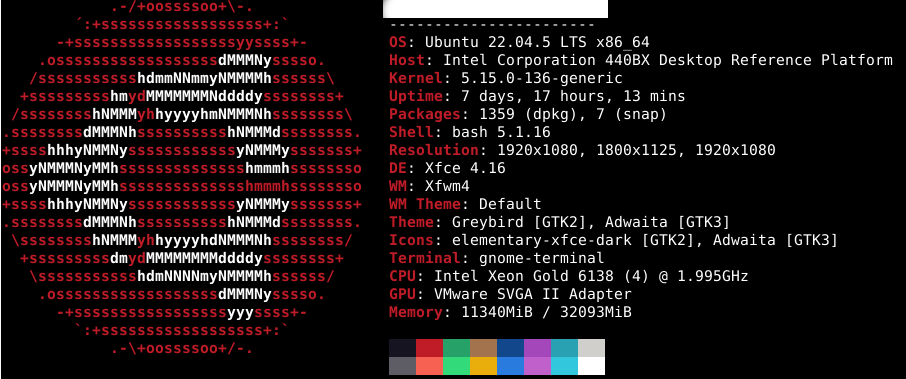
000b796f-91d8-4f89-accf-a83d160fa8e7.png
Hello,
Have you tried to set the credentials mode to "Linked (vault)" bellow with your jump host SSH key ?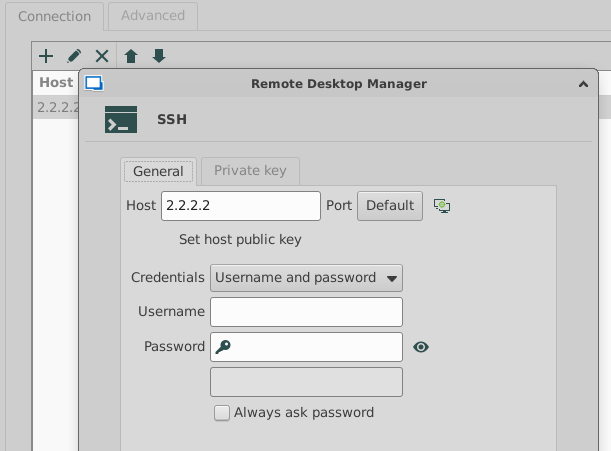
I don't think the configuration you set here bellow is used in this case. Your SSH key should be linked when you add the host.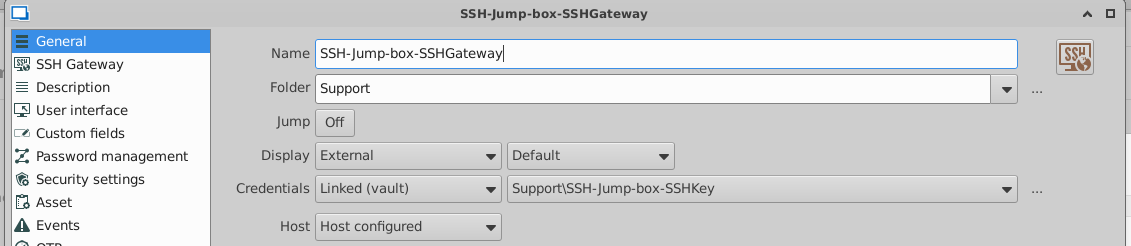
Best regards,
Simon Duguay Létourneau
62d33d60-fcde-42d1-8edb-e38a80280f8f.png
5b4b2b42-f579-4e8d-aab5-744df2239fc6.png
Hi, yes I have tested the following configs with no luck:
- SSH Gateway Credentials set to "Username and password" and Host Credentials set to "Linked (vault)"
- SSH Gateway Credentials set to "None" and Host Credentials set to "Linked (vault)"
- SSH Gateway Credentials set to "Linked (vault)" and Host Credentials set to "Linked (vault)"
Playing around with the options I've been able to make it work with the following options (in SSH-Jump-box-SSHGateway):
I think that the credential fields are not useful here, you have to put the SSH credential in "Private Key" tab for SSH Gateway --> Host definition.
Thanks for the support, but the way of working is not very intuitive and I haven't found any doc related to this feature.
Regards,
9b03c903-e2b9-4d64-bfb8-a2dbd6878c2b.png
6aa85627-07fa-4b73-ab22-8b5564f52e59.png
1358fb44-8763-4fda-8799-a3f5d2d7c119.png
Hello,
Thanks for the feedback — I totally agree that this isn't very intuitive. I’ll raise the concern internally so we can work on making it clearer.
Regards,
Simon Duguay Létourneau
Hello Devolutions Team,
I was introduced to your tool today, and we are currently testing whether it meets our team's requirements. It’s a great tool, but we initially encountered an issue connecting to a child host via a jump host using certificate authentication.
After about four hours of searching through the forum, we found the solution to that particular issue and fixed with this post.
However, one remaining problem persists:
I do not see the console "input" of my child host. Instead, the server information is displayed (as it should be when i login into the server) , and the output stops at the line "Listening on 127.0.0.1:3390."
I am currently running version 2025.2.6.8 on macOS.
Thank you in advance for your help and fix for this.
Hello paul5,
Thank you for reaching out to Devolutions Support.
Would it be possible for you to recreate your forum post in the macOS Support section?
This current thread is related to the Linux version of RDM, so having your post in the appropriate macOS section will help us assist you more effectively. When you do, please include a link to this forum thread for reference.
Best regards,
Carl Marien