SQL Lite Multifactor YubiKey

Hello,
I'm migrating to Devolutions RPM on Fedora 41 with Gnome47 using SQLite as DB.
For what I'm going to use, everything is working good ATM but i want to configure my YUBIkey on multi-factor authentication for SQLite DB but i cant save the configuration after thouch the yubikey.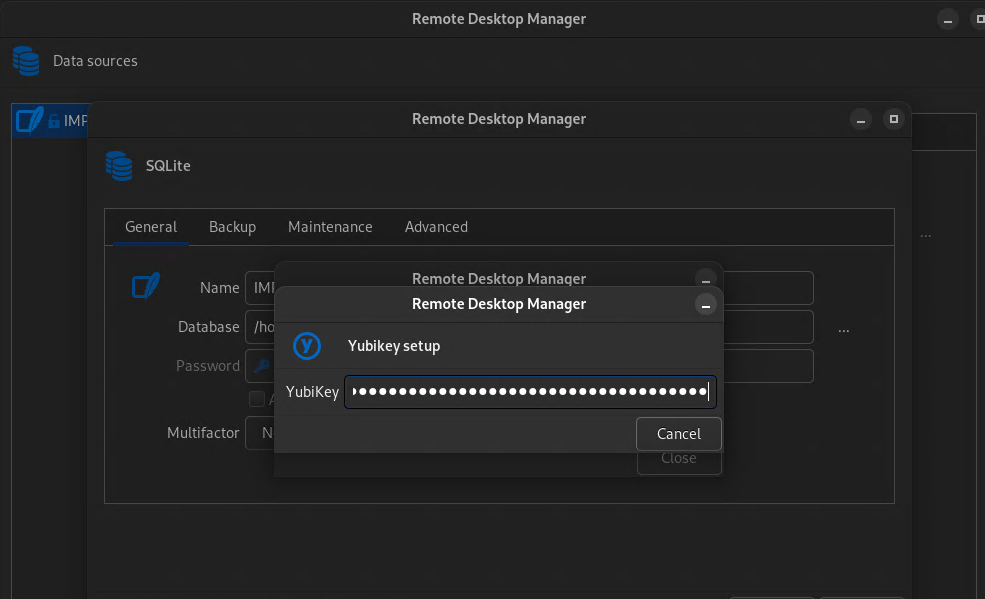
something is missing or i'm trying to configure it wrong ?
969624e7-b330-448a-b5a9-8e820f8ae754.png
Recommended Answer
Hi jrosa,
This indeed seems to be an issue on our end. The "Save" button seems to always be hidden. We have resolved this issue internally and are working on releasing a fix in the coming days. Thank you for bringing this to our attention. Please, do not hesitate to contact us for any other issues.
We will update this thread when the update with this fix is available.
Best regards.
Nicolas Parr
All Comments (7)
Hi jrosa,
This indeed seems to be an issue on our end. The "Save" button seems to always be hidden. We have resolved this issue internally and are working on releasing a fix in the coming days. Thank you for bringing this to our attention. Please, do not hesitate to contact us for any other issues.
We will update this thread when the update with this fix is available.
Best regards.
Nicolas Parr
Happy to help in some way this project :)
Hi jrosa,
This indeed seems to be an issue on our end. The "Save" button seems to always be hidden. We have resolved this issue internally and are working on releasing a fix in the coming days. Thank you for bringing this to our attention. Please, do not hesitate to contact us for any other issues.
We will update this thread when the update with this fix is available.
Best regards.
Hello,
I've tested the new version and now i can configure the yubikey and is working. i'm trying to remove the yubikey to test and i cant revert to password only. I remove the yubikey but he keeps asking the touch on the key.
Is me or the app configuration?
Another note... in this version 2025.1.0.15, the app after some time in "idle" it get "stuck" and cant do anything i need to close de application and open again.
i rollback to 2025.1.0.12 and "stuck" problem don't appear.
Hello jrosa,
We were able to reproduce the issue you reported with removing the YubiKey. We will investigate further and let you know once a fix is available.
However, we were not able to reproduce the freeze during idle. Could you let us know if a specific connection is open when this occurs? Is the data source still SQLite? Are you connected with your Devolutions Account at the time?
Best regards,
Gabriel Dubois
Hello jrosa,
We were able to reproduce the issue you reported with removing the YubiKey. We will investigate further and let you know once a fix is available.
However, we were not able to reproduce the freeze during idle. Could you let us know if a specific connection is open when this occurs? Is the data source still SQLite? Are you connected with your Devolutions Account at the time?
Best regards,
Hello,
About the idle an example, left multiple Windows RDP connection open, after doing something else on other applications like outlook or terminal i get back to devolutions the application is stuck and i cant do anything, i can see the open connection but can't do nothing the application is unsresponsible.
I still use SQLite and i don't Use Devolutions Account to sync information.
Best Regards,
New note on "freeze" problem.
I've made a new Datasource in SQLite without yubikey configured only with password, and the freeze is not happening again.
Can be something related with the yubikey multifactor? exist some "idle timeout" that requires the multifactor authentication again and is not appearing the window to touch the key that is causing the "freeze" ?
Alright, thank you for this clarification, it helps a lot! We will investigate it.
Regards,
Gabriel Dubois