Issue Opening SQLite database with password.

Long time user of RDM for my home lab. I recently moved my daily laptop over to Fedora 41, and I'm trying to get RDM to play nice. I have the Flatpak version installed and i'm trying to open the SQLite database file I've been using for years with my other Windows computers.
Other data sources seem to be fine and the SQLlite database file works fine on any windows host. Since this is flatpak I assume that means the sqllite version is baked into the flatpak file.
Every time I get the following error. Open to ideas or any work arounds people may have. 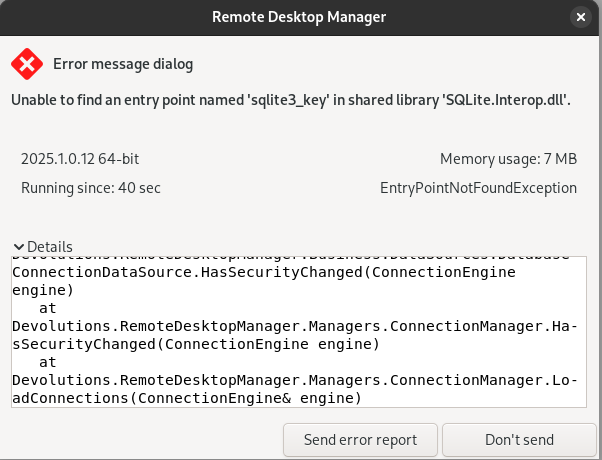
Full text:
at System.Data.SQLite.UnsafeNativeMethods.sqlite3_key(IntPtr db, Byte[] key, Int32 keylen)
at System.Data.SQLite.SQLite3.SetPassword(Byte[] passwordBytes, Boolean asText)
at System.Data.SQLite.SQLiteConnection.Open()
at Devolutions.RemoteDesktopManager.Business.DataSources.DatabaseConnectionDataSource.OpenConnection(IDbConnection dbConnection)
at Devolutions.RemoteDesktopManager.Business.DataSources.DatabaseConnectionDataSource.ExecuteScalar[T](String sql, IDbDataParameter[] parameters)
at Devolutions.RemoteDesktopManager.Business.DataSources.SQLiteConnectionDataSource.GetConnectionCacheID(String repositoryID)
at Devolutions.RemoteDesktopManager.Business.DataSources.DatabaseConnectionDataSource.HasSecurityChanged(ConnectionEngine engine)
at Devolutions.RemoteDesktopManager.Managers.ConnectionManager.HasSecurityChanged(ConnectionEngine engine)
at Devolutions.RemoteDesktopMa
~$ flatpak info net.devolutions.RDM
Remote Desktop Manager - Centralize, Manage and Secure Remote Connections
ID: net.devolutions.RDM
Ref: app/net.devolutions.RDM/x86_64/stable
Arch: x86_64
Branch: stable
Version: 2025.1.0.12-2
License: LicenseRef-proprietary=https://devolutions.net/legal/software-license-agreements
Origin: flathub
Collection: org.flathub.Stable
Installation: system
Installed: 1.2 GB
Runtime: org.gnome.Platform/x86_64/48
Sdk: org.gnome.Sdk/x86_64/48
Commit: 3fec4defee0264ef72fd6ef2885d77452570f7b10df36e2edbb11b44204…
Parent: 126f014b82a5aab5703fea99a985632f3eb1f0e67fdb638be7a0089035f…
Subject: Update 2025.1.0.12-2 (#146) (8cef68b5)
Date: 2025-03-18 16:28:18 +0000
nager.Managers.ConnectionManager.LoadConnections(ConnectionEngine& engine)
c026f254-0bde-47ce-8944-c5d162fa032f.png
All Comments (1)
Quick steps to fix it.
- Make sure you have a backup of you SQLite file
- On your Windows machine, in RDM change the password
- Copy the file over to your Linux
- All should work
Explanation
Chances are, since your SQLite file has existed for a while that the password/security you have configured is the old method (this changed many versions ago) of using the SQLite implementation of protecting/encrypting the file. We stopped doing this because each platform (Windows, Mac, Linux) use a different implementation of the SQLite library (some platform actually share but they are not uniform) and this caused incompatibility between platforms.
Why do the steps above work? Many versions ago we changed the SQLite protection to use our own "security provider", much like we do with SQL Server where the database itself is not locked/encrypted rather we encrypt the Data field of the Connections table.
Let me know if this resolved your issue.
Best regards,
Stéfane Lavergne