RDP to windows server 2019+ not possible

hi,
I already tried different things from the forum (disable gateway and disable sandbox) but i always get the error "Unable to connect to Host ..."
from the terminal:
[14:10:42:984] [18130:000046e7] [INFO][Devolutions.Rdp.Credentials] - [Parse]: parsing "b****************", "x****.l****" (Mstsc) => "Username: "u****************" Domain: "s****.l****""
[14:10:42:985] [18130:000046e7] [ERROR][com.freerdp.channels.virtual.channel] - [virtchan_virtual_channel_init_event_ex]: Unhandled event type 0
[14:10:42:985] [18130:000046e7] [ERROR][com.freerdp.channels.virtual.channel] - [virtchan_virtual_channel_init_event_ex]: Unhandled event type 0
[14:10:42:985] [18130:000046e7] [ERROR][com.freerdp.channels.virtual.channel] - [virtchan_virtual_channel_init_event_ex]: Unhandled event type 0
[14:10:42:006] [18130:000046e7] [WARN][com.freerdp.core.rdp] - [log_build_warn][0x7fb60803d5b0]: *************************************************
[14:10:42:006] [18130:000046e7] [WARN][com.freerdp.core.rdp] - [log_build_warn][0x7fb60803d5b0]: This build is using [runtime-check] build options:
[14:10:42:006] [18130:000046e7] [WARN][com.freerdp.core.rdp] - [log_build_warn][0x7fb60803d5b0]: * 'WITH_VERBOSE_WINPR_ASSERT=ON'
[14:10:42:006] [18130:000046e7] [WARN][com.freerdp.core.rdp] - [log_build_warn][0x7fb60803d5b0]:
[14:10:42:006] [18130:000046e7] [WARN][com.freerdp.core.rdp] - [log_build_warn][0x7fb60803d5b0]: [runtime-check] build options might slow down the application
[14:10:42:006] [18130:000046e7] [WARN][com.freerdp.core.rdp] - [log_build_warn][0x7fb60803d5b0]: *************************************************
[14:10:42:006] [18130:000046e7] [WARN][com.freerdp.core.rdp] - [log_build_warn_cipher][0x7fb60803d5b0]: *************************************************
[14:10:42:006] [18130:000046e7] [WARN][com.freerdp.core.rdp] - [log_build_warn_cipher][0x7fb60803d5b0]: [SSL] {Cipher} build or configuration missing:
[14:10:42:006] [18130:000046e7] [WARN][com.freerdp.core.rdp] - [log_build_warn_cipher][0x7fb60803d5b0]: * des-ede3-cbc: RDP security FIPS mode will not work
[14:10:42:006] [18130:000046e7] [WARN][com.freerdp.core.rdp] - [log_build_warn_cipher][0x7fb60803d5b0]: *************************************************
[14:10:42:006] [18130:000046e7] [WARN][com.freerdp.core.nego] - [nego_enable_aad]: This build does not support AAD security, disabling.
[14:10:42:227] [18130:000046e7] [ERROR][com.freerdp.core] - [nla_recv_pdu]: ERRCONNECT_ACCOUNT_RESTRICTION [0x00020017]
[14:10:42:227] [18130:000046e7] [ERROR][com.freerdp.core.rdp] - [rdp_recv_callback_int][0x7fb60803d5b0]: CONNECTION_STATE_NLA - nla_recv_pdu() fail
[14:10:42:227] [18130:000046e7] [ERROR][com.freerdp.core.rdp] - [rdp_recv_callback_int][0x7fb60803d5b0]: CONNECTION_STATE_NLA status STATE_RUN_FAILED [-1]
[14:10:42:227] [18130:000046e7] [ERROR][com.freerdp.core.transport] - [transport_check_fds]: transport_check_fds: transport->ReceiveCallback() - STATE_RUN_FAILED [-1]
========== DIAGNOSTIC ==========

ManjaroLinux 25.0.0
Kernel version [6.12.17.1]
Container [None]
Desktop environment [KDE]
Display server [x11]
Architecture [X64]
Support local password saving [Ok]
Is administrator [Ok]
Is system administrator [Ok]
Is database administrator [Ok]
Is elevated privilege [No]
Workspace size [2409 / 1301]
Is Internet connected [Ok]
Allow multiple instances [No]
Allow drag-and-drop [Ok]
Auto refresh [No]
Debug level [2]
Running since [Running since: 1 min 6 sec]

========== DATA SOURCE ==========

Data source ID:              483f8e5b-06dd-4d5d-88ef-7ffe7fb2abbf
Repositories (count):        0
Data source type:            SQLite
Data source settings size:   430 Bytes
User specific settings size: 0 Bytes
Connection protocol:
Caching/Offline:             Cache (InMemory, Memory)
Allow connection states:     True

Repository (ID):  (00000000-0000-0000-0000-000000000000)
Repository size:  2 KB
Entries/Items:        4/4
  Sessions:           2
  Data entries:       0
  Credentials:        0
  Sub entries:        0
  Documents:          0
  Contacts:           0
  -->Sub total:       2

  Session tools:      0
  Folders:            2
  --> Total:          4

Entries with variables:     0
Virtual folders:            0
Custom images:              0
Custom images (legacy):     0
RTF notes:                  0

Connection client version:  0x0000000000000000
Recommended Answer
Hi,
i fixed the issue by setting this settings. i found them somewhere in the forum.
SSPI and Sandbox disable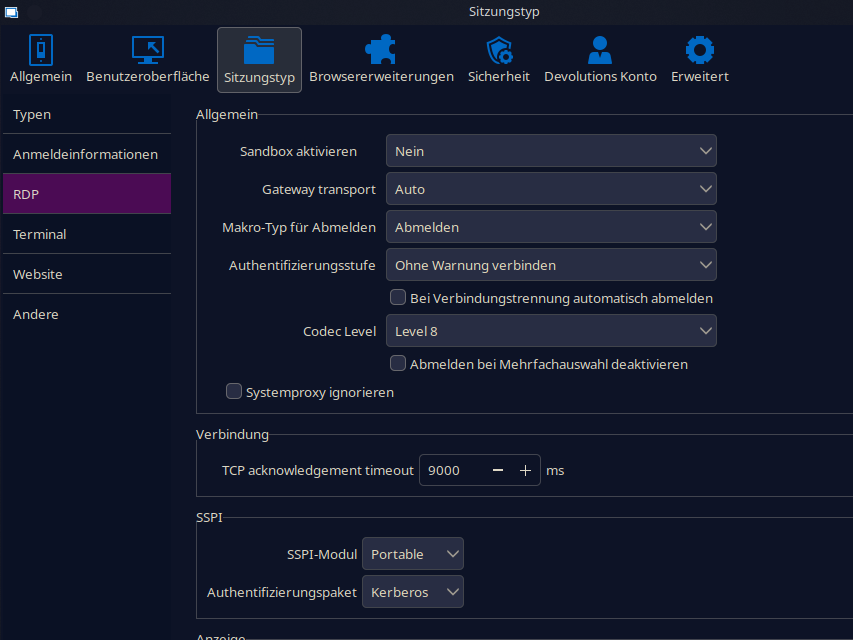
RDM_Preferences.png
All Comments (10)
Hello,
Thank you for reaching out regarding this issue.
Could you try connecting to the server from outside of Remote Desktop Manager, for example, using MSTSC?
Additionally, you may want to change the RDP protocol type in the entry properties under the Advanced section and test again.
Please let me know the results.
Best regards,
Jacob Lafrenière
Hi,
sorry for the missing information. with remmina it works without problems.
i cannot find the option to change the RDP protocol type.
it should be here. but nothing is there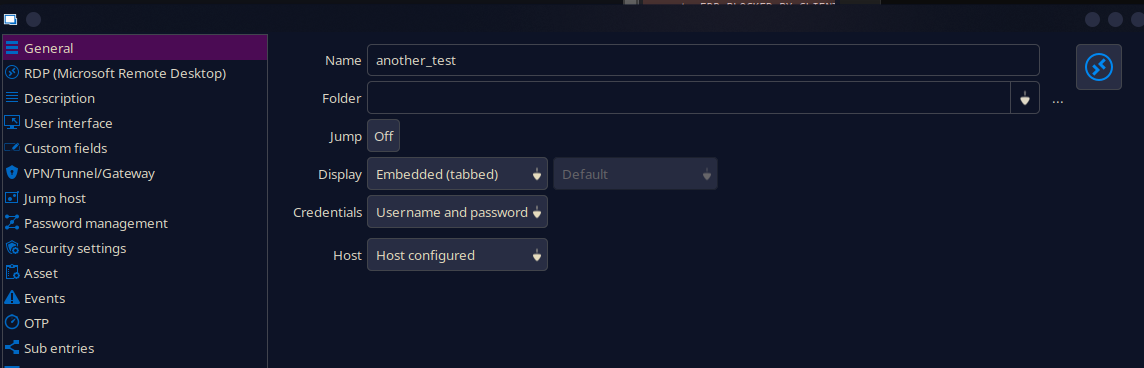
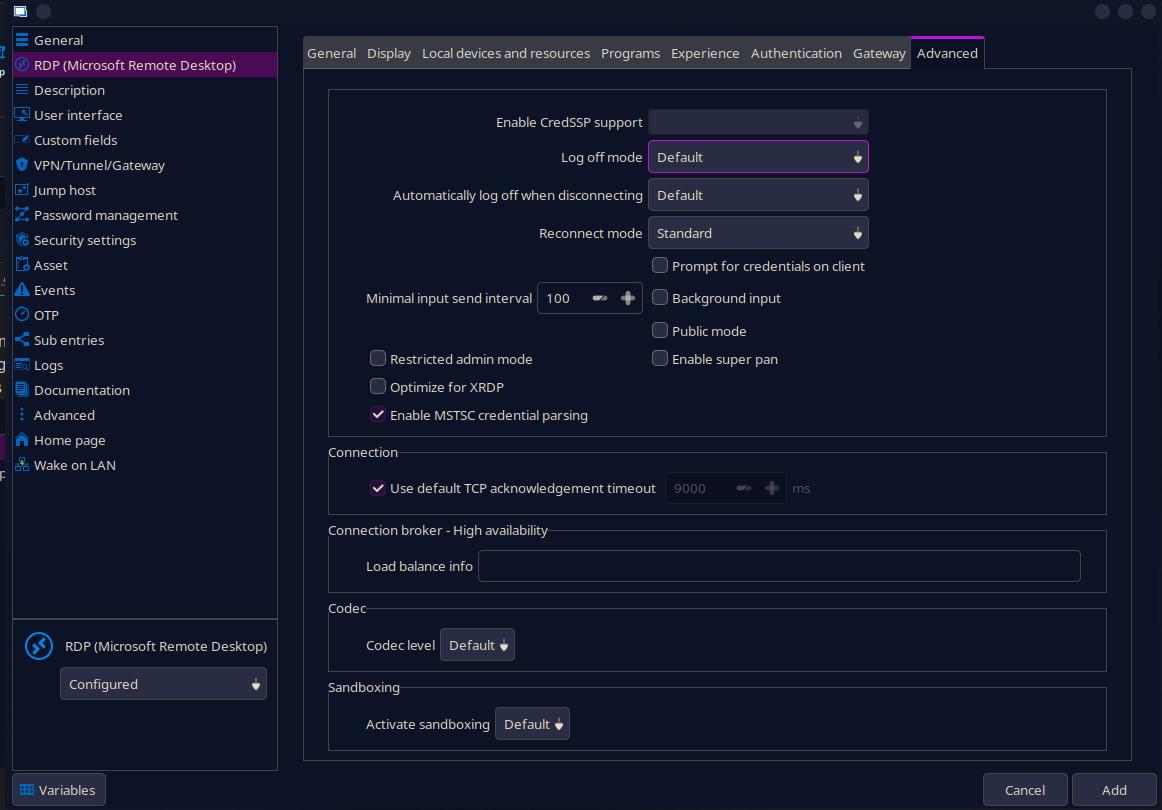
da337a25-1251-4dba-a741-c8b984bbf929.png
65cd8f3b-df07-435a-abd8-df9ecd4d3822.png
Hello,
Thank you for the information provided.
I will forward it to the investigation team and follow up with you if any additional tests or information are required.
Best regards,
Jacob Lafrenière
Hello,
This was quicker than expected—we were able to reproduce the issue.
We will now investigate further to implement a fix in the next patch.
Apologies for any inconvenience this may cause.
Best regards,
Jacob Lafrenière
Good morning,
the patch reached me today, but it's still not working.
Version 2025.1.0.11 (March 12, 2025)
maybe the next patch?
br
Hello,
Thank you for following up.
The error you are experiencing appears in the logs you sent:
[14:10:42:227] [18130:000046e7] [ERROR][com.freerdp.core] - [nla_recv_pdu]: ERRCONNECT_ACCOUNT_RESTRICTION [0x00020017]
Can you make sure the account is authorized to open an RDP session on the remote server?
Could you try adding the domain in the domain field under Entry Properties > RDP > General and see if that resolves the issue?
Best regards,
Jacob Lafrenière
Hi Jacob,
yes the account ist correct. i can connect with remmina without problems.
domain field ist already filles out. you can see that here:
[14:10:42:984] [18130:000046e7] [INFO][Devolutions.Rdp.Credentials] - [Parse]: parsing "b****************", "s****.l****" (Mstsc) => "Username: "u****************" Domain: "s****.l****""
br
Felix
Hello,
Thank you for the follow-up.
We opened an internal case to investigate this issue further.
I will keep you updated on our progress.
Best regards,
Jacob Lafrenière
Hi,
i fixed the issue by setting this settings. i found them somewhere in the forum.
SSPI and Sandbox disable
RDM_Preferences.png
Hello,
Thank you for the follow-up.
I'm glad to hear you found a fix for the issue.
I'll go ahead and mark this topic as resolved. If the issue reoccurs, please don’t hesitate to reply and we’ll take another look.
Best regards,
Jacob Lafrenière