get rdm user info by powershell

Hello, i'm trying to get some user information with the powershell module
DPS Instane 2024.3.11.0
Devolutions.Powershell 2024.3.11
PS 7.5.0
$user = Get-RDMUser -Name 'xxx'
$user.HasPrivateVault
$user.UserInfo.UserAccount.HasPrivateVault
both show false, but user definitely has a private vault
And where to find an assigned tag like "External" ?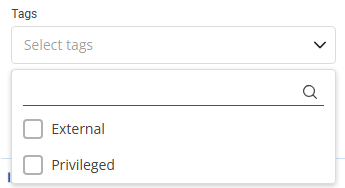
740b586e-c846-4197-8a5a-ee5ac8a5a878.png
grafik.png
All Comments (3)
Hello hoppe,
Thank you for reaching out to the Devolutions support team.
After some investigation, you could have the correct information by:
$user = Get-DSUser -All | Where {$_.Name -eq "<XXXXX>"}
$user.HasUserVault
$user.Tags
To connect to Devolutions server, you could use this method with an application identity:
https://docs.devolutions.net/powershell/dvls-powershell/powershell-connectivity/
Best regards,
Patrick Ouimet
Hello Patrick,
thanks for your reply, i got it working with the Get-DPSUser call.
I have other scripts with Get-RDMxxx calls, should i start switching them to Get-DPSxxx ?
Hello hoppe,
It really depends on what you want to achieve.
Some cmdlet fits more with RDM and some others with DPS.
I suggest that you also check our GitHub for any "template" if you wants to manage your database with PowerShell.
https://github.com/Devolutions/DevoSamples-ps
Best regards,
Patrick Ouimet