Use parameters in "Terminal command" entry

Hello,
I use the "Terminal command" entry for quick access to commands. However, I encountered an error when I tried to add parameters.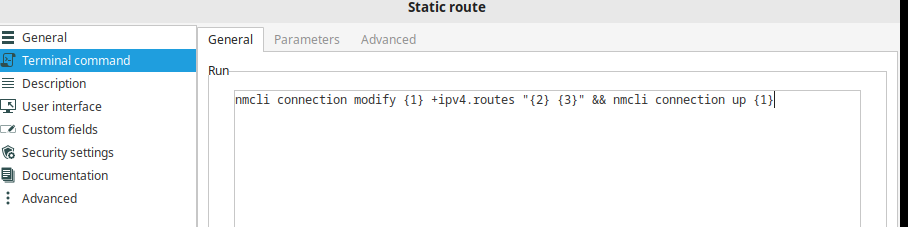
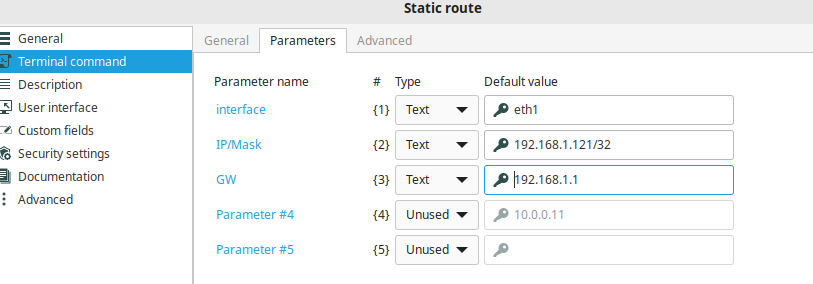
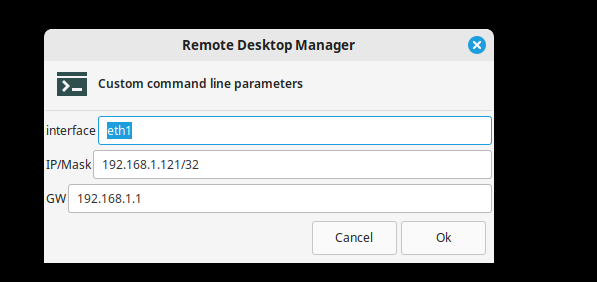
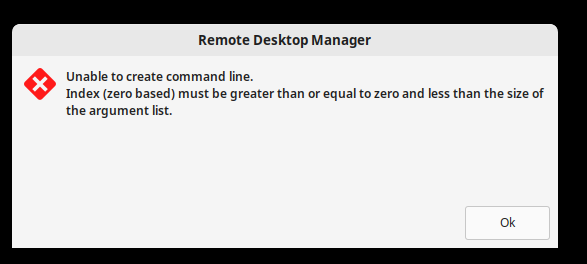
Suspecting an indexing issue (based on online searches), I tried using only one parameter.
nmcli connection modify eth1 +ipv4.routes "192.168.1.121 192.168.1.1" && nmcli connection up {1}
The command runs in the terminal but:
nmcli connection modify eth1 +ipv4.routes "192.168.1.121 192.168.1.1" && nmcli connection up System.String[]
Could you help me with this issue, or explain how command parameters work?
RDM Latest, Fedora 41
Thank you
22826a6b-c03c-4b44-888d-dbf217636629.png
58d3adcc-cd64-420f-a69c-030542b6ee0a.png
89a1040a-3e14-46c5-a4de-b58967c995d1.png
120cb919-ab58-4851-8465-5e07411b4b4e.png
Recommended Answer
Hi Carl,
This is to confirm that the issue has been resolved after updating RDM to the latest release, 2025.1.0.11.
Thank you
All Comments (3)
Hello,
Thank you for reaching out to Devolutions Support.
I was able to reproduce your issue and have created a ticket for the development team. I will keep you informed of any progress on our end.
Best regards,
Carl Marien
Hi Carl,
This is to confirm that the issue has been resolved after updating RDM to the latest release, 2025.1.0.11.
Thank you
Hello,
Happy to hear that the 2025.1.0.11. updates have resolved the issue.
If you encounter any further issues or need additional assistance, feel free to reach out.
Best regards,
Carl Marien