cannot connect RDP from Manjaro

I'm running Remote Desktop Manager 2024.3.28.0 on a Windows 10 22H2 box and 2024.3.2.9-1 on a Manjaro linux box (installed through yay). I have them sharing an XML Data Source. RDM is great on the Windows box. On the Manjaro box, I can't connect to any Windows RDP sessions. I always get the error: Unable to connect to host. I've tried it with:
- using host name or IP address
- saving the credentials or inheriting them
- with or without sandboxing (i've seen that causing issues in the forum)
- with or without bringing down audio from the remote computer
- various remote desktop sizes and display settings
- importing the settings that worked in Remmina and making new sessions
Any help will be appreciated.
I'm currently running Manjaro linux with:
- kernel 6.13.0-1-MANJARO
- KDE Plasma Version 6.2.5
- QT Version: 6.8.1
- Graphics X11
Thanks.
All Comments (12)
Hello,
Could you run RDM from the terminal and share the logs you receive after connecting to an RDP session?
Regards,
Simon Duguay Létourneau
Hello,
Thank you for reaching out to Devolutions Support.
While this may not be the root of the issue, would it be possible to export the entry to a Devolutions Hub Personal or a local data source?
Currently, sharing an XML data source is not recommended, as it can lead to issues beyond our control.
Best regards,
Carl Marien
I can't connect to the RDP session. I've attached two logs. I did one pass with my shared xml, and one using an sqlite local data source.
Let me know if there is another way to generate more detailed logs
rdm-sharedxml.log
rdm-sqlitexml.log
Hello,
It looks like the issue is related to proxy settings:[13:24:43:763] [8854:000022c8] [INFO][com.freerdp.core.proxy] - [proxy_parse_uri]: Parsed proxy configuration: http://proxyip:8080[13:24:43:846] [8854:000022c8] [INFO][com.freerdp.core.proxy] - [http_proxy_connect]: HTTP Proxy: HTTP/1.1 403 Forbidden
You might try bypassing the system proxy by navigating to Preferences → Session Type → RDP → Ignore System Proxy, or check your proxy settings to confirm if it works outside of RDM.
Regards,
Simon Duguay Létourneau
There must be an error with the proxy system in RDM. My box gets to the internet just fine with the system proxy. RDM gives these messages even when the proxy is set to "No proxy"...
[15:32:32:455] [72826:00011c87] [WARN][com.freerdp.core.nego] - [nego_enable_aad]: This build does not support AAD security, disabling.
[15:32:32:455] [72826:00011c87] [INFO][com.freerdp.core.proxy] - [proxy_parse_uri]: Parsed proxy configuration: http://proxyip:8080
[15:32:32:527] [72826:00011c87] [INFO][com.freerdp.core.proxy] - [http_proxy_connect]: HTTP Proxy: HTTP/1.1 403 Forbidden
[15:32:32:527] [72826:00011c87] [ERROR][com.freerdp.core.nego] - [nego_connect]: Failed to connect
[15:32:32:527] [72826:00011c87] [ERROR][com.freerdp.core] - [rdp_client_connect]: ERRCONNECT_SECURITY_NEGO_CONNECT_FAILED [0x0002000C]
[15:32:32:527] [72826:00011c87] [ERROR][com.freerdp.core.connection] - [rdp_client_connect]: Error: protocol security negotiation or connection failure
Plus, if I exit RDM with the proxy still set to "No proxy", when I come back into RDM the proxy is set to "System default"
One thing I forgot - even though it gives a proxy error (whether using the proxy or not), when I test the proxy through RDM it is successful.
I can confirm that the "No proxy" setting is not being saved correctly.
I will perform tests using RDP with a proxy to determine if I can reproduce your issue.
Simon Duguay Létourneau
A 403 error like the one you're encountering could mean that the proxy requires authentication. Looking at this line:
[15:32:32:455] [72826:00011c87] [INFO][com.freerdp.core.proxy] - [proxy_parse_uri]: Parsed proxy configuration: http://proxyip:8080
No credentials are provided. If your proxy requires authentication, you should format it as follows in your Manjaro settings:
http://username:password@proxyip:8080
Since RDM is working fine on Windows, we can also check the logs there. To enable logging on Windows, navigate to:
File -> Settings -> Type -> Remote Desktop (RDP) -> Enable logging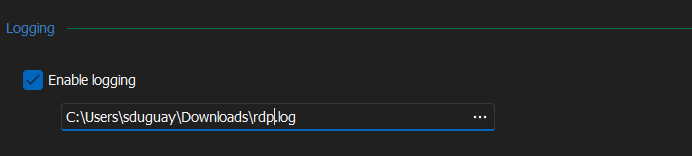
Additionally, update your RDP version by editing your entry
Properties -> General -> Advanced -> RDP version and select RDP (FreeRDP latest).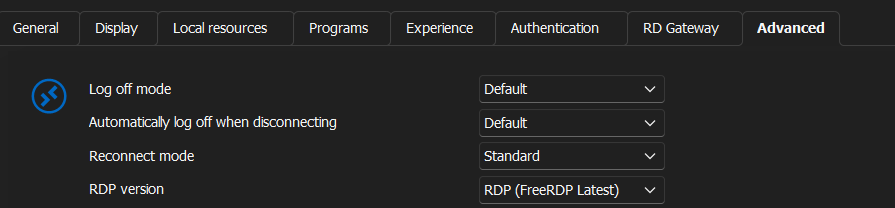
Then, share your logs from Windows here.
Simon Duguay Létourneau
754345ea-76df-45f7-a69a-340d6846629a.png
362c3d92-dfd8-41d4-935b-51c1b5061b1b.png
I'll try the Windows logging and post it in a little while.
Everything else on my box works fine with the proxy. In RDM, when I test the proxy, it says it works. I even tried setting the proxy as custom in the RDM settings, and included the credentials, but it still didn't work.I don't need the proxy to get to the servers I want to RDP to, so if I could just set the proxy to "no proxy", it would probably work; but that setting doesn't seem to stick.
Just as an FYI, I have a couple of ssh connections to linux boxes that work fine through RDM on Manjaro.
If the proxy isn't needed, you can use an alternative setting under Preferences → Session Type → RDP → Ignore System Proxy to bypass it.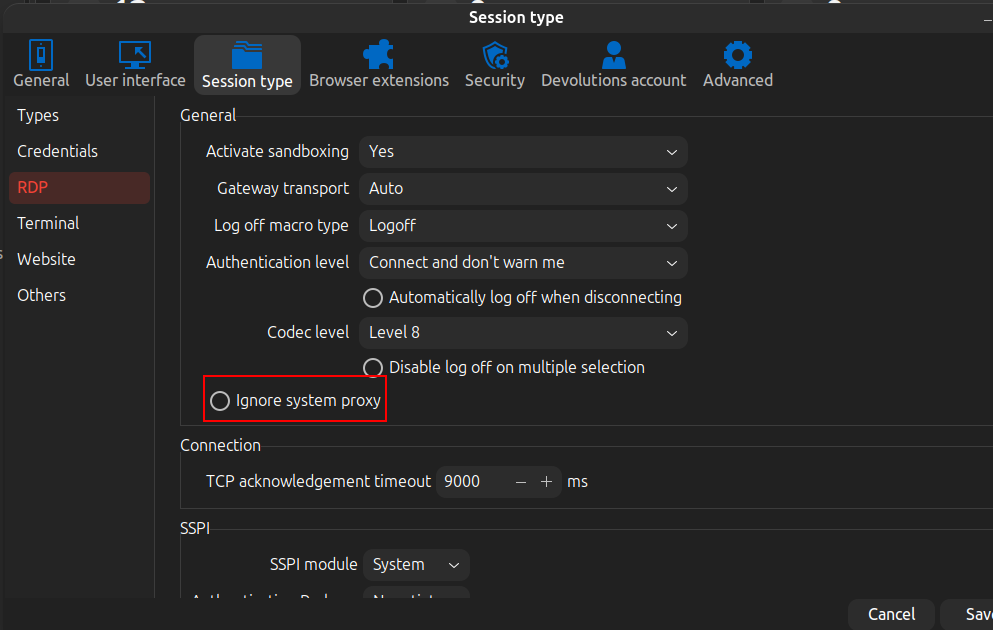
Regarding the issue with the "no proxy" setting not saving, I have fixed it, and the fix will be available in the next version soon.
Simon Duguay Létourneau
Screenshot From 2025-02-12 10-33-27.png
I had missed that proxy setting, but it doesn't help. This one does save when I exit and come back into RDM, but I still can't connect to an RDP instance and it says this...
[10:45:26:327] [8526:00002161] [INFO][com.freerdp.core.proxy] - [proxy_parse_uri]: Parsed proxy configuration: http://proxyip:8080
[10:45:26:410] [8526:00002161] [INFO][com.freerdp.core.proxy] - [http_proxy_connect]: HTTP Proxy: HTTP/1.1 403 Forbidden
it seems like it uses the system proxy no matter what.
Hello,
I wanted to inform you that the latest version includes a fix for the issue where the "No Proxy" setting was not saving.
You can download the latest version using the following link:
https://devolutions.net/remote-desktop-manager/download/thank-you/?platform=RDMLinuxbin&edition=team&os=linux
Best regards
Carl Marien
Awesome!!!! Since I don't need the proxy, having this setting work takes care of my issues. I appreciate the fast work, and the wonderful software you've developed.
Just as an FYI (these issues don't affect me):
- It still can't connect with the proxy turned on, even though the proxy is set to bypass for boxes on our domain
- Sandboxing doesn't allow me to connect (I've noticed other people discussing it)
Thanks again for everything.