Cannot save the Recording storage path

I cannot save my Recording storage path in the settings of the Devolutions Gateway in the Devolutions Server Console. The OK button is greyed out.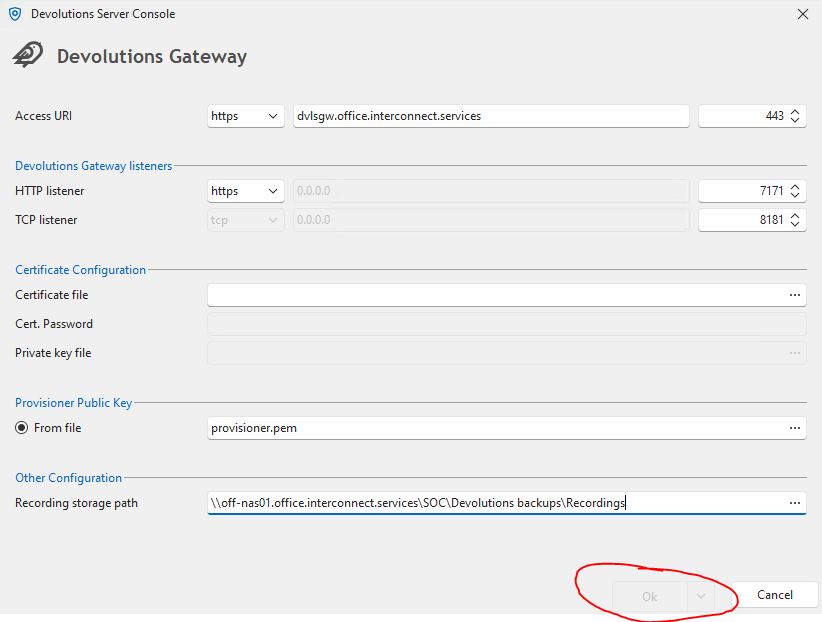
824c27f7-e496-42a1-8909-7388bfb2c9b0.png
All Comments (3)
Hi Pepijn,
I believe the problem is not related to the recording path itself.
In the screenshot, I see you have the listener configured to be HTTPS, but did not configure the certificate (certificate configuration is empty).
You need to either choose HTTP for the listener, or configure the certificate for HTTPS.
Note that you should use HTTPS in the access URI even if the listener itself is set to HTTP.
This is useful if you want to have some kind of reverse proxy for managing the HTTPS part instead of the Devolutions Gateway itself.
To learn more about Devolutions Gateway configuration, please go through the documentation found here: https://docs.devolutions.net/dgw/server/server-configuration/
Best regards,
Benoit Cortier
Thank you for the quick response. If I look in the gateway.json file the certificate and private key are configured. Can you give me the Recording storage path setting for in this .json file?
C:\ProgramData\Devolutions\Gateway\gateway.json{ "Id": "d232d8ef-7123-48c4-b3ee-afb4e8a4212a", "Hostname": "dvlsgw.office.interconnect.services", "ProvisionerPublicKeyFile": "provisioner.pem", "ProvisionerPrivateKeyFile": null, "TlsCertificateFile": "server.crt", "TlsPrivateKeyFile": "server.key", "Listeners": [ { "InternalUrl": "https://*:7171", "ExternalUrl": "https://*" }, { "InternalUrl": "tcp://*:8181", "ExternalUrl": "tcp://*:8181" } ]}
Okay! So I understand that you did configure the certificate in the past, and now you want to update the configuration to specify the recording path, but the installer is requiring you to re-specify the certificate again. Is that accurate?
In the meantime, as you noted, you can configure that manually by modifying the gateway.json directly yourself.
All the configuration keys are documented at this place: https://github.com/Devolutions/devolutions-gateway/?tab=readme-ov-file#configuration
You are looking for "RecordingPath": "/some/path/"
I hope this solves your problem! Can you confirm my understanding above, and I can see how we could improve the graphical configuration experience for the future.
Thank you!
Benoit Cortier