Autofill Problem (Devolutions Password Manager)

Hi, if I have created a "Website" session and include the login data via a "Password list", the autofill function does not work. Only if the login data is stored directly in the "Website" session is it used for the autofill.
I have tested it with the Chrome extension and Android app.
Best regards,
Andrijan
All Comments (3)
Hello Andrijan,
We will add your request to our roadmap. Our plan is to implement a feature allowing you to select which password from a linked list will be used for autofill on a website.
Does this sounds good to you?
Best regards,
Sébastien Aubin
Product manager - Password Management
Hi
Personally I would rather see Workspace "unpack" it and show every credentials pair in the list as if it were created as it's own website entries.
My resoning for this is to avoid a new dialog and the "extra click".
Unless, it could be designed so that the first entry in the list was the default so if you "just" select the entry it uses the first credential pair from the list. If you need some of the other an arrow could be pressed and the entry got unpacked as in above.
Regards Lars
Remote Desktop Manager connected with Devolutions Server running newest versions.
------------------------Signature------------------------
Sorry if any of above sounds harsh or provoking, it is NOT meant as such, but I have Asperger's and don't always know.
My intentions is always to be friendly.
-------------------------------------------------------------
Hi, we just completed a task where you can select a password from your linked password list on a website entry: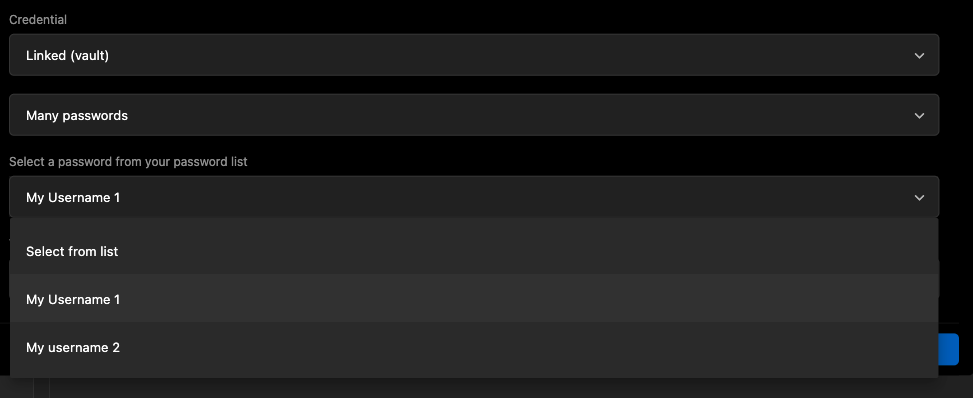
So, if you have a password list with multiple passwords, you can link each one to a website entry.
This feature will be available in the next version of Workspace.
Best regards,
Sébastien Aubin
Product manager - Password Management
c20c6dd5-d37d-4e7e-96ac-336075558340.png