Set permissions for subfolders and files only
3 votes

In the example below, I want to give a group full access to change permissions on all connections and subfolders, but not the "New Zealand" folder itself, but I can't seem to do this. Windows has a similar feature.
Is this something that can be added as a feature?
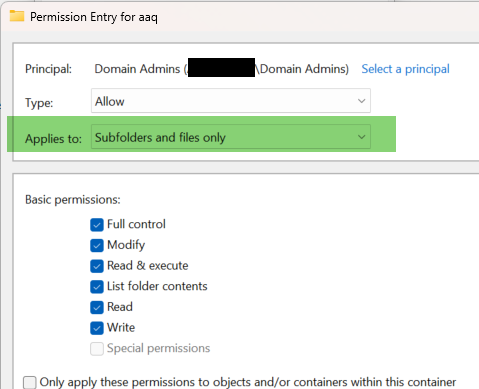
4fd50ed9-fd2b-411c-a171-cb6b8d463c07.png
5debb91f-702a-414a-b566-c3ec357b9dd8.png
All Comments (2)
Hello,
I will create an internal discussion ticket for that. This is not as easy as it seems, but it's definitely interesting.
Regards
David Hervieux
Hi, we are also interested by this feature and would like to ask a little bit more.
Having all the "'Applies to" that exist in Windows would be very great, especially to define this folder only.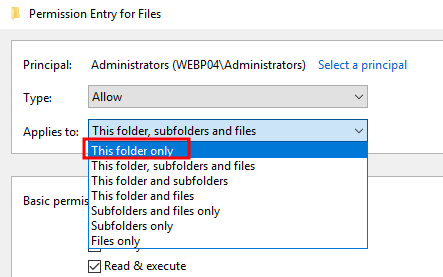
I noticed you implemented the inherit+custom permission recently, that is very similar with the Windows permissions when you can add permissions on a folder and keep the inherited one from the parent directory.
The usecase from sjames would be very appreciated, and I woulk like to share our usecase too:
We as a company have to give access to some servers, credentials or whatever to other teams or external consultant.
We don't want to duplicate these objects in different vaults/folders etc to keep it easy to see who is connected where, reading the logs, and manage the access.
Il our structure we have different parent folders, for example "Servers", then we have child folder for grouping them.
I need a group that have read/write from Servers to all childs, it is used by our team. For the example let's call it Servers_RW
Then I need groups that provide read to some of the child folders, for example FTP_R.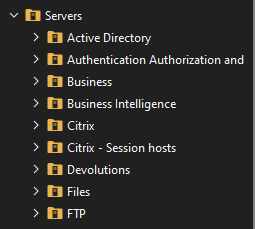
Actually, the only way to do this properly is:
- Set a group with View rights on Servers (Servers_List)
- Set Servers_RW Read/Write rights on every subfolder
- Set the group FTP_R View rights on the subfolder FTP
- Put all these groups as a member of Servers_List groups
You can see how the inclusion with groups look below. We need to go on every subfolder to add Servers_RW group, even if I don't need to create other groups for specific access.
This also give me extra work if I need to change permissions that need to apply everywhere since I can't set these rights on servers an use inheritance.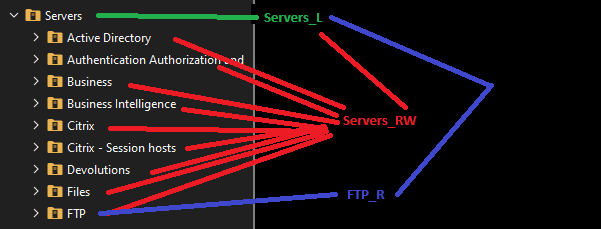
Now, with the new Inherit+Custom permission I could avoir that by define Servers_RW to the Server's folder, and add FTP_R to the FTP folder.
But that's not meeting our needs because this will allow to the members of FTP_R group to see all the child folders since I can't limit the view only to "only this folder"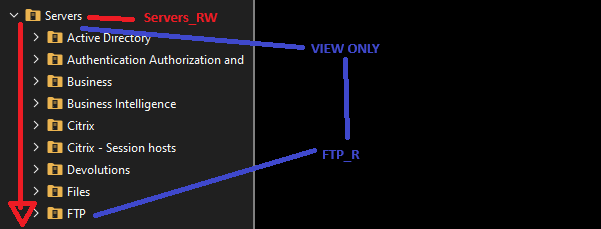
The ideal solution to manage rights should look like this:
- Servers:
- Servers_RW --> Read & Write, subfolders and file only
- Servers_List --> View, this folder only
- All child folders:
- Inherited for normal folders
- Inherited + custom if we need to give access to someone else
- FTP (for the example):
- Servers_RW --> Read & Write from inheritance
- FTP_R --> Read only, added on this folder
The group FTP_R have to be a member of "Servers_List" group obviously.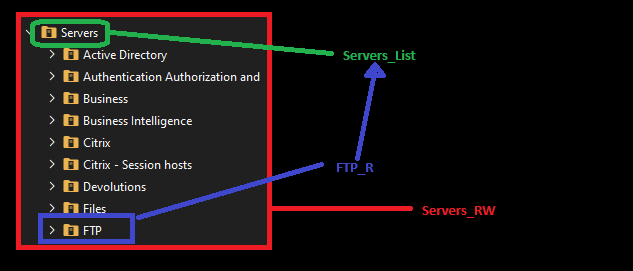
In this configuration we would benefit from:
- Keep the inheritance everywhere and work with best practises regarding permissions applications (think about file servers)
- Reduce errors and work when applying permissions
- Don't need to have 2408482 templates for every subfolder (actually I have a template for Servers's folder child and so many else).
- Responsiveness from RDM/DVLS will increase since it will have less rights to process
And our needs are met:
- We apply the "normal access" only at the parent folder and not on every child
- The specific access can be set without allowing them to see what they shouldn't
- We keep use inheritance
Sorry for the long post, the Paint drawing and my broken english.
If I should move my request as a separate topic, tell me and I will.
TL;DR: We would like to have the same possibility to apply permissions as Windows Explorer because you can manage your DVLS "like a file server".
PS: We can also schedule a meeting if you want so I can show you the details of how we manage this and allow more information. For the context, I managed DVLS/RDM/Gateway for multiple company and implemented it for few managed service provider in my country. From that experience, I think I can say this could be very useful for any company that use DVLS in multiple customer or team environment.
Best regards
5ff1ba49-aee0-41a6-ba36-98787f23f080.png
a9f02420-6580-427b-911f-20de99342a81.png
e162d201-da39-443c-9d32-c0edc1bbe373.png
a2d2c9a3-48c7-42e3-8b80-428d40e08bf5.png
0187cb61-3970-4751-9b35-0dd7caa475f9.png