Export xml with plain-text password
0 vote

Hi,
we use RDM at Work (Enterprise-Environment, Windows)
I tried RDM for my personal-use under Linux with an xml-database.
Now I have ~100 entries but I do not want RDM at home any more.
Using Browser-Plugin works good in Linux but not on Android.
So I wanted to change to an other password-safe und tried to export my entries but I cannot get the plaintext passwords.
I only get a "SafePassword".
Is there a way to decrypt the password via cli or am I stuck at RDM until I copy each credetial by "copy password"?
Thanks
All Comments (10)
Hello,
Thank you for reaching out to Devolutions Support.
From what we understand, you are currently using an XML data source in RDM Linux and want to export the entry to another application. Could you let us know which application you would like to switch to? This will allow us to test it on our end to determine if we have an implementation compatible with your new solution.
Alternatively, you can refer to this documentation for guidance on exporting your entry:
https://docs.devolutions.net/rdm/kb/how-to-articles/export-import-entries/
Lastly, could you share more details about the difficulties you are experiencing with implementation on your phone? For example, is the issue related to a lack of synchronization between devices?
If synchronization is the issue, you might be interested in our free cloud-based solution, Devolutions Hub.
Please let us know how we can assist further.
Best regards,
Carl Marien
Hi Carl,
thank you for your answer.
At home I use RDM with an xml-File under Linux (I do not own a private Windows-Machine).
Sync via nextcloud with Android-Phone works fine.
My issues:
- no basic-auth-support in browser-plugin
- no easy-to-use vpn-configuration in Linux-Version
- no system-access to passwords in Android
- SSH-Session in Android disconnects if I switch App to e.g. Browser and switch back
So I wanted to export all credetial-entries (username/password) to a plain-text-file to import the credentials to keepass and just use RDM as an komfortable SSH-Client.
If I export the entries from Linux-RDM to a xml-file I do not get a plain-text-password - only a "SafePassword" which I cannot import to keepass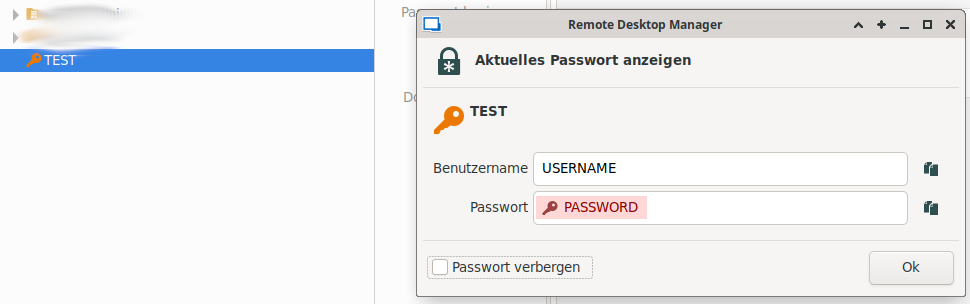

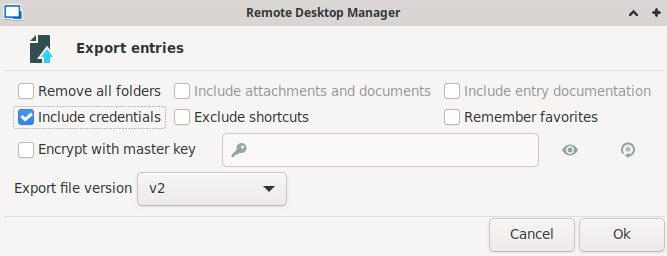

regards ... Kim
4.png
3.png
2.png
1.png
Hello,
Thank you for your patience.
It appears that RDM is not implemented in KeePass, and from my understanding, there doesn't seem to be a way to export the entry without encrypting the password.
I will reach out to the development team and let you know what they advise.
Best regards,
Carl Marien
Hello,
Thank you for your patience.
Unfortunately, it is currently not possible to export the entry with the password encrypted on linux. However, I will transfer this request to the feature request forum and create a ticket for the developers.
For the time being, the suggested workaround is to export the entries using a Windows installation and then export the entry again in CSV format.
Best regards,
Carl Marien
I don't know if this would show up in the XML, but I would think so. You could set the "Allow Password for External System" and set a key. Then decrypt the values in the "unsafepassword" field.
https://docs.devolutions.net/rdm/commands/administration/system-settings/password-management/allow-password-access-external-system/
7d6bcc04-edfd-4d08-a789-99e52d4899e8.png
Hello,
Thank you for your patience.
I wanted to inform you that a ticket has been raised with our developers to add a feature for exporting entries without encrypting the passwords.
For now, a workaround would be to import your entry into a Devolution Hub Personal account and then export the entry from the user interface. Would it be possible for you to try this and confirm if the SSH session disconnection issue persists on Android?
I have sent you a video through a private message
Best regards,
Carl Marien
@thomas2: There ar no such settings if I use XML as datasource.
@cmarien: I will test with a Hub Personal account LATER.
The disconnection with the Android-Client is still there after the last app-update.
I got no pm from you. But I do not know where to look for pms ... I see no icon/notification for that.
Hello Kimrdm,
I have just sent you the video, which you should have received by now. You can find the notification in your inbox near the account icon at the top of your screen.
Please let us know if the workaround resolves the issue on your end.
Best regards,
Carl Marien
Hello Carl,
thank you very much ... the workaround works.
- Exporting to .rdm
- Connect to Personal Hub
- Import .rdm to Personal Hub
- Exprort in Personal Hub (Webinterface) to .json -> SafePassword contains paintext password
Great ...
I sent you a video showing the disconnect in Android-App.
But right now - I can live with that.
Thank you for your assistance.
Now I know ... if I want to stop using RDM I can export and access my credentials - nice,
Maybe someday RDM will support basic-auth in browser ;)
Regards ... Kim
Hello,
Thank you for your response.
As mentioned in my previous message, a case has been created for our developers to enable exporting in CSV format.
Regarding the Android issue, I will forward the video and information you provided to the Android team, and they will attempt to replicate the issue.
thanks you again.
Best regards,
Carl Marien