Feature Request: Variable Password length in Password Generator
3 votes

Dear all,
We would like to assign a variable password length to a password template.
Would it be possible to implement a password length range in the advanced settings option?
Thank you very much!
All Comments (19)
Hello,
First let me apologize about the delay.
I will open a ticket but I'm curious, is this to make brute-force attacks tougher or is there a compliance requirement that recommends that?
Thanks
Maurice
We have a use case where a password of length 32 is required.
We are currently using an old version of DVLS, so the default template is still available.
If we do not enforce our own template, the user can use the default template from devolutions.
In a newer version of DVLS, this problem will not occur because the default template will no longer be available.
So we could just create a second template for the 32 character passwords.
So the reason for my feature request is to make brute force attacks more difficult.
I still think it would be nice if the user could customise the length (if necessary, this length must be greater than the minimum length given in the range).
If no custom length is entered, the password generator will randomly select a password length within the given range.
Hello,
Thank you for your answer. I'm François Dubois, product manager of Devolutions Server and just saw your request. I understand it but would like to understand what you mean when you wrote this in your previous message :
We are currently using an old version of DVLS, so the default template is still available.
...
In a newer version of DVLS, this problem will not occur because the default template will no longer be available.
I would like to be sure to understand what you mean. Could you let us know what version you are using and what version you plan to update to ? Don't hesitate to give us more information to be sure that we will add the right things.
Best regards,
François Dubois
Hello everyone,
DVLS version is 2024.1.11 and we are planning to update to 2024.3.8.0.
In this version there is a password template that cannot be deleted: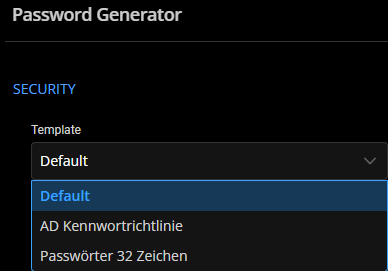
If we enforce our own template, users with the 32 character passwords will have to concatenate a generated password 3 times to achieve their requirements, as
the only template allowed is the one with the default password length of 15.
I thought it would be nice to set a range in the password template.
For example:
16-32
When the user generates a password, they can select a number that will determine the length of the generated password (the number must be in the given range).
If the user does not enter a custom number, the password will just be a random length (within the given range).
781b7bce-f91c-4584-90cd-e02f48cf7e95.png
Hello,
Sorry for the delay. I understand your point. You would like to enforce your password template, but you don't want to set it with 32 characters so if you enforce it, people who needs a 32 character passwords will not be able (or will have to concatenate a generated passwod 3 times like you said). A ticket has been created, we will post back here once we have an update.
Best regards,
François Dubois
Hi,
Another solution might be to simply remove the default-template or make it unselectable in PasswordGenerator.
Best regards,
Ben
Hi Ben,
Thank you for your feedback.
Following a discussion with François, could the following workaround fulfill your request? The goal is to prevent users from saving an entry that won't respect the password template.
1- First, set the Password template check to Required in Administration - System Settings - Password management on the DVLS web UI. You can also set the Default template for the most used template for your entries.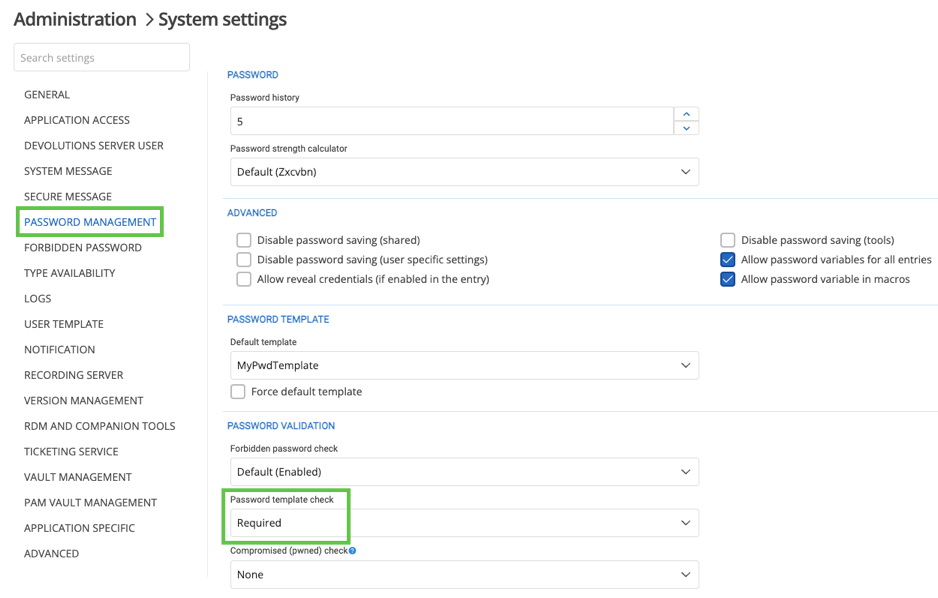
2- On folders, set the Template property to List and select the password template the users must use on the child entries. If the template is different than the one set by default, you can select the appropriate one in the dropdown list. For the Complexity parameter, make sure it is set to Required if it's not the Default value.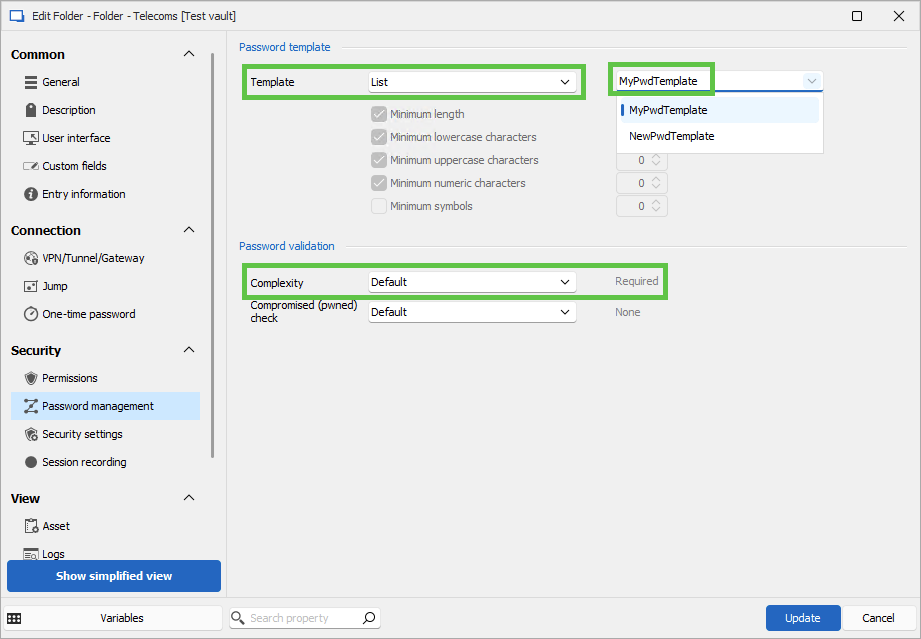
3- Finally, on child entries, set all parameters to Inherited in the Password management section.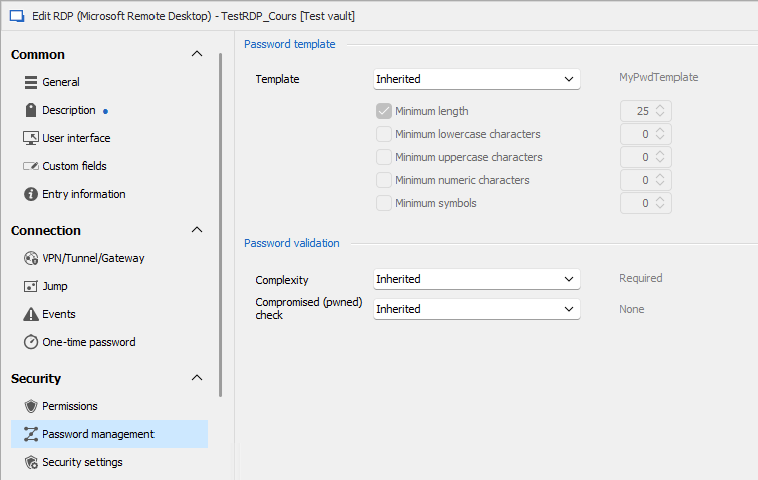
The Default template will still be visible but not usable. If they use the Default template in the Password generator, on saving the entry, they should get the following message and prevent them saving the entry.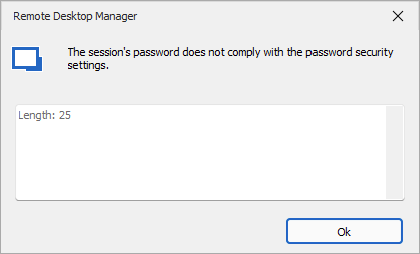
Using the Generator option, because a template has been set and inherited from the parent folder, the generated password will respect the template set on the entry.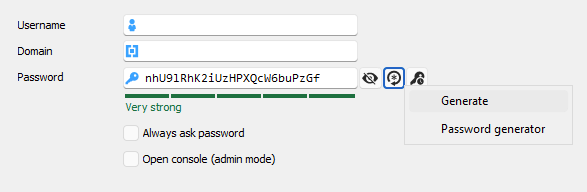
Let us know if that is a viable configuration for your use case.
Best regards,
Érica Poirier
df27e0d9-99a1-4db1-a9a1-a1fa88585c65.png
650256c8-418f-4d6b-a23e-ac0acf4cc02a.png
7897bd88-accd-4f55-9fc4-841dd5ff0737.png
4d25b919-6c97-457e-aa3f-21e94c238028.png
b7968860-1d6f-4a87-b883-e6de723e3776.png
Hello,
No is is not a viable config since i prevents the usage of the second template that we want to allow users to use.
Best regards,
Ben
Hello,
In that case, the Default template should be set to the less restrictive template the users should use.
Are both templates similar, or do they have differences that could prevent using this workaround?
Best regards,
Érica Poirier
Hello,
Because the Password Generator tool is only a tool to easily generate passwords based on rules, from a template or manually set, the user can also type the password using his keyboard.
Another method would be to use entry templates with the password template set in the properties combined with the Password template check option set to Required.
Another one is to set the password template on a folder and set all child entries to inherit this password template from the parent folder combined with the Password template check option set to Required.
Let us know if any of these methods could help.
Best regards,
Érica Poirier
Hello,
This might solve our problem.
However, at the moment we do not know if we can set "Password Template Check" to "Required" as we are gradually onboarding the rest of our company.
How does this setting affect importing passwords from a CSV file?
Kind regards
Ben
Hello Ben,
Thank you for your feedback.
Even if the passwords saved in the CSV file don't respect the password templates you have in DVLS, the credentials will be imported.
Let me know if that helps.
Best regards,
Érica Poirier
Hello,
I will discuss this with my colleagues.
Thank you very much!
Best regards,
Ben
Hello,
I tested this on our Test-Instance
I wanted to import a Cred-Entry with a very short password:
This Error was returned by the CSV-Import-Assistent: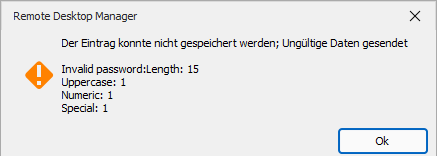
e6b5606a-a90c-4137-9e6b-fa0ce2397244.png
ef012729-4369-45d7-975b-8de59e8d2465.png
Hello Ben,
Thank you for your feedback.
In the tests I did when I mentioned you can use that configuration, I didn't get this prompt you get even if I have 2 password templates with a length of 15 and 25 characters minimum. The passwords I imported were between 6 and 7 characters.
Are you still on DVLS 2024.1.11 and RDM 2024.1.x? The versions I am using are RDM 2024.3.27 and DVLS 2024.3.11.
Using your file format, RDM cannot import them because the ConnectionType column is missing. That is the file format I used for my tests.
Is the Force default template option disabled in Administration - System Settings - Password management?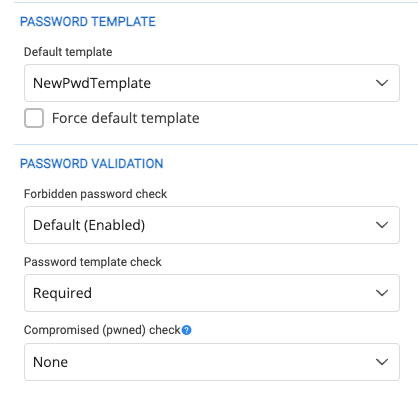
Best regards,
Érica Poirier
9559ed4d-0624-46a5-94ab-8dc747c5e1e1.png
7f838256-eb5b-427d-9da9-cd25d01fc187.png
Hello, we are currently using:
RDM-Version: 2024.3.18
DVLS-Version: 204.3.9
DVLS-Settings:
CSV-Test-File:
import-Steps:

There is no option to Map ConnectionType to a property:
Error:
If i select "Session" under "Header format instruction"
I can map it to Entry type:
Error:
Hello Ben,
Your previous post images are not visible. Could you post them again or try to fix the broken image in your previous post?
Thank you for your collaboration.
Best regards,
Érica Poirier
Hello,
I set the images to you via the private chat!
Best regards,
Ben
Hello Ben,
Thank you for your feedback.
I cannot get it working anymore with the same settings I used. I'll check with the developer team and get back to you.
Thank you for being so patient.
Best regards,
Érica Poirier