[LINUX] ScriptLibrary DVLSForLinux Errors with sh and ps1??

I have been trying to get those two install-dvls scripts to work in docker, initially I was using Ubuntu official container, but I only tried the sh script and could not get past this error:
root@1d11918bec9a:/working# ./install-dvls.sh
/usr/bin/env: 'bash\r': No such file or directory
/usr/bin/env: use -[v]S to pass options in shebang lines
Assumed it was an issue with the ubuntu image, so I switched to a Debian image, but with the sh script I ran into the exact same error??? FYI I did have to manually install several packages initially such as Sudo, pwsh etc
I think decided to try the ps1 using pwsh package, it fired off and i went through the interactive prompts then i think it errored around ln 282 of the ps1:
[20241017210813] Creating user (dvls), group (dvls), and directory (/opt/devolutions/dvls)
useradd: user 'dvls' already exists
groupadd: group 'dvls' already exists
usermod: user '' does not exist
Write-Error: [20241017210813] User, 'dvls' and '', are not members of the group, 'dvls'
Should mention, this was the 2nd run of the PS1. Hopefully, you gathered that already going by the "Already Exists" lines.
Granted I have not tried on an ubuntu VM yet but in theory this should work in docker if the requirements are met??
Any ideas
JK
Devolutions Force Member (and Long time Devolutions Fan)
All Comments (39)
I seem to have gotten past the ps1 error, seems it was not calling the current user correctly at least with pwsh on linux...
I changed ln 52 too:
'CurrentUser' = $(whoami)
And i managed to pass my first error but now I've hit another snag lol, it's not downloading the zip file to extract to /opt/devolutions/dvls/
Did you say these scripts were confirmed working on Ubuntu VM?? May try on a VM next although I can't. see why running on the docker Ubuntu / Debian container would not work (Although I realise It requires the extra requirements from the missing vm version default packages)
Anyway, if you find a fix let me know as its more than likely to be faster than myself.
JK
Devolutions Force Member (and Long time Devolutions Fan)
Hi John!
Thank you for trying out the script. As you probably quickly realized, most Docker image won't work for this as it is missing bash, systemd, and potentially other prerequisites (such as logname generally not working due to how Docker users work). I'll update our documentation to reflect that. For now, you will need to use a full install of Ubuntu (a VM should work fine, and what we tested on). I am working on a Docker image, but it is not ready yet.
If you could try this on an Ubuntu 22.04 install, that would be great, and let me know if you encounter any bugs during that. Once again, thank you for trying this out!
-Adam
Adam Listek
Don't forget docker on WSL2 now has systemd option, plus bash is in the official docker container, I will be trying it on a vm next though but my wish is still do containerise this, I'll keep trying.. As I mentioned it's still Ubuntu just doesn't have many of the preinstalled packages as the non minamilist versions. I didn't realise logname was actually a package, I ended up using a built in function, logname is yet another requirement lol, also like I previously mentioned I think it may come down to compiling a package requirements list for docker deployment.
I mean mssql runs fine in docker so surely dvls should with some work right?
JK
Devolutions Force Member (and Long time Devolutions Fan)
Hi John,
I appreciate the notes! I haven't tested it on WSL2 as an option, but I'm certainly not opposed to making it work there as well. As logname is built-in to the full Ubuntu, it came along with that prerequisite, but you are right that there are multiple requirements and we should be more explicit. I'll work on updating the documentation (full documentation is also coming, more than just the GitHub readme).
Not saying it can't or won't work in there, we just haven't tested it yet. I am actively working on making both a single-image Dockerfile and a multi-container docker-compose configuration. Yes, it can work in Docker, I do have a test version of a single-image Dockerfile, but needs refinement.
Thanks for testing!
-Adam
Adam Listek
No problem, I know youve probably got your hands full already just getting a Linux build released. So I'll try the vm next while I either wait for more docs or work it out during my play time lol.
I do think that getting dvls to run on docker plus eventually kubernettes would be a winner for you guys though, I'm sure mid to large enterprises would buy it as a preferred deployment option on premise and cloud, after all it would cost less to run compute wise.
Just had thought, out of interest what does DPH business run on? Is it containerised? Talking about this topic I now wonder, wouldn't we have had a Linux dvls build by now if dph was containerised as the 2 products are very similar aren't they dph & dvls? Unless it's on windows based containers, seeing as devolutions apps are prodomanently .net?
JK
Devolutions Force Member (and Long time Devolutions Fan)
Hi John,
I appreciate the notes! I haven't tested it on WSL2 as an option, but I'm certainly not opposed to making it work there as well. As logname is built-in to the full Ubuntu, it came along with that prerequisite, but you are right that there are multiple requirements and we should be more explicit. I'll work on updating the documentation (full documentation is also coming, more than just the GitHub readme).
Not saying it can't or won't work in there, we just haven't tested it yet. I am actively working on making both a single-image Dockerfile and a multi-container docker-compose configuration. Yes, it can work in Docker, I do have a test version of a single-image Dockerfile, but needs refinement.
Now a docker compose file I would love to get my hands on, especially as from my point of view I'm trying to reverse engineer packages every run, could you commit it to the script-library repo pls when you have something. You would be my best friend then lol.
Thanks for testing!
-Adam
JK
Devolutions Force Member (and Long time Devolutions Fan)
I'll add the Docker build files once everything is working correctly in the ScriptLibrary repo. We are also interested in having it run on Kubernetes. I can't speak to the infrastructure for Hub, as it's not my area, but we use various methods and technologies to make everything work!
I'm hoping to make solid progress on the Docker components by the end of next week, but that depends very much on the time I can devote to it. I'll add that as soon as I can, though!
-Adam
Adam Listek
I gave this a go on an Ubuntu 2204 vm today, initially I saw the same errors I was seeing in docker, then I noticed my forked repo had updates which I synced then retried on the vm. First run it got a lot further than I've seen so far but failed towards the end the script, seemed it couldn't open appsettings.json. So, I retried this time as root, this worked, perhaps there is still a slight bug to work out around 450 ish I think, as my current user didn't seem to have the correct permissions on /opt/devolutions/dvls/.
I have the webui now working, but how is the authentication handled as I can't seem to login with any user??
I found it dvls-admin dvls-admin, found with trusted azure data studio
But appreciate the time you've put in on this its much appreciated.
JK
Devolutions Force Member (and Long time Devolutions Fan)
Hi John,
Sorry for the delayed response! I'll take a look at the check for appsettings.json, that check is just there to make sure the files got extracted correctly and permissions assigned. By default, we use logname to find the current user (though I'll see if there are some alternatives to this, in case it's not available), and add that user to the dvls group. Once added, we use the sg command to reload the current running users groups (i.e. the current user), so that they can access the /opt/devolutions/dvls location. If the sg command didn't reload your group membership in dvls, or permissions of 660 did not set right to that file, that might be why the appsettings.json was failing.
Just to double-check, what shell are you trying to execute this in? And, can you see if your current user is in the dvls group after running the script?
You bring up a good point about the default user, it's mentioned in the confirmation what the username and password will be, but that really should show in a message at the end, I'll update that. Also, I will make notes in the documentation that you should change that as well, the default user is just that, a default.
Once again, thank you for testing this and all your help!
-Adam
Adam Listek
I normally just use /bin/bash shell, but so far logname runs but it returns no login name on WSL??
MY BAD I discovered install-dvls.sh was saved in CRLF not LF which caused the line break errors i was seeing. saved in LF and it ran, still had to use & whoami rather than & logname..
Failed still on the permissions, current user wasnt added to DVLS group??
seems SG hadn't worked,
manual SG,
JK
Devolutions Force Member (and Long time Devolutions Fan)
1d075864-de96-4295-9525-6cd61d5ee01f.png
46099265-24c5-4769-b47d-2aabc73e02ca.png
f6b3480c-1421-4958-9e02-26a19b11f354.png
63b8dbba-c945-4777-9192-e149efb98a4e.png
Hi John,
I’m helping with pushing forward DVLS for Linux along Adam, and contributed to the installation scripts.
I tried to run again the script from a freshly installed Ubuntu 22.04 Virtual Machine, and I was able to reproduce your issue: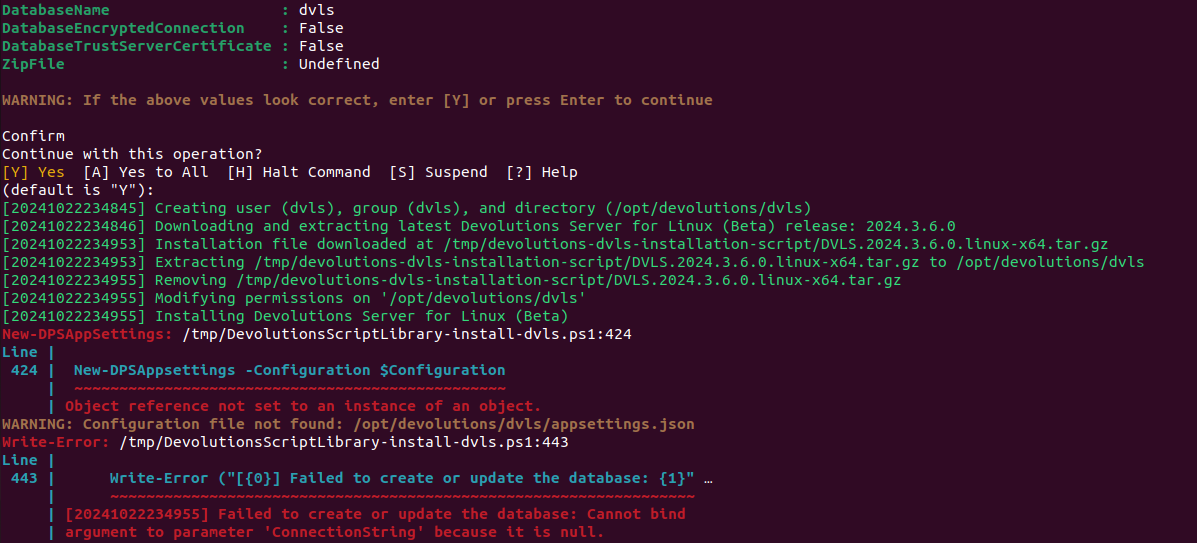
I did nothing special outside of running sql server via docker and downloading the installation script and running it directly in the default bash shell obtained by opening the Terminal application.
The user does not appear yet as in the dvls group during the execution of the script, nor after running it. Indeed, it only takes effect on the next login, we can see that by using `su - $USER` to re-log in directly inside the terminal: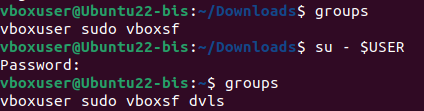
I’ll look into fixing this.
> still had to use & whoami rather than & logname..
We’ll update the script to use something else.
Benoit Cortier
7e459d17-482a-4f12-8adf-5190b46bce3f.png
2619e8aa-ed6d-418b-897d-71dadc0319a2.png
Hi John,
Thanks for the notes. Also, just a minor note: WSL probably won't really be supported since you wouldn't run a production service there, but I'll make my best effort.
I committed a change to the script to replace logname with id -un which should be a better way to pull the currently executing user. I also added a final log output that says the URI, default username, and password.
I would imagine that the group dvls is case-sensitive and it's hard to tell in your screenshots but it seems like case is changing between the two. We use the lowercase dvls for the group name.
-Adam
Adam Listek
thanks guys, yeah, I caught the dvls group case sensitivity. But as Benoit mentions there's still something wrong in the script as to the user & group being created then refreshed in script to be used in script??
Would using "newgrp dvls" cmd work although don't know how it's different to "sg"??
JK
Devolutions Force Member (and Long time Devolutions Fan)
Hi John,
Right now, it seems like it's not working as expected in WSL. Ubuntu proper seems to be able to handle the inline user group switching. The crux of the problem is that we create the new group and add the new user to it, but to avoid completely restarting the script itself, we use the sg trick to reload the users groups in the current session without replacing the shell. Newgrp will replace the shell which has other effects. There is not an easy cross-platform solution.
We are taking a look, but ultimately, may not have a quick solution at the moment. Since I can't find an easy answer for that one, I'm going to focus on the Docker side to try to get that in your hands as well, which should give more flexibility overall. Then after that, I'll see if we can come up with a better cross-platform way of handling that.
-Adam
Adam Listek
Could you not use the .sh to call 2x .ps1 scripts one with the group creation in then the sh script waits for a select exit code before continuing, then refreshes the groups then calls the next ps1 to finish the deployment?
Or even call new ps1 scripts at ends of ps1 scripts??
JK
Devolutions Force Member (and Long time Devolutions Fan)
There are a few ways to rearchitect it, but I can tackle that next week, depending on how far I make progress on the Docker stuff this week. My goal is to get a Docker configuration into your hands by the end of the week. Yes, that is one way (though I want it to work both ways starting from Bash, or from the PS script itself and not being reliant on Bash as that was only meant to bootstrap PowerShell if you didn't have it). I could also potentially spawn off using PS jobs, etc. but will explore that after the Docker stuff.
I really appreciate you bringing up all the good points and notes here, certainly looking at how to re-do some things to make it more robust and support more platforms :)
-Adam
Adam Listek
Any update on a docker-compose.yml yet?? Will you commit to the ScriptLibrary repo for docker??
JK
Devolutions Force Member (and Long time Devolutions Fan)
Hi John,
Yes, I'll commit there as soon as I can. I had a number of projects that pulled me away more than I would have liked this week, so probably closer to the end of next week I hope to have the first iteration out there. Thanks!
-Adam
Adam Listek
if you commit what you currently have it would be ideal, you never know perhaps I can assist in contributing??
Just create a ALPHA_STATE.md file in its own dir perhaps to make users aware it's still in dev....
JK
Devolutions Force Member (and Long time Devolutions Fan)
Fair enough :) But I'm not quite there since I just rearchitected what I had, and it's pretty rough. I promise I'll try to get something up sooner than the end of the week next week!
-Adam
Adam Listek
Yeah np, I get your no doubt busy juggling projects. Just don't forget collaborating on code is one of GitHubs selling points lol hint hing.....
If its too rough, are you able to publish private repos on the Devolutions Org, then add me as a contributor??
JK
Devolutions Force Member (and Long time Devolutions Fan)
Hi John!
I'll answer here, and also in the other thread. It took me some time, and I apologize for that, but I have the first release of our Docker Compose configuration. Please check it out here, and let me know how well (or not), it works for you!
https://github.com/Devolutions/ScriptLibrary/tree/main/DVLSForLinux/Docker
Adam Listek
Hi John!
I'll answer here, and also in the other thread. It took me some time, and I apologize for that, but I have the first release of our Docker Compose configuration. Please check it out here, and let me know how well (or not), it works for you!
https://github.com/Devolutions/ScriptLibrary/tree/main/DVLSForLinux/Docker
Top man, the time I wasn't worried about, I knew you would come through.....
Ill give it a bash shortly.
Side topic question for you:
DS how does it interact with Gateway, for that matter I'm assuming DPH would also interact with Gateway in a similar manner correct? I ask because once I have DS running in Docker my next step would be to implement Gateway with DS, from what ive seen so far the setup from DS / DPH runs off the UI actions for the Gateway parameters correct, i.e. you provide it with the fqdn to the gateway then use the auto configure button to confirm the connection. So as long as the DS / DPH passes those connectivity tests it should then work from the UI shouldn't it??
If I'm understanding its workings correctly so far, am I right in thinking that we should in theory be able to deploy gateway via PowerShell withing the docker container and then add the gateway instance in the same manner mentioned previously??
Sorry, I know I'm trying to run before I can walk here again lol. So please take this side topic as a brainstorming session ok. Once I have DS running in docker, I will come back to this topic...... I will prob ping the gateway team in on this too at that point....
JK
Devolutions Force Member (and Long time Devolutions Fan)
Hi John,
There are a few ways to run Gateway, depending on your needs, but yes, as long as DVLS (from within the Docker container) can reach a given Gateway, it should work. I am planning on adding a config including Gateway as well for a demo setup.
Technically there is a Docker config for Gateway here, but it needs some work and documentation, but you are welcome to try it.
https://github.com/Devolutions/devolutions-gateway/blob/master/package/Linux/Dockerfile
-Adam
Adam Listek
Hi John,
There are a few ways to run Gateway, depending on your needs, but yes, as long as DVLS (from within the Docker container) can reach a given Gateway, it should work. I am planning on adding a config including Gateway as well for a demo setup.
Technically there is a Docker config for Gateway here, but it needs some work and documentation, but you are welcome to try it.
https://github.com/Devolutions/devolutions-gateway/blob/master/package/Linux/Dockerfile
-Adam
Had been toying around with Gateway earlier, but got stuck installing gateway with a cert and the provider cert for DPH, see here:
Standalone gateway, Management?
Plus my Feature Request
[Feature Request] Gateway Standalone,
Anyway, the compose spun up but looks like my networking must be out again lol......
Also, it left an alpine container in the compose which I haven't looked into myself yet but it doesn't start, would it be a build orphan perhaps, which app runs on alpine MSSQL right as I notices that Ubuntu was also built which im assuming is the main DVLS app right??
JK
Devolutions Force Member (and Long time Devolutions Fan)
Hi John,
There are a few ways to run Gateway, depending on your needs, but yes, as long as DVLS (from within the Docker container) can reach a given Gateway, it should work. I am planning on adding a config including Gateway as well for a demo setup.
Technically there is a Docker config for Gateway here, but it needs some work and documentation, but you are welcome to try it.
https://github.com/Devolutions/devolutions-gateway/blob/master/package/Linux/Dockerfile
-Adam
Had been toying around with Gateway earlier, but got stuck installing gateway with a cert and the provider cert for DPH, see here:
Standalone gateway, Management?
Plus my Feature Request
[Feature Request] Gateway Standalone,
Anyway, the compose spun up but looks like my networking must be out again lol......
Also, it left an alpine container in the compose which I haven't looked into myself yet but it doesn't start, would it be a build orphan perhaps, which app runs on alpine MSSQL right as I notices that Ubuntu was also built which im assuming is the main DVLS app right??
Alpine was DVLS healthcheck I see now
JK
Devolutions Force Member (and Long time Devolutions Fan)
Hi John,
There are three services involved (when running docker-compose up -d): the MSSQL container which contains the DB, the built DVLS container, and a third Alpine container which simply exists to depend on the DVLS container for it's healthcheck.
If I don't use the third container, then the health check won't wait (can't depend on itself). It's not required for function, but it does mean that that you don't prematurely attempt to access DVLS until it's fully up and running (takes about 1 min. the first time you run the container, and like 15 seconds each re-run of the persisted data).
Adam Listek
Im really getting sick of WSL2 and Docker on Win 11, the networking is so unreliable, it works then it doesn't, it works then it stops completely lol
JK
Devolutions Force Member (and Long time Devolutions Fan)
Hi John,
Sorry to hear that! It does have its challenges. For what it's worth, this is my WSL2 configuration (%USERPROFILE%\.wslconfig that has been working pretty well as of late:
[wsl2]
dnsTunneling=true
networkingMode=mirrored

[experimental]
autoMemoryReclaim=gradual
bestEffortDnsParsing=true
Adam Listek
Hi John,
Sorry to hear that! It does have its challenges. For what it's worth, this is my WSL2 configuration (%USERPROFILE%\.wslconfig that has been working pretty well as of late:
[wsl2]
dnsTunneling=true
networkingMode=mirrored
[experimental]
autoMemoryReclaim=gradual
bestEffortDnsParsing=true
Yeah I am using Mirroring which has been working, but then its matter of getting these 2 options to work correctly: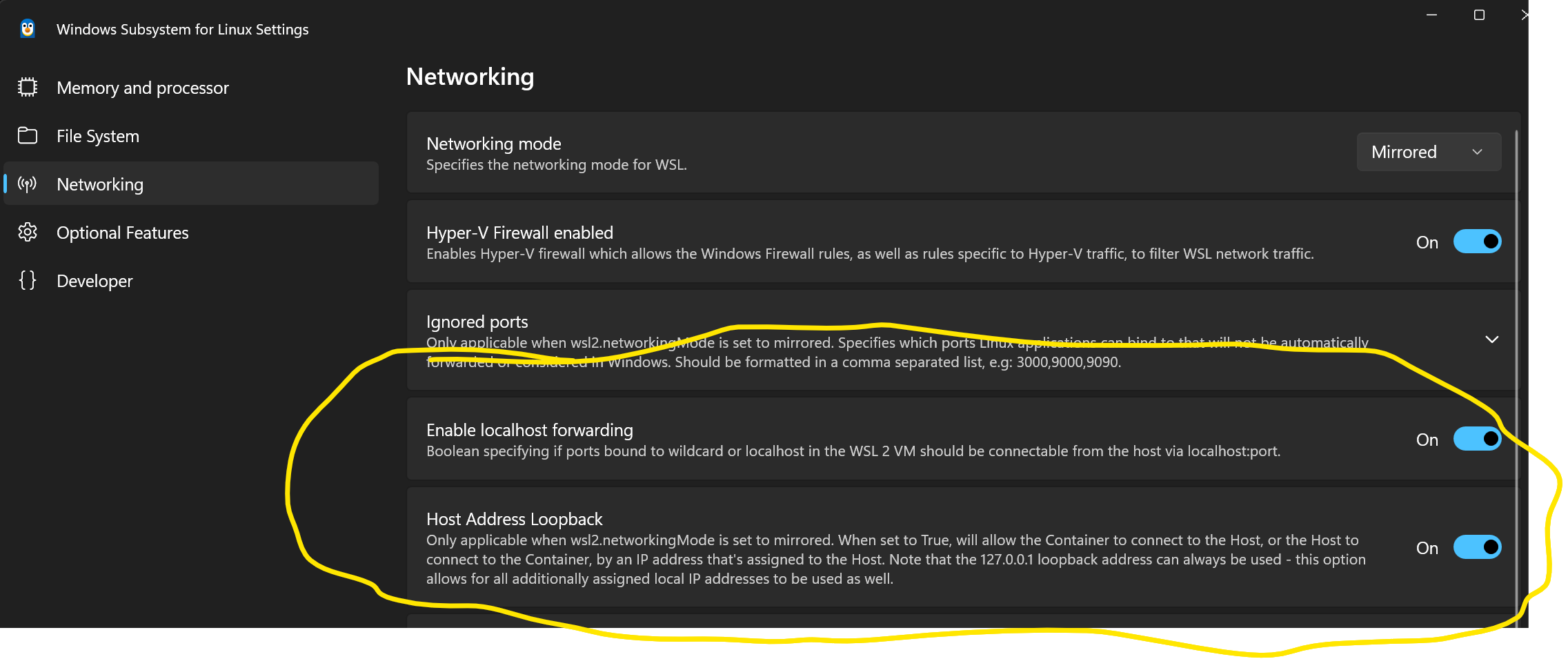
i think those 2 settings then utilise a Vswitch called FSE Switch, although ive not been able to confirm that yet as i cant seem to correlate which of those settings deploys / undeploys that FSE Switch.
JK
Devolutions Force Member (and Long time Devolutions Fan)
2260dd72-c76a-4e09-9c7e-48410e1fafc8.png
Hi John,
I see, I'm not as familiar with those!
Adam Listek
Even without those 2 settings, with mirroring WSL2 and Containers should respond to 127.0.0.1???
Oh well ill come back to this nightmare, thanks for the code and help, I really appreciate all your fantastic work, same for your colleagues.
What, grinds my gears though is WSL2 and Containers networking works flawlessly in Win Server 2025!!! So do wonder why MS can't. make Win 11 work the same, for some reason with the client OS's they keep trying to make use of ageing ICS etc which complicates everything, same with the Default switch they push on Win client users for NAT use lol.
SOZ Rant at Windows over lol
JK
Devolutions Force Member (and Long time Devolutions Fan)
ah ha as soon as I joined the DVLS container to the docker bridge Net the browser tabs open spring to life!!!
So, looks I have an issue with the docker-default net the compose stack was using???
Before I switch off for the evening, I inspected the 2 docker nets which were both using the bridge driver, but the bridge network that worked had these options:
"Options": {
"com.docker.network.bridge.default_bridge": "true",
"com.docker.network.bridge.enable_icc": "true",
"com.docker.network.bridge.enable_ip_masquerade": "true",
"com.docker.network.bridge.host_binding_ipv4": "0.0.0.0", <!-- I'm assuming it may be related to this specific line?? -->
"com.docker.network.bridge.name": "docker0",
"com.docker.network.driver.mtu": "1500"
JK
Devolutions Force Member (and Long time Devolutions Fan)
Hi John,
I have a pretty similar setup to yours it looks like (sans those settings your referenced in the screenshot). I haven't had a problem addressing the Docker containers from 127.0.0.1:5000 and localhost:5000. Keep in mind that you will need to use https, by default, since it generates a self-signed cert.
I am also on Windows 11 24H2 with the latest Docker Desktop and Ubuntu 22.04.5 LTS as my WSL2 container. I have a stock Docker setup, no changes to the default networking.
Adam Listek
Hi John,
I have a pretty similar setup to yours it looks like (sans those settings your referenced in the screenshot). I haven't had a problem addressing the Docker containers from 127.0.0.1:5000 and localhost:5000. Keep in mind that you will need to use https, by default, since it generates a self-signed cert.
I am also on Windows 11 24H2 with the latest Docker Desktop and Ubuntu 22.04.5 LTS as my WSL2 container. I have a stock Docker setup, no changes to the default networking.
As its stock I am assuming your WSL2 settings still has those 2 settings i highlighted earlier disabled??
If it spins up on ubuntu vm without issues, then its fine... like i say WSL2 can be a nightmare....
JK
Devolutions Force Member (and Long time Devolutions Fan)
Not that I've configured it, but the first option appears to be a default, but I have not explicitly configured the host address loopback, so I assume off.
-Adam
Adam Listek
Not that I've configured it, but the first option appears to be a default, but I have not explicitly configured the host address loopback, so I assume off.
-Adam
As I say, it either works or it dont lol on win 11.
time to give up and move on to win 2025 vm, which is the os being used in production....
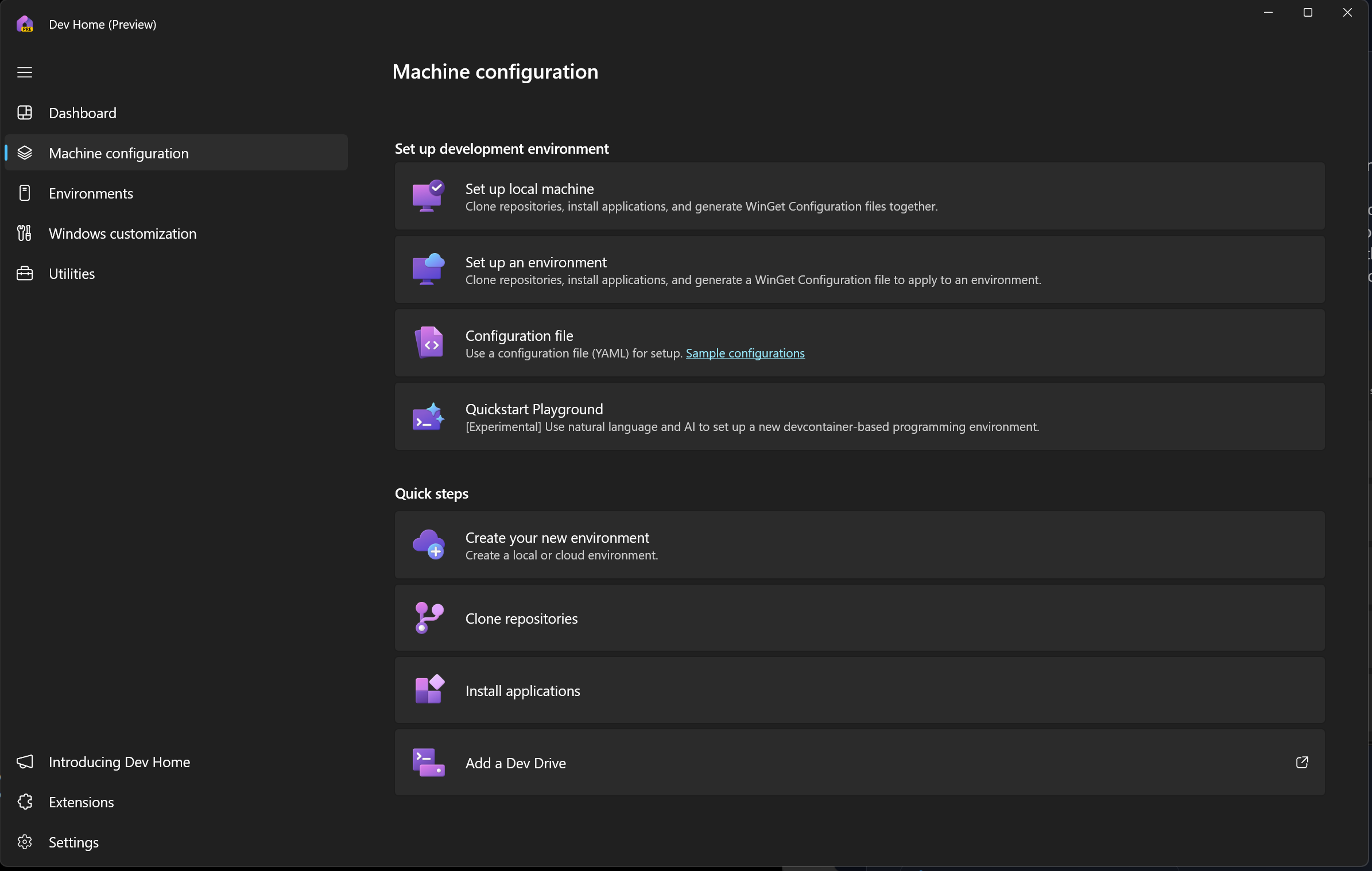
Also trying to learn how to use the new Dev Home app, its able to spin up multiple environment providers, Hyper-V, WSL2 and Azure, then it also configures the environment including app installs via Winget. If I can work out the Machine Config parts, I'll be happy days!!!! Can then spin up various environments which also are ready to use, cloned repos and all.....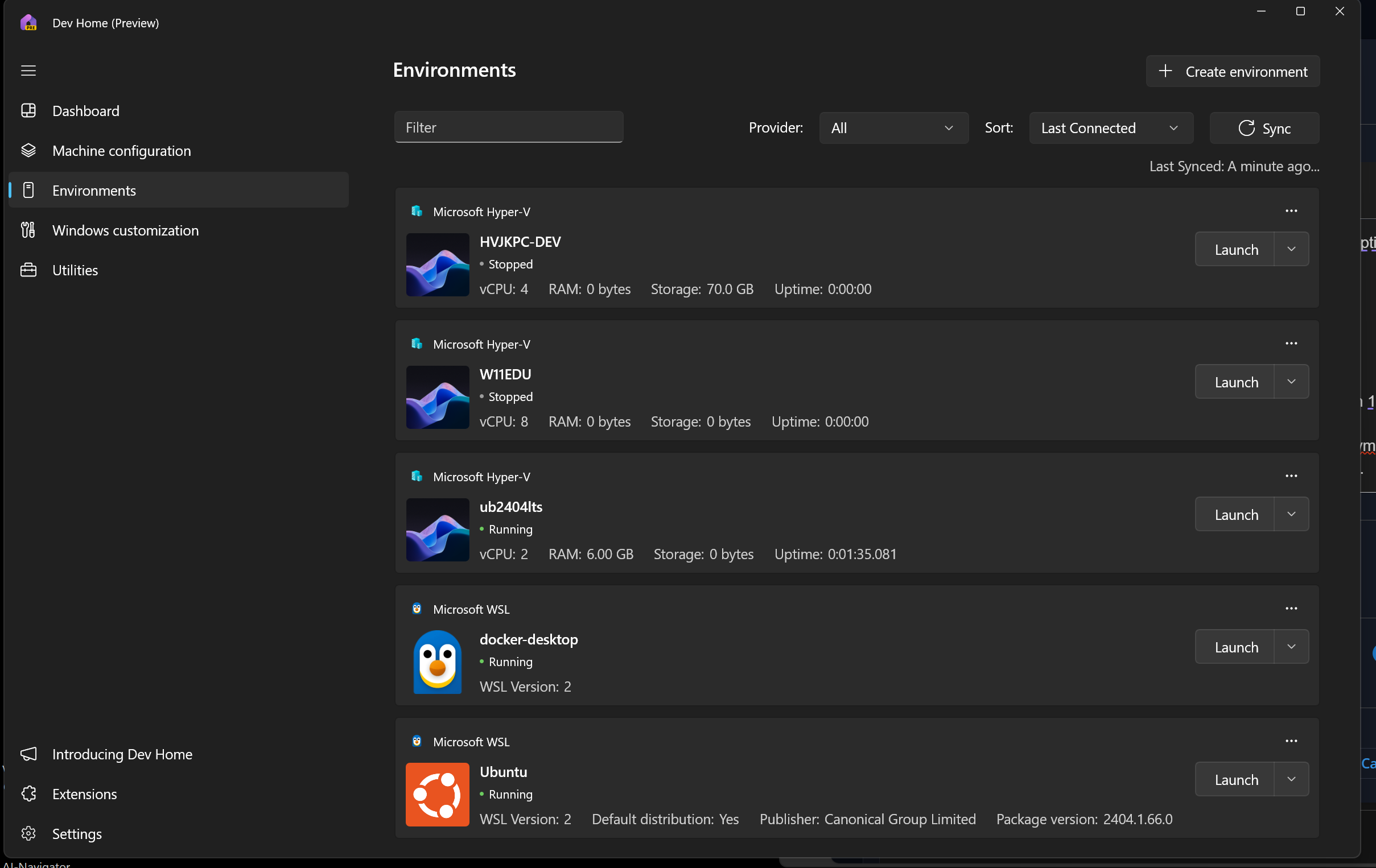
JK
Devolutions Force Member (and Long time Devolutions Fan)
31dbbf7d-6eb6-4d5f-b0f1-4573cc54f812.png
5dd0aebd-f5fb-4e75-897b-6d23d1adae1e.png
So a quick update for you, as I expected the docker compose spun up first time on Win Serv 2025 and everything working via Docker for Desktop - WSL2 engine!!!! Like I mentioned, Win 11 vs Win Serv 2025 for WSL2 based docker dev is night and day!!
Thanks again, now I have a base template to play with and make use of. Id also be extremely interested to try out the Gateway integration we discussed previously. I'll keep a watch on the Repo!!!
JK
Devolutions Force Member (and Long time Devolutions Fan)
Hi John,
Sorry for the delayed response, but glad it's working! I'll be looking into the next set of improvements to this over the next few weeks, as I have some other work to finish first. Thanks for testing it out!
-Adam
Adam Listek