Hub Business - Auto-assign licenses based on user groups
0 vote

Hello,
I'm posting this feature improvement following a discussion I had with a customer.
They're in the process of moving from Devolutions Server to Hub Business and they would like to have the possibility to auto-assign Remote Desktop Manager licenses to specific user groups.
This is the interface we currently have in Devolutions Server: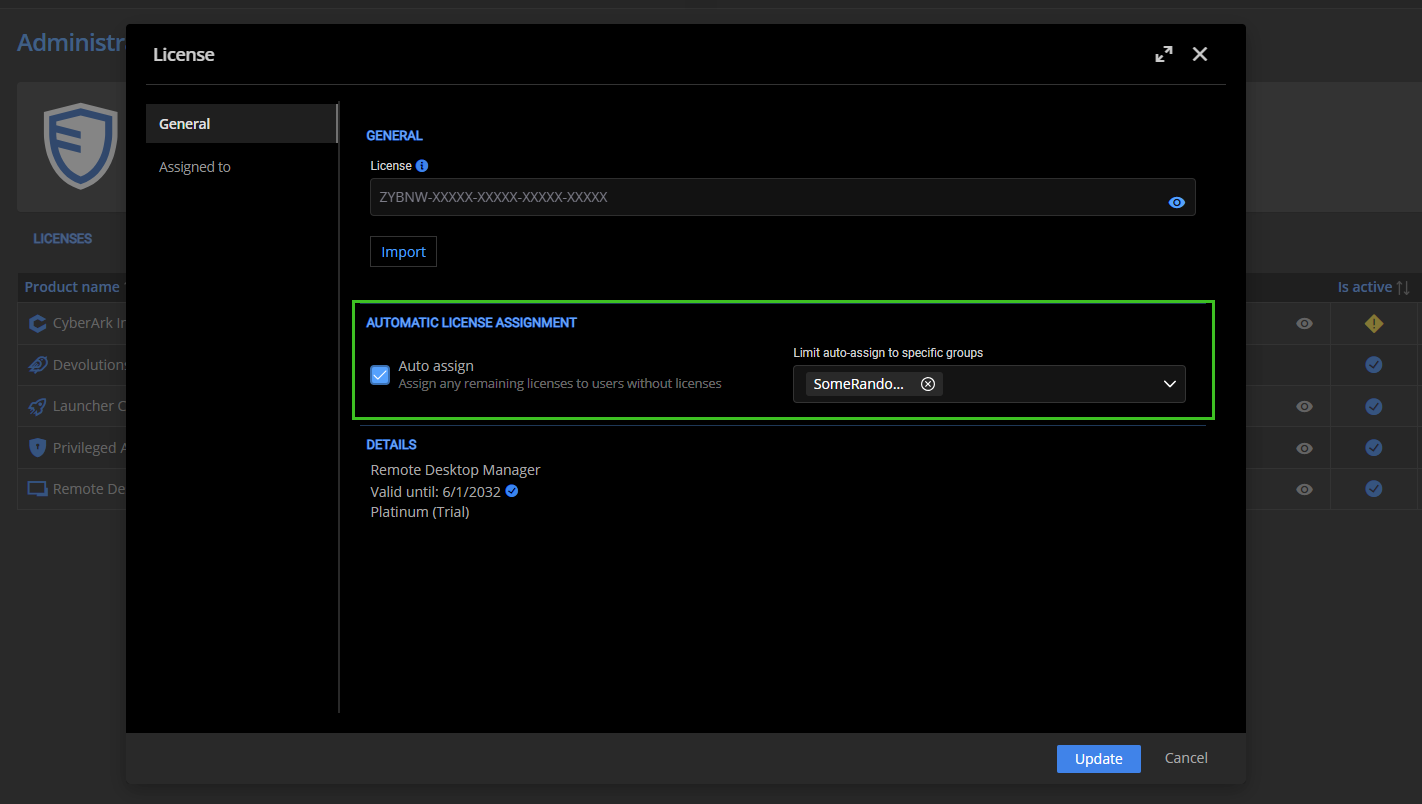
If you're interested in seeing this change, please show your interest in this thread.
Best regards,
Marc-Antoine Dubois
25fd8925-ca82-4dc7-9ed0-d409fe22038f.png
All Comments (15)
Hi Marc-Antoine,
Yes I agree this would be a valuable enhancement for any potential or existing Hub customer with more than a handful of seats, particulary because in those scenarios the users/groups will likely be syncing from an identity provider such as EntraID where group membership is managed/replicated. Hopefully this enhancement also includes automatic unassingment of licences for disabled users or when being removed from the respective group.
Joe
Hi Marc-Antoine,
Another example of how this feature would be useful, is the onboarding process of new users provisioned via SCIM in conjunction with the encryption service. Currently licences cannot be applied to users prior to first login, even when they have been synced from the identity source. Prior to first login, the respective accounts are in 'invitations waiting to be sent' list, but the encryption service negates the need to send an invitation. Auto-assigned licences would hopefully remove the need for a multi-step process where a new user has to login once, and then an admin manually assigns the licence/s and the user relogs in.
Please let me know if you would like any additional info.
Thanks
Joe
Hi Joe,
Hub Business should automatically assign unused license seats to users when they connect RDM with your Hub Business. Let us know if that's not the case.
Have a good day!
Maxime Morin
Hi Maxime,
Thanks. Does that also occur for Launcher and Gateway licences?
There is also the scenario where a user exclusively uses the Web Client to connect with a browser, in which case they wouldnt be launching RDM or Launcher, but still need a gateway licence assigned, ideally without manual intervention by a Hub admin.
Thanks
Joe
Hi Joe,
Yes, it also auto-assign with Launcher but not with Gateway licenses nor with PAM licenses. The web client does not support auto-assign right now.
Have a good day!
Maxime Morin
Thanks Maxime, yes the Launcher licence seems to auto-assign when opened the first time.
Refering back to the original post, I guess the qualified feature request appears to be 'Allow auto assignment of any/all product licences to specific user group/s (including those provisioned via SCIM), and auto unassignment when user is disabled or removed from group'
The current capabilities result in a multi-step process for Gateway (and PAM) assignment which requires users to have performed the initial login before an adminsitrator can assign licence. Additionally current capabilities appear not to accomodate auto-unassignment, or scenarios where users exclusively use Web client to connect in browser.
Joe
Hi Joe,
Your feature request has been heard. We will look into a solution and let you know once implemented.
Have a good day!
Maxime Morin
Hi,
we could use the feature as well were licenses, RDM in our case, could be assigned via groups of Entra ID. Not every user may have an RDM license, only consultants in specific teams/countries may have one. As you stated, Hub automatically assigns unused RDM licenses to whomever connects via RDM.
Now I have to manually check every couple of months if licenses aren't used by people who shouldn't have RDM.
Kr
Hello,
We have Entra ID users in Devolutions Hub Business and would also like to auto-assign licenses. I have to assign every user a license after they activated their Devolutions account. In our case it's an RDM license and a gateway license and this causes unneccesary slowdowns.
Good morning I have the same problem, I have external providers without RDM clients, only Internet access to connect to the gateway and autoassigment doesn't work. I hope it can be resolved soon
Good morning I have the same problem, I have external providers without RDM clients, only Internet access to connect to the gateway and autoassigment doesn't work. I hope it can be resolved soon
Hello,
Could you clarify which client is being used by these providers? Is it the open in web browser/client?
Have a good day!
Maxime Morin
Good morning, our organization has a devolution server and several devolution gateways used as jump servers. External providers are given the access URL. The RDM license is auto assign, but it is not taken unless you first log in from the RDM client or if the administrator is asked to assign it. We would like auto assign to also work remotely by connecting to a browser, and that there could be a policy that removes unused licenses after a certain time.
Good morning,
Thank you for your interest. If I understand correctly, you would like to auto assign a RDM/Launcher license when a user use the web interface, is it what you meant ? If there is a group configured with the auto assign, we could probably try to see if the user is part of the group, but would be hard to know if he needs a launcher license, a RDM license or even a PAM license, this is why we don't try to auto assign a license with the web. We could discuss internally how it could be improved, but I don't have an easy solution for now.
For your information, starting with 2025.1, licensing will changed and Devolutions Gateway licenses will be removed so those licenses will not be an issue. I'm letting you know since you talked that you use Devolutions Gateway so I'm not sure if assigning license to Devolutions Gateway was an issue.
You also wrote :
and that there could be a policy that removes unused licenses after a certain time.
What you would like is probably a floating license, am I right ? It is not something planned for now, but I keep it in mind.
Best regards,
François Dubois
Hi François,
Any progress on the auto assign for web only usage scenarios? Currently when a user is provisioned via SCIM, there appears to be no way to assign them a Launcher or RDM license prior to first sign-in because they are not shown in the list of assignees. This prevents those new users from being able to launch sessions in browser upon their first login, resulting in administrative intervention post account provisioning and initial use. Additionally in cases where the users will have a RDM or Launcher license assigned in order to obtain gateway entitlement, but only ever intend to use WebUI (or lack permission to install/run RDM/Launcher locally), it is suboptimal for an administrator to have to disable MFA (inc enrollment) for a provisioned user in order to preemptively authenticate to Hub as them so licenses can be assigned.
Please let me know if you would like any additional info.
Thanks
Joe
Good Morning Joe,
First of all, I apologize for the delay in my response.
I wanted to give you a quick update regarding your request. After internal discussion, having pre-access to a user created outside the HUB should not really be possible.
The good news is, right now, you should be able to activate the licenses auto-assignment feature for web users only. If you go to your licenses management and select Auto-assign, a new user (even created outside of HUB), upon their first login, should automatically be assigned their license and thus, should have access to their various functionalities immediately, without having to wait for additional administrator manipulations. This can also be configured by group like DVLS.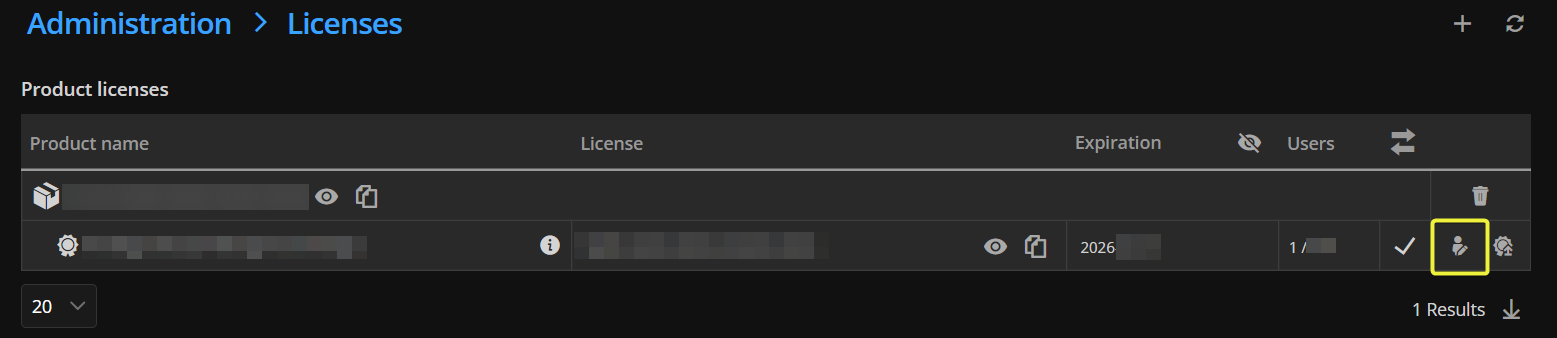
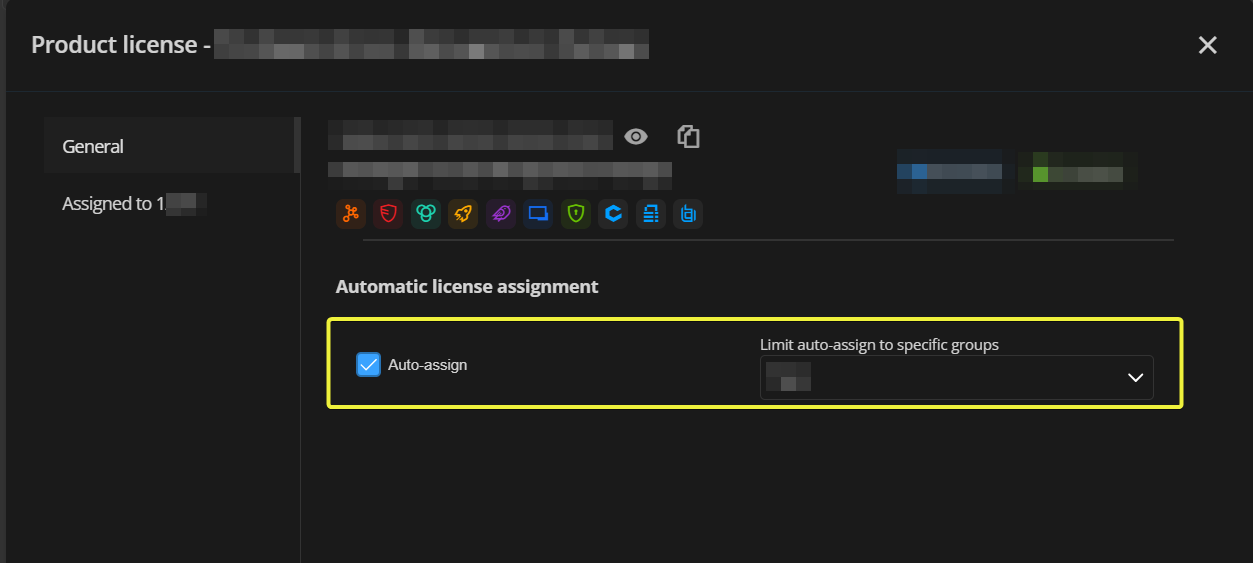
Please try it and let me know if you have any additional questions.
5d93bd02-f336-406f-9d28-0732922add64.png
54400ade-e46d-4e38-bd37-10de39ff0aa4.png