Attachments directly editable from workspace and webpage
0 vote

Hello,
We were using keypass previously and it was possible to directly open a csv file attachment and edit it in keypass (without the need to download it and save it back).
It would be great if at least workspace and webpage (and also web extension if possible) could be able to do this. Thanks. Marc-Andre
All Comments (6)
Hello,
I imagine that this is only possible for some specific content types in KeePass? Do you have a screenshot to guide us?
Regards
David Hervieux
Hello David,
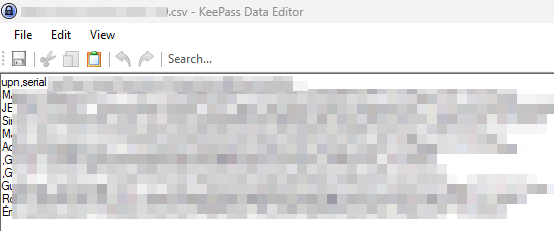
Yes, I've tried it for txt and csv files. Here's screenshots of what it likes in Keypass. For example, I search for an entry and in advanced tab, I can click the file and open as below:
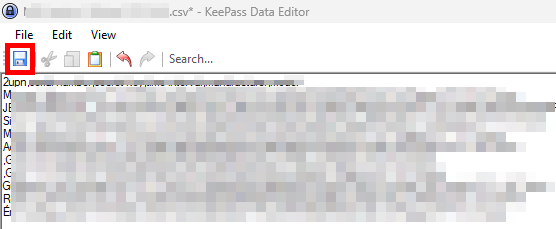
Directly here, I can edit the content and click the save button at the end.
It also works for other type of documents as Keypass extract it to EFS encrypted temporary file and allow us to import it back after modification, as shown below with an Excel file example:
Thanks for your time. Have a nice day,
Marc-Andre
Hi Marc-Andre,
Are your images showing on your side? I'm not seeing them on my side. If you could fix that, it would greatly help us.
Have a good day!
Maxime Morin
Hello Maxime,
I've attached the pictures directly from attachments section. Thanks.
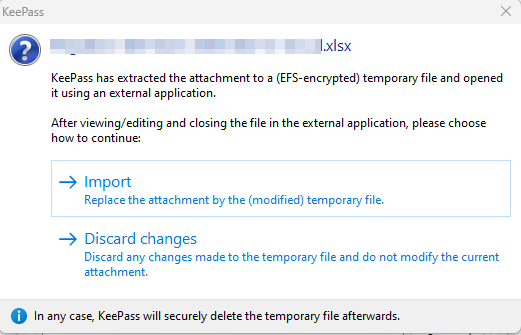
03_KeyPass_Excel.png
02_KeyPass_edit_save.png
01_KeyPass_display.png
Hi Marc-Andre,
Thank you for the updated screenshots, I've added a task in our backlog to analyze your request. We will let you know if there's any development.
Have a good day!
Maxime Morin
