Duo MFA link existing devices

Hi
I have set up DUO in DVLS/RDM according to https://docs.devolutions.net/rdm/data-sources/multi-factor-authentication/duo/
But when I go to set it up per user I only get a message that I need to enroll a device 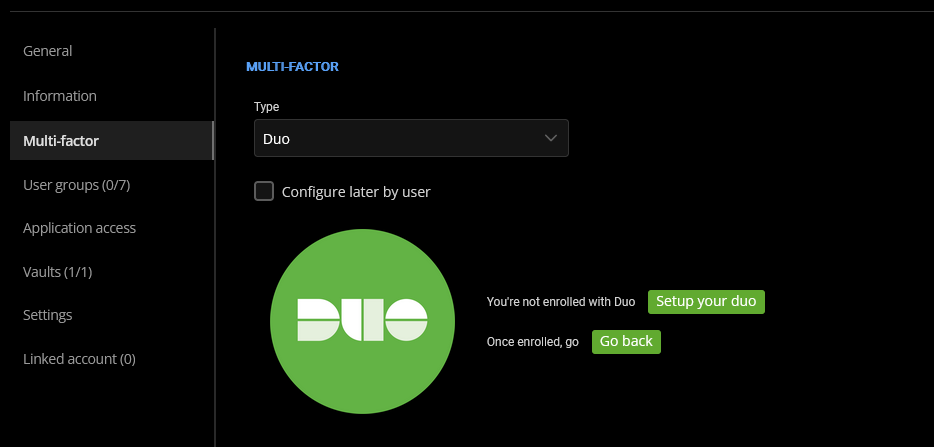
Currently on the free DUO plan and that might be causing the issue but there is a solution by manually inputting DUO user ID for each user from the DUO admin panel.
This exists in Authentik (a open source identity provider that use the same type of DUO integration) but I cannot find it on DVLS.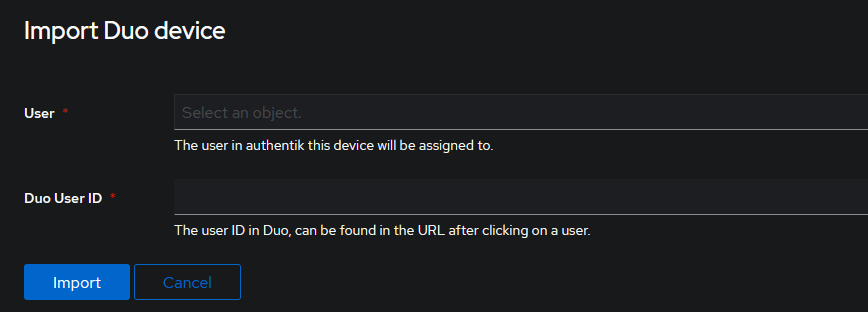
fa2535a5-73f8-45b3-ac4e-90342c8863b7.png
0ea97a60-6ab8-49cb-bb5e-8466e9b34252.png
All Comments (13)
Hello,
If you don't want to enroll the user at that moment, you can check the option "Configure later by user". It will force the user to configure his DUO at next login and the user will enroll his own device. 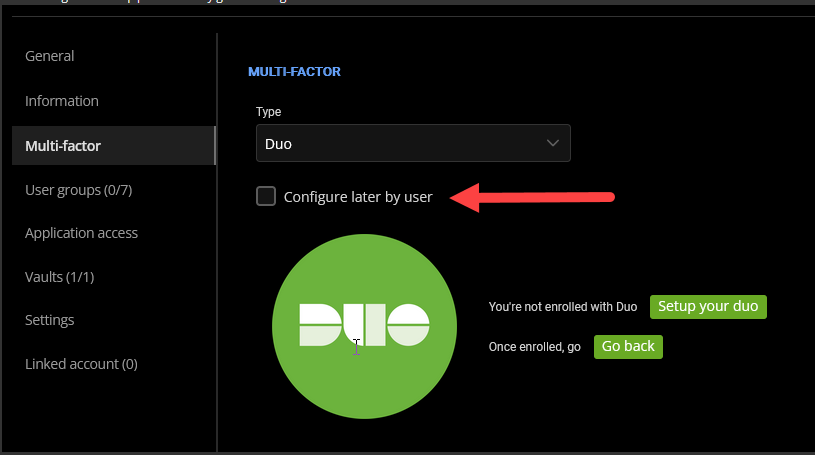
Let me know if that helps.
Best regards,
François Dubois
7dbb168a-9876-4dd2-a326-5bbf80f77e8d.png
All users already have devices enrolled in DUO. I need a way to link their ID:s to the accounts in Devolution.
Hello,
Sorry for the delay, we have things to validate if it is something easy to add. We will post back here once we have an update.
Best regards,
François Dubois
Hello,
Thank you for your patience. I looked and asked a colleague to get more information. Finally, it is probably something that we could do, but for now, we send the username to Duo and not the user ID. Do you have different username between DVLS and Duo or same usernames are used ? If same usernames are used, you could probably just configure your user to "Configure later by user". When he will log in, we will ask 2FA with his username and it will be found and everything should be configured. If it is not the same username, I understand your request, we could improve that in future.
Please let me know if that help
Best regards,
François Dubois
Yes if I have an account in DVLS with same username as DUO it works with existing DUO devices. But we are having different usernames and it does not seem possible to change username in DVLS?
Hello,
What type of authentication do you use in DVLS ? Of course, if your users come from an Identity Provider, you can't change the username because they are defined in a separate system. But if you use Devolutions Server users, I could have a look if we could improve that or at least, give you a workaround for now.
Best regards,
François Dubois
Hi
We are using Devolutions server built in auth for all users. Username field in Administration->Users are greyed out.
Hello,
I made a few tests and it is not a problem to change the username of Devolutions Server users. Of course, the old username is still in old logs, but it should not be an issue. I will send you a way to change your username if you want them to match usernames in Duo. You should receive a DM soon.
Best regards,
François Dubois
We have the same problem. The solution workaround is: add an alias in DUO with only the first part of the UPN (without @domainname.com).
Is there maybe a solution for this problem in DUO? It appears that the entire UPN isn't being sent to DUO.
Hello Arnoud,
Thanks for reaching out.
To my knowledge, the alias (workaround) is the way to go.
I will see with our QA department if we can attempt to replicate...
Thanks for your patience.
Best regards,
Alex Belisle
Hello!
Thanks for your patience; we had a good discussion around this.
We identified mainly 2 possible improvements on the DUO integration
1. Allow configurable username mapping
Let the user (or their admin) choose what username is sent to Duo
This makes the process more flexible and removes the need for managing aliases in Duo.
2. Use the Duo user_id instead of the username
This one may show more challenges, but would likely prevent issues related to username changes in the long run.
We're not excluding the development of both solutions as fallback options.
Thoughts?
Best regards,
Alex Belisle
Hello!
Thanks for your patience; we had a good discussion around this.
We identified mainly 2 possible improvements on the DUO integration
1. Allow configurable username mapping
Let the user (or their admin) choose what username is sent to Duo
This makes the process more flexible and removes the need for managing aliases in Duo.
2. Use the Duo user_id instead of the username
This one may show more challenges, but would likely prevent issues related to username changes in the long run.
We're not excluding the development of both solutions as fallback options.
Thoughts?
Best regards,
@Alexandre Bélisle
The first option fits for now. The most flexible option is number 2. And more sustainable.
Thanks for your reply.
Hello,
I’ve just resolved a similar issue for another client, and here’s the solution that worked:
What to Verify First
- Usernames and aliases of users in Duo
- Username Normalization setting of the Devolutions Server application in Duo
- Usernames of users in Devolutions Server
Matching Usernames Between Systems
In Devolutions Server, each user’s username must match a username or alias configured in Duo.
- In Devolutions Server, usernames are typically in the format:
username@domain.loc
- In Duo, the Username Normalization setting affects how Duo interprets that username:
- Simplify → removes the “
@domain.loc” portion - None → keeps the full “
username@domain.loc” value
- Simplify → removes the “
Recommended Configuration
- If Duo uses short usernames (e.g.,
username), set Username Normalization to Simplify. - If Duo uses full usernames (e.g.,
username@domain.loc), set Username Normalization to None.
Once both sides align, authentication should function correctly.
Feel free to reach out if you have any questions or need further clarification.
Best regards,