Host set to "inherit" does not work with GW

I have just upgraded DVLS to the latest and greatest, as I were a bit behind.
I the also installed the GW alongside DVLS as I have some servers in a locked off VLAN, where GW would be the perfect solution.
My folder structure is:
Server1 (A folder of type Server) where I define the hostname of the server.
-- RDP (More or less everything set to inherit.
This results in the following connection in the DVLS Administration page: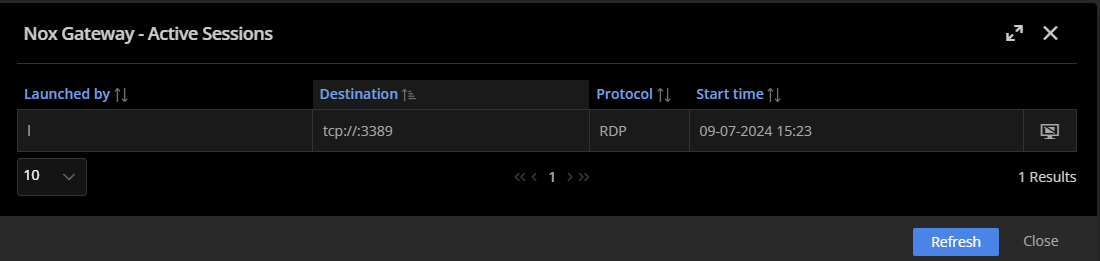
And all my RDP connections battle over connecting to the DVLS/DVGW itself.
If I type in the host directly in the RDP session it works as expected.
Remote Desktop Manager connected with Devolutions Server running newest versions.
------------------------Signature------------------------
Sorry if any of above sounds harsh or provoking, it is NOT meant as such, but I have Asperger's and don't always know.
My intentions is always to be friendly.
-------------------------------------------------------------
a8e328d8-4207-4389-a607-2ac16d9ce85c.png
All Comments (12)
Thank you for using our forum and for providing detailed information about your setup.
I will forward your issue to a level 2 technician for further investigation. In the meantime, please ensure that your DVLS and Gateway configurations are correctly set up according to our latest guidelines.
Best regards,
Carl Marien
Hi
Any news on this?
I assume everything is setup correctly as it works when I type in the hostname directly in the entry.
And, I use inherit all the time, so I'm pretty sure that is as it should.
Regards Lars
Remote Desktop Manager connected with Devolutions Server running newest versions.
------------------------Signature------------------------
Sorry if any of above sounds harsh or provoking, it is NOT meant as such, but I have Asperger's and don't always know.
My intentions is always to be friendly.
-------------------------------------------------------------
Hello,
I'm really sorry for my late response.
I wanted to let you know that I will be testing this on my side and try to replicate the issue. I will get back to you shortly.
Best regards,
Hello,
Would it be possible to confirm the version of your Devolutions Server and Remote Desktop Manager client?
I'm currently using version 2024.2.8.0 of Devolutions Server and version 2024.2.16.0 of Remote Desktop Manager, and I'm able to open some connection by configuring the hostname and credentials on the folder and setting an RDP session with everything set as inherited. It worked both in RDM and the web interface of the Devolutions Server.
Best regards,
Hi
I have updated everything to the current and created a video which shows my setup and the versions in the end.
Please let me know if there should be something I need to change.
https://streamable.com/m8x4hi
Ps. I use variables in the "host" entry, but I have tested without and this dosen't seam to influence the result.
Regards Lars
Remote Desktop Manager connected with Devolutions Server running newest versions.
------------------------Signature------------------------
Sorry if any of above sounds harsh or provoking, it is NOT meant as such, but I have Asperger's and don't always know.
My intentions is always to be friendly.
-------------------------------------------------------------
Hello,
Just to be certain, if you configure the hostname manager.nox.4tw.dk on the folder instead of the variable it resulted in the same behavior where you are opening an RDP to the gateway host and not the manager server?
I've been testing the same thing on my side, and I'm getting to the right server each time.
Best regards,
Yes, same result.
Will also test a bit further, to see if I can pin point it.
I am connecting to DVLS and GW through HAProxy, but can't see why that should change the direction after the GW, when it works with host entered
Remote Desktop Manager connected with Devolutions Server running newest versions.
------------------------Signature------------------------
Sorry if any of above sounds harsh or provoking, it is NOT meant as such, but I have Asperger's and don't always know.
My intentions is always to be friendly.
-------------------------------------------------------------
Hello,
I'm sorry for the delay in my response. I tried to replicate the issue multiple times, and I was unable to. I've opened a case #00066905 so that we can take a closer look at the issue and plan a session together.
We will follow up directly in the case, and we'll update this forum if needed.
Thank you for your understanding.
Best regards,
EDIT Sorry, forgot I have temporarily opened up for network access directly.
Remote Desktop Manager connected with Devolutions Server running newest versions.
------------------------Signature------------------------
Sorry if any of above sounds harsh or provoking, it is NOT meant as such, but I have Asperger's and don't always know.
My intentions is always to be friendly.
-------------------------------------------------------------
Hello,
No problem.
For everyone's information, we've found the origin of the issue being the Variable that is configured in the name of the folder under which the RDP session is configured.
We've opened an internal case to fix this issue.
Best regards,
Just updated to 2025.2 and is a bit sad to see that this still isn't fixed.Let me know if you need further information.
Edit, let me give current state at least :)
Create a folder with:
Name: Domain $MACHINE_DOMAIN$
Folder type: Domain
Asset - Network - domain: yourdomain.com *
Under this folder, create a new folder:
Name: Server $INFORMATION_MACHINE_NAME$
Folder type: Server
Host: $COMPUTER_INFORMATION_MACHINE_NAME$.$DOMAIN_MACHINE_DOMAIN$
IP: $COMPUTER_INFORMATION_IP$
Asset - Network - Host: myserver *
Asset - Network - IP: 10.10.1.1 *
Asset - Network - domain: $DOMAIN_MACHINE_DOMAIN$
Under this server folder create an RDP connection with:
RDP: RDP $COMPUTER_INFORMATION_MACHINE_NAME$.$DOMAIN_MACHINE_DOMAIN$
Host: Inherited
Credentials: Inherited (or select credentials, don't feel like this is an important part)
VPN: Devolutions Gateway
* Set to valid values of a server you can RDP to, which is not the Gateway or DVLS server.
Connect to the rdp connection, and you will find yourself connected to the gateway/dvls server instead of the intended server.
/Lars
Remote Desktop Manager connected with Devolutions Server running newest versions.
------------------------Signature------------------------
Sorry if any of above sounds harsh or provoking, it is NOT meant as such, but I have Asperger's and don't always know.
My intentions is always to be friendly.
-------------------------------------------------------------
Hello,
Thank you for the confirmation. I verified our internal ticket, and it has not yet been implemented in the released version.
I will let you know as soon as I have more information.
Best regards,