Version 2024.2.6.0 (June 27, 2024)

If you use a client (RDM, PowerShell, etc.), version 2024.2 is required for this DVLS version
NEW FEATURES
- Core - Display the application identity name instead of the application ID in logs and place where we want to identify the application
FIXES
- Core - Fixed an issue where editing a permission set was failing
- Core - Fixed an issue where the wrong logo was displayed in the side panel
- Core - Fixed an issue where using DUO as 2FA was not possible because the user interface didn't let you enter your code
## CONSOLE RELEASE NOTES ##
FIXES
- Fixed an issue where documentation link didn't work during Devolutions Gateway installation
Érica Poirier
All Comments (17)
This upgrade caused massive issues for us that affected user permissions and no-one could work so we had to roll back (NOTE: we were upgrading from 2024.1.12.0)
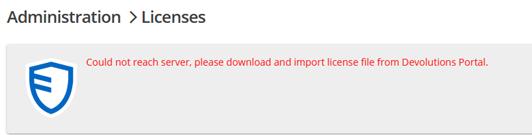
Firstly, DVLS licenses expired themselves and could not reactivate. I had to download keys manually from the portal. Apparently the fix is to enable internet access in Admin -> Server -> Features. Not sure what else this opens up. Licensing checks should be excluded from this setting in my opinion.
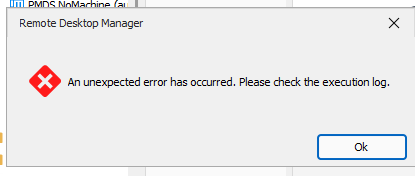
Secondly, no user could generate OTP anymore. I managed to track this down to the security permission "View Password" was disallowed. Our settings have always been to ALLOW View but DISALLOW password, so I assume there's been a security change in the upgrade so that "View Password" is a requirement permission now for OTP but wasn't before. I can't find this mentioned in release notes, so assume a bug.
Thirdly, none of our users can now connect to any customer sites. When they double click on a server and select the credentials it will not work unless this permission is changed to ALLOW. However we don't want our users to be able to view the password, only to be able to connect with it. This is a deal breaker. We cannot do this so had to roll back. I don't see anything in the release notes about this change either, so assume a bug.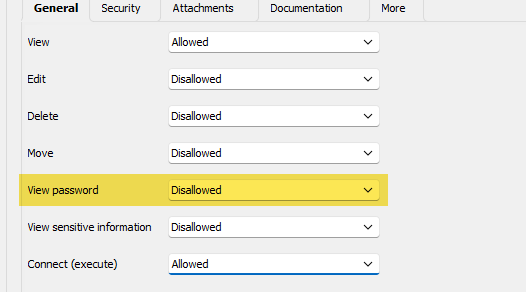
We have had to roll back.
b2024907-ed58-4081-840d-b23f72bbe3d3.png
63f35bec-efca-48b2-bf0b-a5e1248fa43d.png
90460518-4738-4f20-aa80-21438ae3a5ba.png
Hello,
I'm sorry to hear that and sorry for the inconvenience. Could you tell me which version of RDM did you install with DVLS 2024.2.6.0 ?
Best regards,
François Dubois
We are using 2024.2.13.0 64-bit
Hello,
For you second issue (OTP), I believe it might be caused by the fact that we removed an extremely old legacy setting "Allow clipboard" which could only be seen on old entries that already had the setting activated.
If you wish to use the OTP you need to have either the "View password" or "Execute" permission. In your case, I would recommend using the Execute permission on your OTP entries if you wish to allow your users to view the OTP without granting the view password permission. If you do not have either of these permissions then RDM assumes your user should not have access to that OTP code.
On another note, there might be an issue unrelated to permissions if you receive an "unexpected error".
Would it be possible to go in Help -> Application logs and retrieve the logs related to the error you receive during your OTP. It could help us pinpoint your issue as we cannot reproduce it.
For your third issue, we also cannot reproduce it. Can you describe what you mean by "it will not work"? Does it simply not start or does it start but fails to login? On which entry types does this issue happen?
To make it easier for us to fix this issue for you, would it be possible for you to provide us with an export of an entry which you cannot open anymore. Please make sure to remove any sensitive information before sending it to us.
Best Regards,
Michaël Beaudin
No problems adding the view password permission to OTP - we will do this - although the removal of this setting wasn't mentioned anywhere in the release notes otherwise we would have made the change prior to upgrade.
I can't get the logs for the third problem as we had to roll back the upgrade as no user could connect or access clients.
For our setup, we have RDP session credentials set as "Linked Vault" / "Prompt on Connection" and then specify which folder to look in for the list of credentials.
Users were able to open the RDP session and select the credentials fine, but the credentials were not being passed through to the RDP session login so they were then prompted for the username/password to log in to the session. I have sent a video to support.
Hello,
I've been trying to reproduce your issue, but no luck so far. I believe it might be another side effect of the removal of the legacy "Allow clipboard" setting mentioned by Michael.
Before we go further with the investigation, could you please confirm that the affected users/user groups have the execute permission on the credential?
Regards
Jonathan Del Signore
Yes. All users have "View" and "Connect (execute)" permissions but have no other permissions to the credential. Users can execute the permission, but RDMS is not passing the credentials through to the server they are connecting to. I would assume this has something to do with the allow clipboard setting you have removed.
If I change "View Password" to allow, users can connect again and the password is passed through. However I obviously don't want to do this as it allows staff to view the credentials for the server and we don't want that.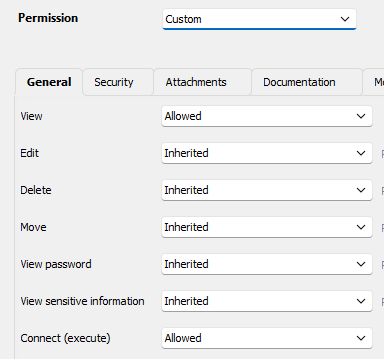
c178b0f6-4886-4ce9-8504-d3576961fa7e.png
Hello,
Thank you for the additional information. This is not an intended behavior, but for now, we cannot reproduce your issue. There are a few things I would like to explore further.
- Do you reproduce the issue if you create a new RDP and Credential entry from scratch without using a template and then try to connect using those?
- Do you use any "special" settings configured on your entries like time-based access, temporary access, check outs, etc?
- Do you remember enabling or disabling any "System settings" that would interact with how entries are executed or passwords handled?
Best Regards,
Michaël Beaudin
- I can't reproduce any issues as we had to roll back DVLS to 2024.1.12.0 otherwise none of our staff could use RDMS or access any client sites - our whole company was effectively dead in the water as RDMS is arguably more important than e-mail to us. We currently have a version mismatch and everyone has RDMS in read-only mode pending a resolution to this issue
- Nope, we have none of this in play
- No, we didn't change any system settings
Everything worked on RDMS 2024.1.32.0 with DVLS 2024.1.12.0
Everything also works on RDMS 2024.2.14.0 with DVLS 2024.1.12.0
So something changed between DVLS 2024.1.12.0 and DVLS 2024.2.6.0 that caused this problem. I'm assuming the undocumented removal of the legacy copy clipboard setting caused this problem and prevents the credentials being passed through to the server. I can't tell you why though.
Hi
I think that I've been able to reproduce your issue.
I'm currently investigating what could have happened.
I'll let you know when I have a fix for you.
Best regards
Marc-Andre Bouchard
This is great news. We're stuck in a read-only mismatch at the moment.
We seem to have everything setup differently to everyone else, so finding the root cause of issues is always a challenge :)
Any updates here? We're still in mismatch mode which means that users can't view log files which is causing some issues. I'm not overly sure why entry logs can't be viewed in mismatch mode. Viewing anything should be possible without causing an issue, even if there's a mismatch.
Hello,
You should not have any more mismatch issues starting from the next version of RDM (2024.2.17.0) as the prompt will be removed.
Best Regards,
Michaël Beaudin
Hello,
I have talked more with the DVLS team and they will have a potential fix for the view password issue in the version 2024.2.9.0 of DVLS which should be released in the following days.
Please let us know if the issue persists after updating to that version.
Best Regards,
Michaël Beaudin
Excellent news - thanks for the update.
Hello Stuart,
DVLS version 2024.2.9 is now available.
Once updated, let us know that RDM works without being blocked in read-only mode.
Best regards,
Érica Poirier
Thanks Erica, this has fixed the problem.
What a relief - thank you.