unable to connect over Devolutions Gateway - License Error?

Hello everyone,
Since the update to 2024.2.3 of our Devolutions Server Cluster, we have had problems with the licences.
The licences are still valid until 01.07.2024. For Devolutions Server Enterprise as well as for our two Devolutions Gateway. For the Gateway, one licence is valid until 2025, the other expires on 01.07.24.
However, new licences have already been ordered via the customer's ordering system.
For the RemoteDesktopManager licences, one licence bundle expires on 01.07.24 and others are still valid until 2025.
When I log in from my RemoteDesktopManager for Mac, I receive a message after successfully logging in that I do not have an Enterprise licence.
However, according to the Devolutions Server WebUI, I definitely have a licence assigned to me. The same applies to users who log in with their RDM from their client.
After refreshing the connection to the Devolutions Server several times, the licence is also available and I can work.
But when I open a connection to the target via the Devolutions Gateway, I get the message that it is not possible to establish a connection to the Devolutions Gateway. "To initiate a remote session, the user must have a valid licence for Devolutions Gateway".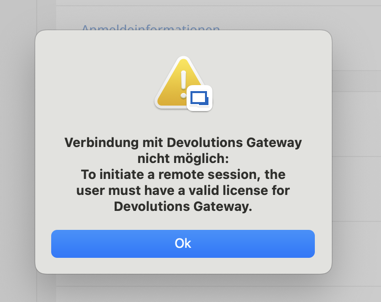
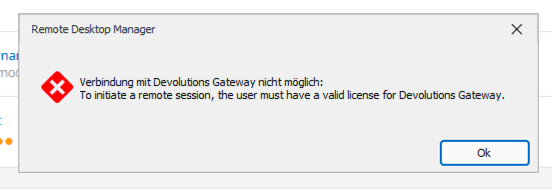
But it is not possible to assign a licence to a user in the stored licences. Only the newly added "Devolutions Gateway (Free)" licence can be assigned to a User.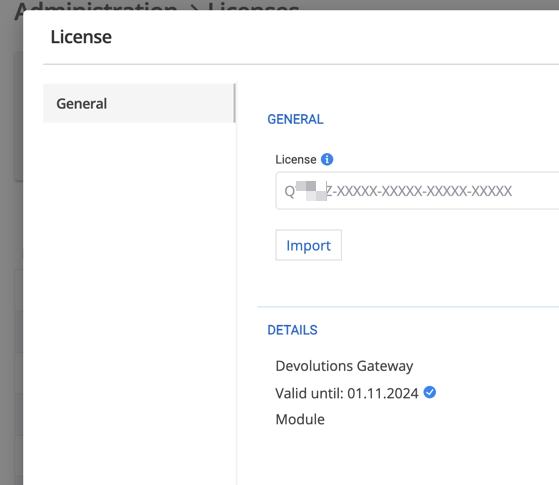
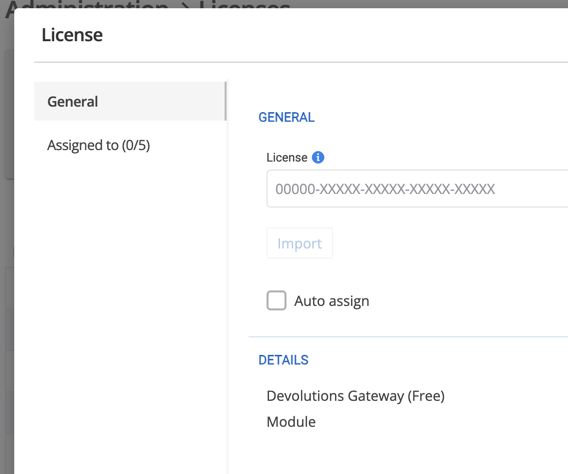
With Devolutions Server 2024.1, a capacity was still displayed for the Gateway licences. Since 2024.2, this capacity is no longer available. A capacity is only displayed for the "Devolutions Gateway (Free)" licence.
In version 2024.1, we have assigned the Devolutions Gateway licence to the respective gateways. Both gateways are located in a gateway farm. Unfortunately, it is currently not possible to assign the licences.
Error:
GatewayUserUnlicensedException - To initiate a remote session, the user must have a valid license for Devolutions Gateway. at Devolutions.Server.Managers.License.Section.GatewayLicenseManager.GetLicense(ISessionContext context) at Devolutions.Server.Managers.Gateway.GatewayManager.ValidateGatewayLicense() at Devolutions.Server.Managers.Gateway.GatewayManager.GetGatewayInstance(Gateway gateway, Boolean validateGatewayUserLicense) at Devolutions.Server.Managers.Gateway.GatewayManager.GenerateToken(ConnectionInfoEntity connection, Nullable`1 tokenType, Gateway gateway, String alternateHost, ApplicationProtocols applicationProtocol) at Devolutions.Server.Managers.Gateway.DefaultGatewayManager.GenerateToken(ConnectionInfoEntity connection, Nullable`1 tokenType, Gateway gateway, String alternateHost, ApplicationProtocols applicationProtocol) at Devolutions.Server.Controllers.APIControllers.Gateway.GatewayApiController.GenerateToken(ConnectionInfoEntity connection, Nullable`1 tokenType, Gateway gateway, String alternateHost, ApplicationProtocols applicationProtocol) at Devolutions.Server.Controllers.APIControllers.Gateway.GatewayApiController.GetGatewayToken(Guid connectionId, String alternateHost, Nullable`1 tokenType) --- DevolutionsGateway
Source:
Devolutions.Server.Common
How can I continue working here as quickly as possible, as there are currently around 20 users working via the Devolutions Server every day.
I have also already opened a ticket via support.
Many thanks in advance
Alex
All Comments (1)
Hello Alex,
I'm sorry to hear that, I will try to help you with that issue. Starting with version 2024.2, Devolutions Gateway licenses are now assigned to users. If you have an "old" Devolutions Gateway licenses where you used to assign it to a Devolutions Gateway directly (and this is what you have from my understanding), all your users should have access to Gateways. It is normal that now, you can't assign them to your Gateway and you can't assign them to users. They are "legacy" license and they should allow all your users to use the Gateway. All new licenses will have to be assigned to users and only users with valid license assigned to them will be able to use Devolutions Gateway.
Could you try to refresh your RDM licenses and your Devolutions Gateway licenses here in the user interface ?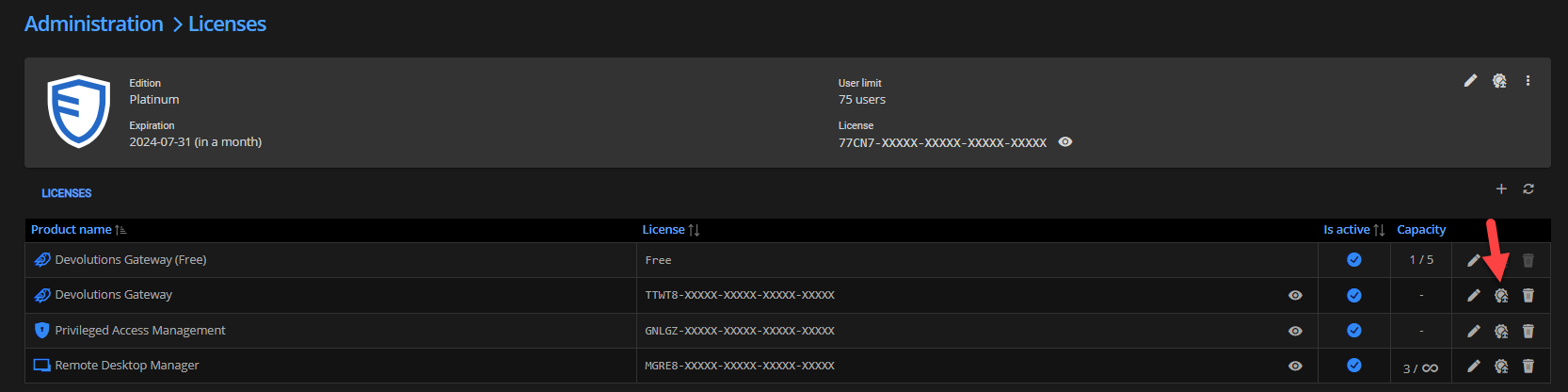
If the button is not available or if the refresh doesn't work, it means that your Devolutions Server can't reach our servers to validate licenses. If it is the case, you could import license files.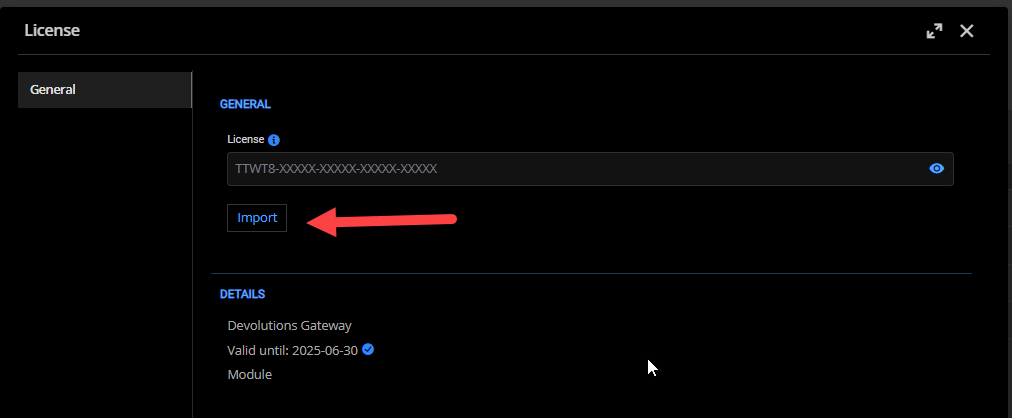
You can get the lic file by accessing your portal here : https://portal.devolutions.com/serials
But first, please try to refresh your license, if that works, it should fix your issue. Meanwhile, I will investigate why you are in a such situation, I'm not sure to understand why it happened. Sorry for inconvenience, please let me know if it fix your issue.
Best regards,
François Dubois
a99cfff1-8851-4492-8f06-834490e87203.png
f03ae857-5516-4a0a-947d-082b5181feba.png