User expiration
3 votes

Hi,
Could you allow us to set an expiration for users please?
It could even be better if we could do it based on user tag or groups.
Here is my use case:
I have to give access to our infrastructure to many MSP (managed service provider) but we don't want them to be able to connect without asking.
Their users are synchronized from Microsoft and we can't set an expiration in the Active Directory (since they need the account for other purposes).
As an example, if someone need access for one day I have to assign him a Launcher license then remind me to remove it the next day.
It would be more convenient to just set expiration date (with license removal eventually).
Thanks
All Comments (14)
Hello,
Thank you for your request. I'm taking note of your request. Having a way to add an expiration on a user could be useful, I agree.
Meanwhile, we have a feature calls "Conditional access policies". That feature allow you to define some rules to let users access or not to the system. That feature is available here : 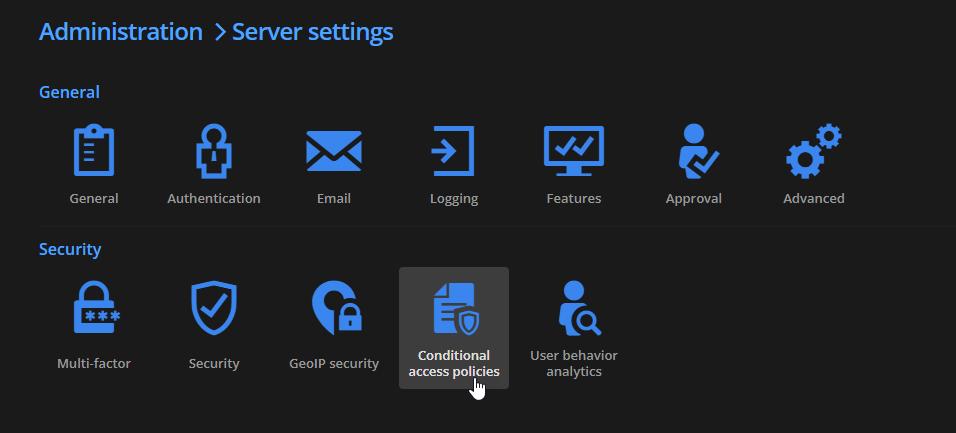
With that, you can configure rules based on different things: user tags, time, user groups, IPs, ... Here is an example of rule based on user tags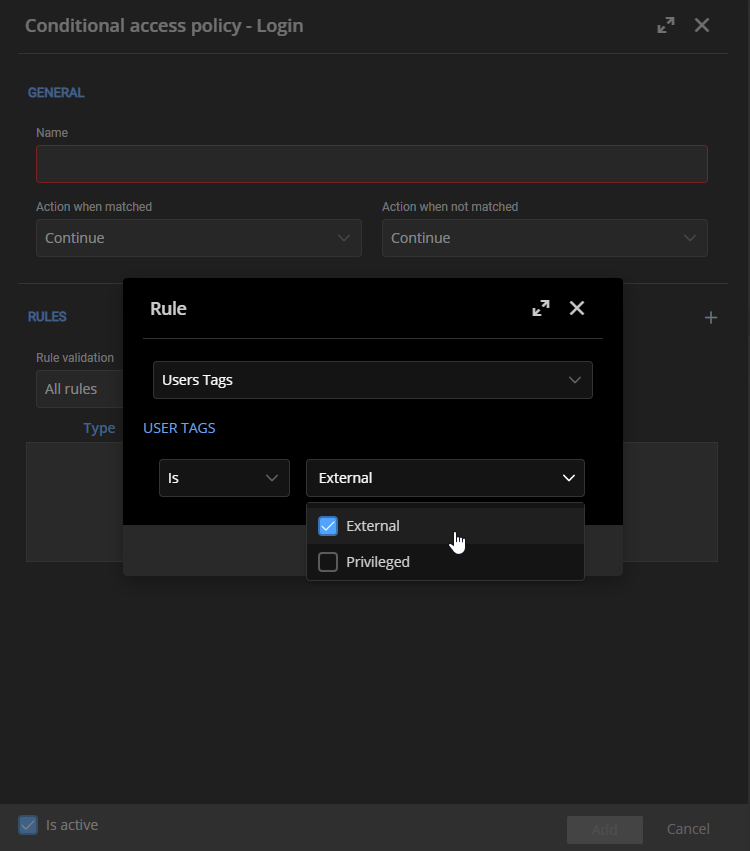
Based on policies created, the system will let your user access the system or will block the access. Let us know if it is something that could help you.
Best regards,
François Dubois
ea8ac415-f068-494a-b1d4-e3412afe628c.png
e0faddb5-de05-47b6-a11a-b61701ffafea.png
Hi and thanks for your answer,
It's not fitting our needs unfortunately...
Hello,
Thank you for your answer. Could you elaborate more why it doesn't fit your needs ? Of course, being able to set an expiration directly on a user would be easier, but is it because it is too hard to configure or it doesn't fit your need at all ? Don't hesitate to elaborate more on that, it will help us to be sure to fit your needs once we work on something.
Best regards,
François Dubois
Hi François,
It's more because it doesn't fit my needs at all.
Perhaps I missed something but I can't use rules to block access to someone after X days automatically.
And we need also to be able to delegate this right because we wan't to keep administrative rights to a fewest people as possible.
Actually we delegate users and licensing rights to our level 2 team so they can activate/deactivate users account without having the key of the whole kingdom.
Best regards
Hello,
Oh, you are right. We can't specify a date. The time rule allow you to specify days/hours, but not a specific date. Now I understand your point. Thank you for your reply. And I also understand your point about the rights, I understand that, we don't want to give administrative rights to many people of course. I keep that in mind and will se what could be done to improve that.
Best regards,
François Dubois
Hello,
Is there any news on this request please?
I noticed I didn't explain the main point of my request... We have to give access to external providers to our infrastructure from time to time.
We would like to activate their account and set an expiration/disable date so our support doesn't have to do it manually at the due date.
It could reduce their worktime for this and improve the security by reducing the risks of mistake.
Hello,
Unfortunately, it is not planned yet. I can't promise, but I will check if it would be possible to accommodate that request in our next major release since it should not be too difficult. Do you need only an expiration date when the user would be disabled, or would you like an interval during which the user would be enabled?
Best regards,
François Dubois
Hi François,
Both options could work for us but being able to set an interval would probably suit more Devolutions customers.
If you go that route I suggest the start date stay an option because you don't always need to configure it.
But from our need perspective, we prefer the fastest you could implement.
Best regards
Hello,
Thank you for your answer. It is clear. I will see what is possible and post back here once we have an update.
Best regards,
François Dubois
Hi,
We are one year later... is this request will be on the roadmap for 2026?
This is really needed in our company to deal with all the consultant we hire for specific job, without the expiration we have to do the job two time for every request.
Best regards
Arnaud
Hello Arnaud,
Thank you for following up, and sorry for the wait!
I have good news: we recently introduced a Contractor user type in Devolutions Server, which natively supports an expiration date. This is a great fit for your use case with external consultants and MSPs who need temporary access. 
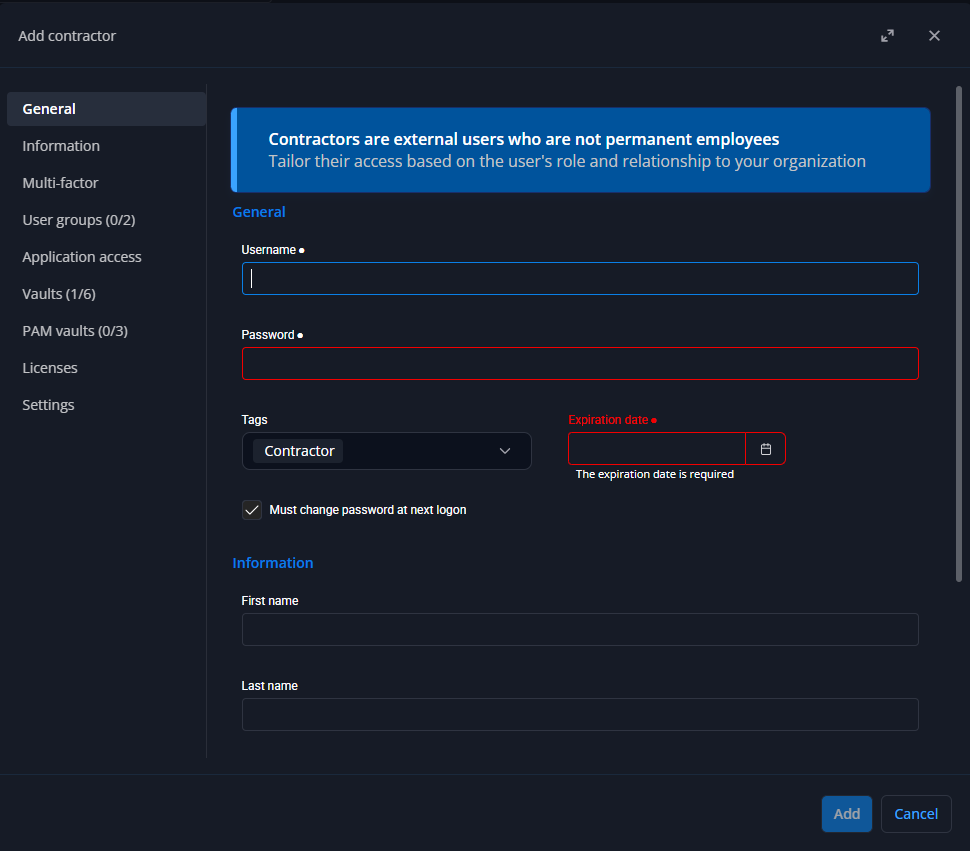
This was intentionally our first step toward broader user expiration support. Our goal in the short term is to extend this capability to all user types, not just contractors.
We'll keep you posted here as we make progress on that.
Best regards,
François Dubois
965186d8-199b-4ec1-ba50-e4a088332042.png
7c72d1cd-9562-41dc-8f82-697ba50c12c8.png
Hi,
The new contractor users are local. This will not work for us because they need a user account in our Active Directory, and they're synchronized to DVLS.
We also use Active Directory groups to manage permissions and we can't add a local account to these groups.
Maybe this will help others, but in our this doesn't help us at all unfortunately...
I also see you implemented a contractor tag, but what's the difference with external?
f0dda6ff-fc8b-4a22-9c85-3750e4693c98.png
Hi Arnaud,
Thank you for your continued patience on this request.
Regarding your question about the Contractor tag: you are correct that it was recently added, but it is specifically designed for users of type Contractor (a Devolutions user type), so it is not an adapted solution if your users are Active Directory users.
As for the difference between the External and Contractor tags, the distinction is subtle. The Contractor tag is intended only for users of the Contractor type and serves mainly as an informational indicator. A small bug currently allows it to be applied to any user, but this will be corrected in an upcoming release. The External tag, on the other hand, is the appropriate one to use in situations like yours, where users are of a different type (such as AD-synchronized accounts).
As for the user expiration feature itself, we don't have an ETA at this time, but we should be able to add it to all user types in the short term.
Best regards,
François Dubois
Hi,
Thanks for your reply. I hope this improvement will happen soon.