E-mail notification on Entry Expiration
0 vote

Hello Devolutions,
It would be beneficial to receive an email notification for entries that are about to expire, such as Entry ID secrets or Certificates.
I look forward to seeing this feature implemented in the near future.
best regards,
Chris
All Comments (14)
Hello Chris,
Thank you for your request. It is something that we would like to improve, I'm noting your request. Meanwhile, we have a report called "Expired entry list" that will list you entries expired or that will expire in X days
You can create a scheduled report once a week to get the information in your mail box.
Let me know if that help in the meantime.
Best regards,
François Dubois
7e550ba3-053a-4403-bb78-233cd3d12785.png
Hi François
I can't find the report that you are referring to. Can you guide me in the right direction?
best regards,
Chris
Hello Chris,
I made a mistake, I'm sorry. I thought it was a thread in Devolutions Server, but you posted in Hub Business' Forum. What I pasted is a report that we have in our product Devolutions Server. That product is very similar to Hub, except that it is self-hosted. We don't have all the same features, unfortunately, and I don't think that report exists for Hub Business. I will keep track of your request and see if it is something that could be done.
Best regards,
François Dubois
okay, thanks for the info.
I am looking forward to the inclusion of the new feature in the Hub Business platform. Which is hopefully some. :-)
Hi,
I wanted to support a-cjlin's request. I get this question a lot if there is a way to receive a mail or any notification when an entry is about to expire.
Preferably the system can send a notification to the vault owner and not only to the admin as we have over 1300 vaults with different people managing them.
Meanwhile I got the request today if it is possible to get the expiry dates via an API or PowerShell. Is there such an option available now?
Kr
Hello @a-cljn & @irisms,
Thank you for your request. This is not the first time we've been asked about this feature. Unfortunately, from what I know, it is not on our work priorities until 2025. I would have to confirm with my Product Owner, but he's on vacation this week.
In the meantime, using our PowerShell Module could potentially be a good short-term solution for you. I'll investigate the feasibility and get back to you shortly with an PowerShell Script for your specific needs.
Best regards,
Maxime Forest
@Maxime,
any update on the PowerShell Script?
Kr
Iris
Hello Iris,
One of our developer is currently working on the PowerShell script today. We will provide you with an update as soon as it is ready.
Best regards,
Maxime Forest
Hi to both of you,
Sorry for the delay in providing this script. Here's an example of a PowerShell script (refer to my attachment) that will extract information about expired entries in each vault that your Application Identity has access to.
Three variables need to be set for the script to work.
$appSecret = ""
$appKey = ""
$hubUrl = "YOUR_HUB_URL"
Step 1 - Creating an Application Identity:
KB: https://docs.devolutions.net/hub/web-interface/administration/management/application-users/manage-application-users/#create-an-application-identity
Step 2 - Give your newly created Application Identity access to vaults
It's the same as when you assign permissions to a user or a group. You can either assign it using System-wide permissions or to specific vaults. You can also add the Application Identity to a Group which will inherit the group's permissions.
Hope this serves you well. If you have any questions or if something isn't working, let me know.
Best regards,
Maxime Forest
expired-entry-hub-business.ps1
Hello,
With the latest 2025.1 version, it is now possible to generate reports for expired entries. Our new self-hosted service is required to access these reports. Please visit the following link to learn more: Scheduled reports - Devolutions Documentation
Have a great day!
Maxime Morin
Thanks, that could already help us out!
But what we're really looking for is a scheduled report or notification on vault level.
We do have different vault owners and it is basically up to them to check whether their vaults do not have any expired or exposed credentials.
And it would be too time consuming for the administrator to check all our 2000 vaults. So, it would be great of the report could be set on vault level and then send to the vault owner(s).
Kr
Hi Iris,
If we were to offer the possibility to email vault owners instead of specific emails when configuring the schedule report, would that help? Let say something like a check box "Notify vault owners" instead of the X here.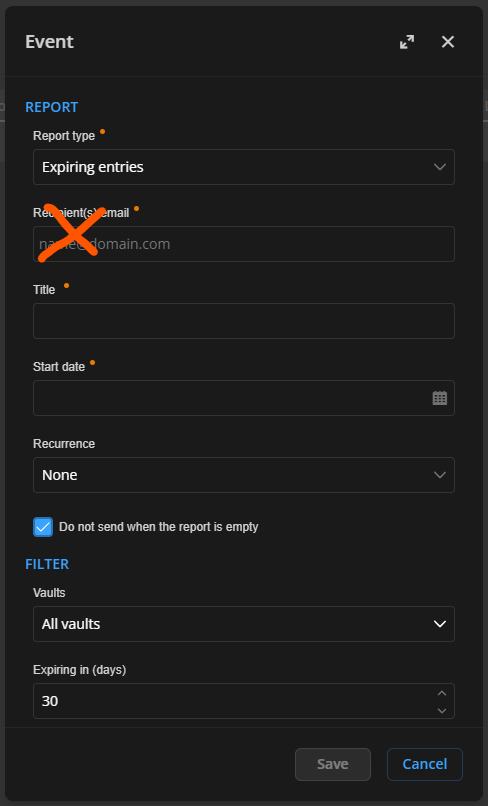
Have a good day!
Maxime Morin
361b34ed-e27f-4cab-b7c2-d2db71d20d10.png
Hi Maxime,
We're currently using "Custom" instead of "vault owner" as we don't want people to be able to export data.
For us, it would be ideal if we can use an AAD group (that's already synced to Hub). So if there is a change in ownership, then we don't have to adjust the report every tiem.
However the proposed solution could work for other companies I think. We just have a bit of a more specific setup.
Kr
Iris
Hi Iris,
Am I wrong in thinking that you would require a group per vault for the reports? In that case, if you have 2 000 vaults, it would have to be 2 000 reports with each report a specific group. That's why I originally suggested vault owners as those are linked to the vault itself, but if I'm not wrong, I think I understand the issue and I will ask the team for ideas on how to handle this.
Have a good day!
Maxime Morin