Pam Privileged Account - Heartbeat Failure

Dear all
We have a problem with some PAM accounts. We get the above message many times a day and the log entry says:
PSRemotingTransportException - Connecting to remote server 10.4.0.210 failed with the following error message : WinRM cannot process the request. The following error with errorcode 0x8009030d occurred while using Negotiate authentication: A specified logon session does not exist. It may already have been terminated.
Possible causes are:
-The user name or password specified are invalid.
-Kerberos is used when no authentication method and no user name are specified.
-Kerberos accepts domain user names, but not local user names.
-The Service Principal Name (SPN) for the remote computer name and port does not exist.
-The client and remote computers are in different domains and there is no trust between the two domains.
After checking for the above issues, try the following:
-Check the Event Viewer for events related to authentication.
-Change the authentication method; add the destination computer to the WinRM TrustedHosts configuration setting or use HTTPS transport.
Note that computers in the TrustedHosts list might not be authenticated.
-For more information about WinRM configuration, run the following command: winrm help config. For more information, see the about_Remote_Troubleshooting Help topic.
at System.Management.Automation.Runspaces.AsyncResult.EndInvoke()
at System.Management.Automation.Runspaces.Internal.RunspacePoolInternal.EndOpen(IAsyncResult asyncResult)
at System.Management.Automation.RemoteRunspace.Open()
at Devolutions.Server.Powershell.PowershellScriptRunner.TestRemoteConnection(PSRemotingCredential credential)
When I test the PAM accounts manually I can
- Check out and connect to server
- Check back in
- Change password in the PAM vault successfully (red attention triangle disappears)
- Connection test in "PAM Providers" is successful
- Scan fails
Looking forward reading from you
Kind regards
Urs
All Comments (5)
From what I can see, the problem occurs during the scan. Is this true, or does it happen with other actions too?
From what I understand, the error that you receive in large numbers in your logs originates from the scheduled heartbeat, which must run once a day.
These are two actions executed by the Scheduler Service. From what I see, the user running the service is unable to connect to the machine.
It would be necessary to check if the user who runs the service has the right to connect to the machine.
Let me know if you need more information.
Best regards
Marc-Andre Bouchard
Hi Marc-André
Thank you for your information. Ich checked the user and the different accunts and I don't think, that the service user is the problem. In your documentation it says, that the user must be able to connect to the DB and to read/write from the file system (Pre-deployment account survey - Devolutions Documentation). It would be impossible to set up as user, that allows connection to local servers (not in AD) from customers. Presently the service is running under "local service".
This corresponds to the fact, that the scheduler has no problems to connect to other local servers we set up in the system.
Kind regards
Urs
Hi Marc André
Any news on that issue?
Kind regards
Urs
Hello Urs,
We will continue this discussion in the created support case.
If there's relevant information for other customers, I will post back here with our findings.
Best regards,
Marc-Antoine Dubois
Marc-Antoine Dubois
Hello,
I'm adding the solution here in case someone else stumbles on this thread.
When you're using Windows User or Windows Local Accounts (Anyidentity) you must add the device name in front of the username in the PAM Provider configuration, like so: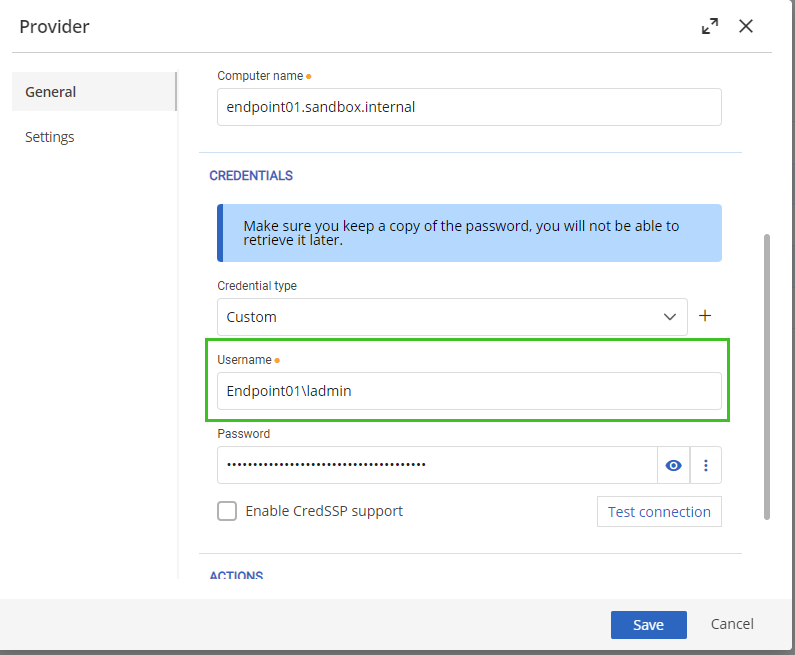
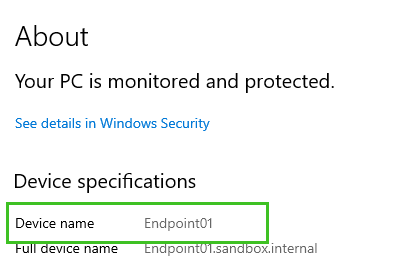
This is also documented here: https://docs.devolutions.net/pam/server/providers/windows-users-provider/
If you have any questions, don't hesitate to let us know.
Best regards,
Marc-Antoine Dubois
Marc-Antoine Dubois
b90b0503-9417-4880-82d8-fc9fb52f51e6.png
6f611ec2-1acb-4ef2-868e-4fde1797e87a.png