Sharing credentials between vaults
0 vote

I have a need to use the same credentials in two different vaults. There are hundreds of them. I don't really want to duplicate them all as this makes managing credential changes difficult. The system vault is probably the most suitable place, but it appear that it doesn't support credentials. I also can't see a way in the System Vault to lock entries down to only certain vaults. The "move to vault" function also doesn't let you move entries to the System Vault.
Just to complicate things, we use prompt on connection a specify the folder location, so we'd need to be able to select the system vault in here.
I'd be just as happy to create a vault JUST to store credentials rather than using the system vault, but the same restrictions/problems currently exist.
5f57f2db-f5af-4d96-8e1f-7dfd2999f3b8.png
All Comments (8)
Hello,
Thank you for your request. I understand your need. You're right, we don't support credentials in the current System Vault. But what we plan to do is to allow users to link an entry with credentials stored in a different vault. A such feature would be available only for Devolutions Server and not for RDM SQL Server but I'm assuming that you are using Devolutions Server, correct ? Let me know if it would work for you.
Meanwhile, as workaround, you could use Devolutions Server (Credentials) entry to point on credentials from a different vault. It is not perfect, but you could add this entry type in all vaults and keep the real credentials in a specific vaults. At least, if you have to change the password, you won't have to change it to many places.
Best regards,
François Dubois
Linking to a different vault would be fine. I like the idea of having a dedicated vault for passwords that other vaults can reference (maybe it's a new type of vault called Password Vault - similar to Infrastructure and System). We just need to be able to select that vault in the folder list for prompt on connection.
Need to think about how permissions would work in this instance. In an ideal world, you would want to be able to set the permissions for users on the credentials stored within the Password Vault but not actually have to give users permissions to the vault itself, so that way it can't be selected within RDM and viewed/accessed like a normal vault can.
Yes, we use DVLS.
Our setup is a little different to most I suspect. We have 5 passwords for every client, and certain RDMS user groups have access to different credentials which have different permissions on the destination server. We have it setup so when users double click on the session, it prompts them with a list of credentials they have access to and logs them in. For that reason, Devolutions Server credentials won't serve the purpose. We'll have to wait for the feature to become available.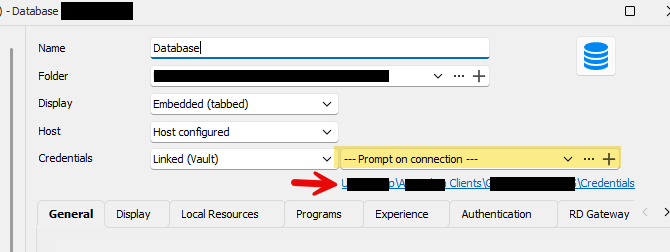
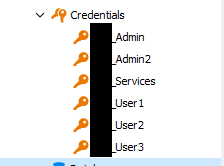
So that when a user connects, they select which credential to use: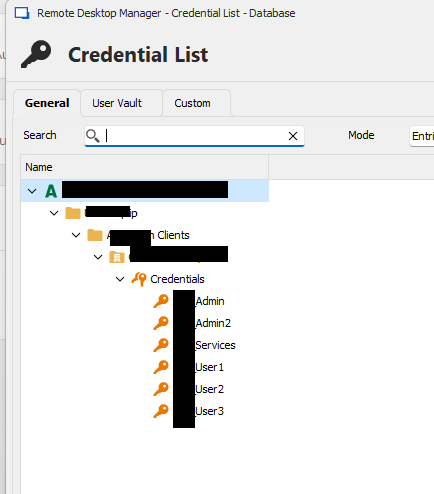
3d637450-98d6-410e-bcd7-73cac58ec58e.png
7ee06a16-bff2-407b-a998-6aa49c099a16.png
15bbfc5c-b3a2-45a7-b85a-b560787ac838.png
Hello,
We don't plan to add a new vault managed by the system itself. We plan to allow you to point on any vault. If you want to put all your passwords in the same vault, it would be possible and you will point on that vault. For your information, next major version, 2024.2 will allow user to set a content type to a vault. It will be possible to configure a vault to only contains credentials for example. It could be useful in your case.
And you're right, we will have to think about security and access to those passwords. It is a good point, we will analyze that and see what is the best way.
Best regards
François Dubois
Sounds great; thanks
Hello,
Thank you for your request. I understand your need. You're right, we don't support credentials in the current System Vault. But what we plan to do is to allow users to link an entry with credentials stored in a different vault. A such feature would be available only for Devolutions Server and not for RDM SQL Server but I'm assuming that you are using Devolutions Server, correct ? Let me know if it would work for you.
Meanwhile, as workaround, you could use Devolutions Server (Credentials) entry to point on credentials from a different vault. It is not perfect, but you could add this entry type in all vaults and keep the real credentials in a specific vaults. At least, if you have to change the password, you won't have to change it to many places.
Best regards,
So because I don't have Devolutions Server, I can't share passwords across vaults? and we still don't have an option for storing credentials in the system vault?
Is the only option to store them in the same vault as they are used? so i would need to create the credential multiple times if I have need to use them in more than one vault?
Hello,
If you are using RDM with SQL Server, version 2025.2 will allow you to link to an external vault. It will be possible to save all your credentials in a vault and link any session with creds from that vault. Version 2025.2 BETA is already available (https://forum.devolutions.net/topics/44761/remote-desktop-manager-20252--beta). The release version should be later this week.
If you are using Devolutions Server, it will be available in the next major version, 2025.3, which will be available in a few months.
Best regards
François Dubois
This is terrific news, thanks for the update.
Can we point to the other vault in prompt on connection?
Also how will permissions work? Can the user execute using credentials if they have access to those credentials only, or do they need access to the entire password vault?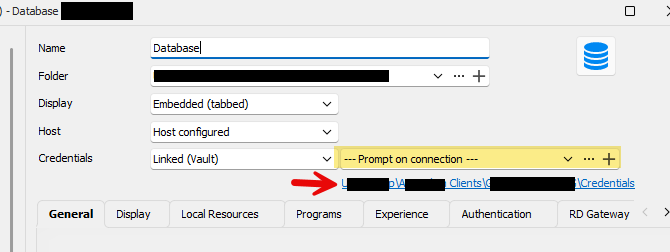
IMG_9834.png
Hello,
Yes, it will be possible to use "Prompt on Connection" and point to a different vault. Additionally, the linked credentials will be available if you have access to the vault and the entry linked. Yes, the user needs access to the entire password vault if they want to be able to link to it.
Let me know if this is not clear or if you have any other questions.
Best regards,
François Dubois