Add More .csv Options for Import and Export in DVLS
0 vote

In RDM, there are options to export an entire folder tree as a .csv file. We have some users who through RDM can import that .csv directly into Devolutions to create the same vault or folder entry tree as it shows in RDM. There are other users in our company who only use DVLS and do not use RDM, who also don't want to purchase RDM licensing only for this direct import feature. They have mentioned they would like the same capability to be added to DVLS to import an entire folder tree or vault entry as a .csv file. Currently, the only export option on a folder in DVLS is to export as a .rdm file. The only import option for .csv is to import as a Google .csv. While the Google .csv imports things similarly, the credential records are imported as a website type instead of a credential entry. It would be great for DVLS to have the ability to import as a .csv the same way that RDM allows it to add another option for import for DVLS. I should mention that using the .csv import 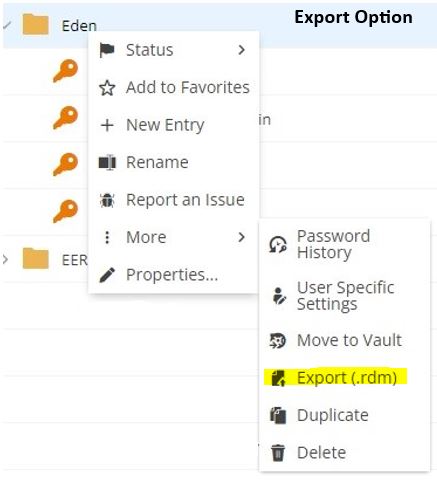
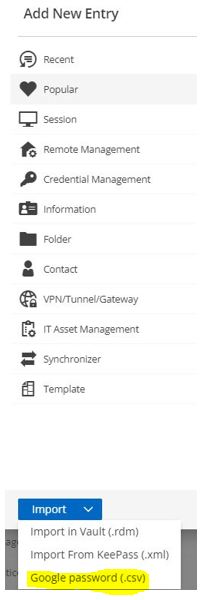
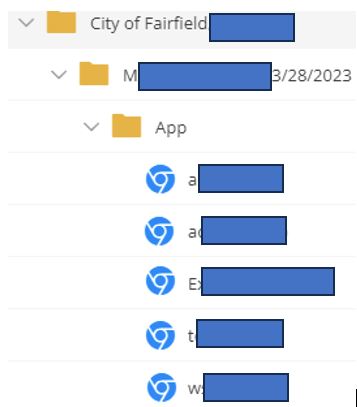 would be primarily for creating credential records in bulk as some customer passwords we keep can be around 50-60 at a time, which is quite cumbersome to enter manually.
DVLSGoogleCSVResult.JPG
DVLSImportOptions.JPG
DVLSExportOptions.jpg
All Comments (5)
Hello,
Thank you for your request. You are right that RDM has more options to export/import. Could you elaborate on your goal when you are doing a such operation ? Could you send me screeshot on the export option used in RDM and the import option. Do you export the host list in csv or the vault itself ? I would be interested to know why .rdm export doesn't fill the need to export a folder and import it again to duplicate a folder somewhere else. Once I understand a bit more your goal, it will be a pleasure to plan improvements to help your users.
Best regards,
François Dubois
Hello Francois,
So what I'm discussing here is for users who do not have RDM as an option. I mentioned the option in RDM as an example. Basically, our users have a custom .csv file that they use for the import option. I'm just aware that RDM has an option to import a .csv file so that when it comes into DVLS via a setup integration from RDM to DVLS, the entries in the .csv file come through as credential records. For those users that do not have RDM, the only .csv option in DVLS is to import as a Google .csv, which turns those credential records into websites. While we can still store a username and password with this method, it's not ideal since the type of record is incorrect. While I am aware that RDM Free is an option, I've discussed this with the users who requested we reach out to DVLS and their main issue with having to add using RDM Free into the mix is that it creates another step of manually creating records in RDM and they don't like the possibility that someone could accidentally forget to clear out their RDM and leave confidential credentials in the program. So basically, what I'm requesting is an alternate .csv option for DVLS where it can import a .csv file with entries as credential entries instead of websites.
Hello,
Thank you for your answer. If I understand correctly, what you want is mainly a way to import a custom CSV file through DVLS Web Interface, am I correct ? You would like something similar to a Generic CSV Wizard available in RDM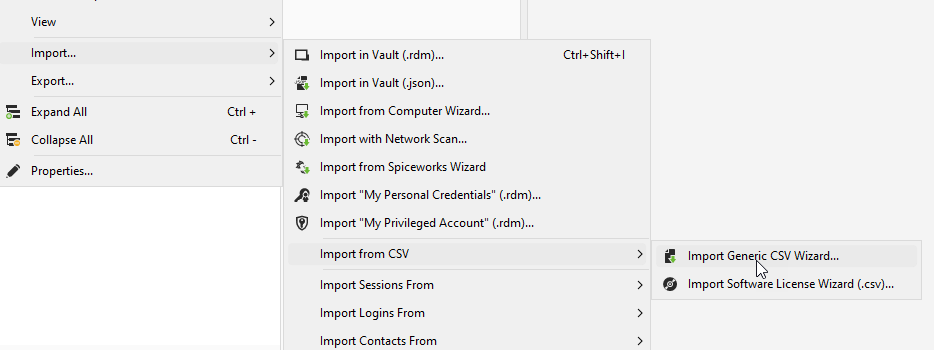
Exporting in csv is not required, but importing custom csv is what you are looking for, correct ?
Best regards,
François Dubois
bda81724-7c4f-4aea-ad16-14e49a8a592e.png
Correct, it would the importing of the csv that we are looking for. Since we know from a different user group that this method works when going through RDM to DVLS with the integration setup, it seems that it should be possible for our user group to do the same without RDM if this type of option were available directly in DVLS. The main goal is to be able to have the credential records in the csv imported as credential records correctly in DVLS.
Hello,
Thank you for clarification. I understand your need. This is not a product development that is currently planned. We’re taking note of your feedback and we will follow this topic to see if there's any additional interest or input from other users.
Best regards,
François Dubois