Unable to connect to RDP connections

Hi All,
Just updated to the newest version offered and got and issue with connecting to RDP connections: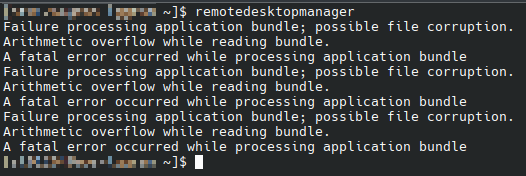
That was a connection attempt to 3 windows machines. ARD and SSH both work for other devices (mac pro and switches) so it just seems like something has gone bad for the RDP protocol. I have run th emost recent updates to endeavour OS (Arch) and the package I'm using is from the AUR site. I have rebuilt the package and reinstalled from scratch post a cleanup. Are you able to assist with rectifying the issue?
I would normally just rollback to a previous version and run that, but unfortunately last week I decided to clear the yay cache and all previous packages were deleted.
b3df7214-becb-4580-8742-07c572f00030.png
All Comments (7)
Hello scril,
Thank you for contacting us on that matter, we are currently not able to reproduce this issue. We will investigate and get back to you as soon as we can.
Regards,
Gabriel Dubois
Hi Gabriel,
Thanks for the response. Just an update. Enabled logging to the database on RDM and got the following. Not sure if it helps:
System.Exception: Failed to initialise RDP client
at Devolutions.NativeSessions.SandboxedRDPSession.Initialize()
at Client.Views.Controls.Sessions.RDPControl.InitializeSession()
Tried disabling sandboxing and I'm able to connect. Weird as this was the same workaround as was previously patched a few version ago for another issue.
Hi scril,
Thank you for these additional details, we are continuing to investigate the issue.
Regards,
Gabriel Dubois
Similar issue here:
remotedesktopmanager
(RemoteDesktopManager:27990): Gtk-CRITICAL **: 18:20:59.857: gtk_widget_grab_default: assertion 'gtk_widget_get_can_default (widget)' failed
Failure processing application bundle; possible file corruption.
Arithmetic overflow while reading bundle.
A fatal error occurred while processing application bundle
Hi iemmav,
Thank you for providing us with more information. We are actively working on resolving this issue and we are sorry for the inconvenience this might be causing.
In the meantime, we suggest you disable RDP Sandboxing by changing "Activate Sandboxing" to "No" in RDM's Settings. Running RDP without sandboxing should still work fine, so, as long as your RDP connections have sandboxing set to No or Default (as Default should follow the option set in Settings), you should still be able to use RDP.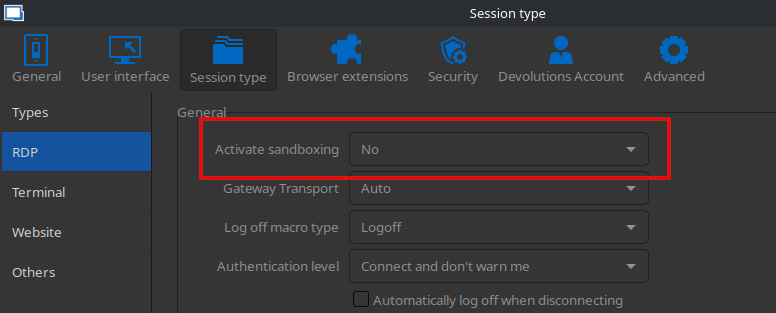
Again, we are very sorry for the inconvenience and we are hopeful that this will be resolved shortly.
Best regards.
Nicolas Parr
Sandboxing No.png
I confirm that now it's working. Thank you!
Hi Gabriel,
Just wanted to let you know that post installing the 2024.1.1.3 I have re-enabled sand-boxing and it appears to be working.
Thanks for the help.