How to create a SQL datasource with cutom login

Hi!
I want to create a datasource with a custom login. I have tried this:
$securePW = convertto-securestring "myDBPassword" -asplaintext -force
$ds = New-RDMDataSource -SQLServer -Database "myDatabase"  -Username "myDBuser" -Password $securePW  -Server "mySQLserver" -Name "myDS"
Set-RDMDataSourceProperty -DataSource $ds -Property "LoginMode" -Value "Custom"
Set-RDMDataSource -DataSource $ds
That seems working fine. No error.
But setting current datasource does not work:
get-rdmdatasource -Name "myDS" | Set-RDMCurrentDataSource
Login failed for user ''.
Login failed for user ''.
Login failed for user ''.
Login failed for user ''.
This also happen, if I set the username / password in the Set-RDMCurrentDataSource command.
In the RDM the datasource ist set up like this and working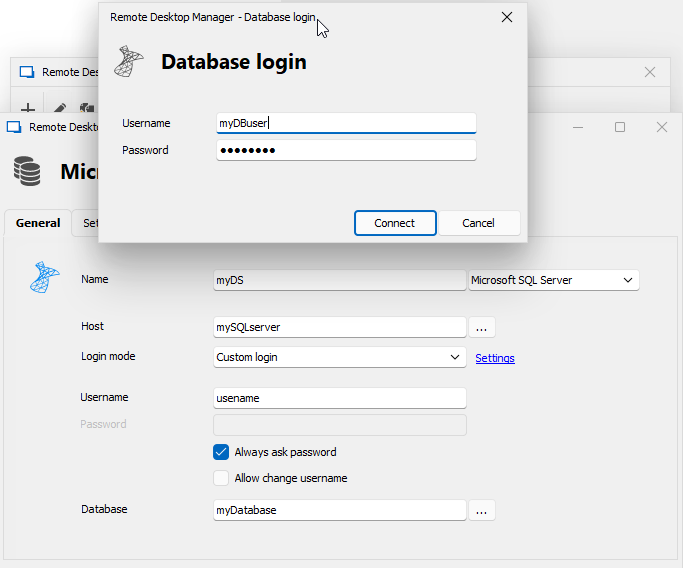
The RDM and the powershell does not share the configuration. I want / have to set up the datasource via the powershell.
I am using powershell 7.4.1, RDM V2023.2.32.0 and powershell module V2023.2.0.10
I can not upgrade RDM and/or powershell module for compatibility reasons.
CU,
Timo
80692a56-428a-4c90-b31d-47bcb5ec4e42.png
All Comments (1)
Hello,
To set the database user, you must set them in DBLoginPassword and DBLoginUserName.
So based on your example:
$ds = New-RDMDataSource -SQLServer -Database "myDatabase"  -Username "username" -DontSavePassword -Server "mySQLserver" -Name "myDS"
Set-RDMDataSourceProperty -DataSource $ds -Property "LoginMode" -Value "Custom"
Set-RDMDataSourceProperty -DataSource $ds -Property "DBLoginPassword" -Value "myDBPassword"
Set-RDMDataSourceProperty -DataSource $ds -Property "DBLoginUserName" -Value "myDBuser"
Set-RDMDataSource -DataSource $ds
Let us know if this solve your problem.
Best regards,
Maxime