Transferring the DPS.Console database from one virtualization to another.
Transferring the DPS.Console database from one virtualization to another.

Good afternoon. We use DPS Console 2019.1.20.0
Can you provide instructions on how to migrate a database to another virtual environment? We are going to install Windows Server 2022, we need to understand how to download the existing database.
I strictly ask you not to judge, I am just getting acquainted with this software solution.
I apologize if something is not clear, I am using a translator.
All Comments (1)
Hello,
If you are looking to migrate the whole Devolutions Server to a new Virtual Machine, you can follow our guide here: https://docs.devolutions.net/kb/devolutions-server/how-to-articles/create-server-staging-instance/
The page is called Create a Devolutions Server staging instance, but it works the same when migrating the whole server.
If you are looking to only move the database to a different server, you can take a backup of the database and restore it on the new server. You can then edit the Devolutions Server instance from the Devolutions Server Console to point it to the new SQL server:
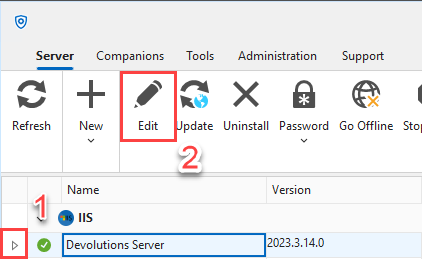
Make sure you selected the correct Devolutions Server instance
Click on the Edit button from the Server tab
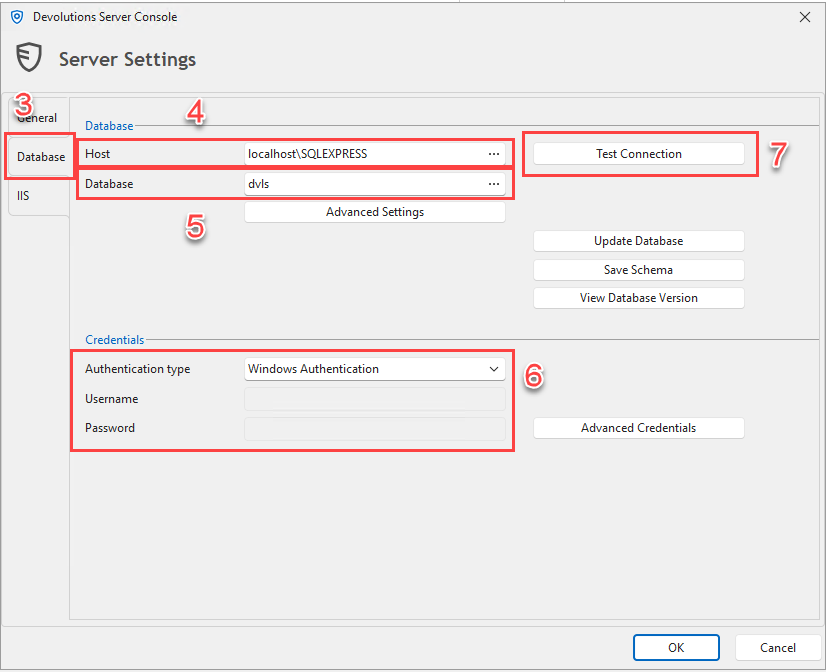
Go to the Database tab
Change the Host to the new SQL server
Make sure you entered the correct Database name
Verify the credentials
Test the connection
Best regards,