WARNING: Not allowed in limited mode

Running PS version 2023.2.0.9
DVLS 2023.2.9.0
I've got a script running in a loop and the first loop runs absolutely fine and updates the credentials fine.
However, for all the subsequent loops in this script it comes up saying "WARNING: Not allowed in limited mode"
Any ideas what might be causing DVLS to go in to limited mode after running through the loop the first time?
function doit($folderName) {
$folders = Get-RDMSession | Where-Object {($_.ConnectionType -eq "Group") -and ($_.Group -like ($folderName + "*"))}
foreach ($f in $folders)
{
# make sure we're not processing sub folders :
if ($f.Group -eq ($folderName + $f.Name))
{
write-host $f.group -foregroundcolor cyan
$thefolder = $f.group + "\Passwords"
$a = Get-RDMSession -Name "guest" -Group $thefolder -Type Credential
$otherPermissions = @()
# View Password Permission
$permission = New-Object Devolutions.RemoteDesktopManager.Business.ConnectionPermission
$permission.Right = "ViewPassword"
$permission.Override = "Everyone"
$otherPermissions += $permission
$a.Security.Permissions = $otherPermissions
Set-RDMSession -Session $a
write-host "guest updated"
}
}
}
All Comments (13)
Hello,
Usually, we get this error message when we are not using the proper PS module version and DVLS version, but you are using 2023.2.x for both.
What authentication type are you using in your script?
Let me check with the developer team, and I will keep you posted.
Best regards,
Érica Poirier
Using auth as follows.
The loop works for the first entry, but fails for the rest, so I'm assuming authentication is fine.
$dsname = "DVLS PowerShell"
$dsurl = xxxx
$appkey = xxxx
$appsecret = xxxx
$ds = New-RDMDataSource -DVLS -Name $dsname -Server $dsurl -ScriptingTenantID $appkey -ScriptingApplicationPassword $appsecret -SetDatasource -WarningAction SilentlyContinue
Set-RDMDataSource $ds
Set-RDMCurrentDataSource $ds
Hello,
Thank you for your feedback.
Does the Application have enough rights on those folders? It seems that for the first folder, it does, but not on the others!
Let us know if that's the case.
Best regards,
Érica Poirier
Yes, the application has global administrator rights. The permissions for all the folders are set to inherited - so are identical.
Hello,
Thank you for your feedback.
Our development team is currently investigating this issue.
Do you have any expired licenses in Administration - Licenses? Usually, the PowerShell module should not be impacted.
From your second post, it seems that you create the data source every time you run the script. Do you remove it at the end of the script as well?
Best regards,
Érica Poirier
Nope, no expired licenses - although we did renew our 3 year licenses a month ago so the licenses are all brand new - not sure if that is making a difference somehow? I can't see anywhere where the application is assigned a license.
No we don't create the data source everytime. My second post is a standalone script. We run that to connect, and then once it's finished we run the second script that has a loop.
Hello,
Thank you for your feedback.
Someone from the developer team is investigating your issue. Once we will get something, we will keep you posted.
Thank you for being so patient.
Best regards,
Érica Poirier
Hello,
I haven't successfully replicated the issue so far. It seems possible that the problem may be related to cache issues. To verify this, could you please execute the Update-RDMEntries command following the Set-RDMSession? This will refresh the cache, helping us confirm if this is indeed the issue.
Regards,
Maxime
Yep, that appears to have fixed it, albeit slowing the script down and it taking 2 hours to run in.
Still getting a couple of "WARNING: Not allowed in limited mode" errors - but only about 12 out of 300 odd so can do those ones manually.
Strangely, I went in to data sources in RDM and it has this - not sure if this provides a clue?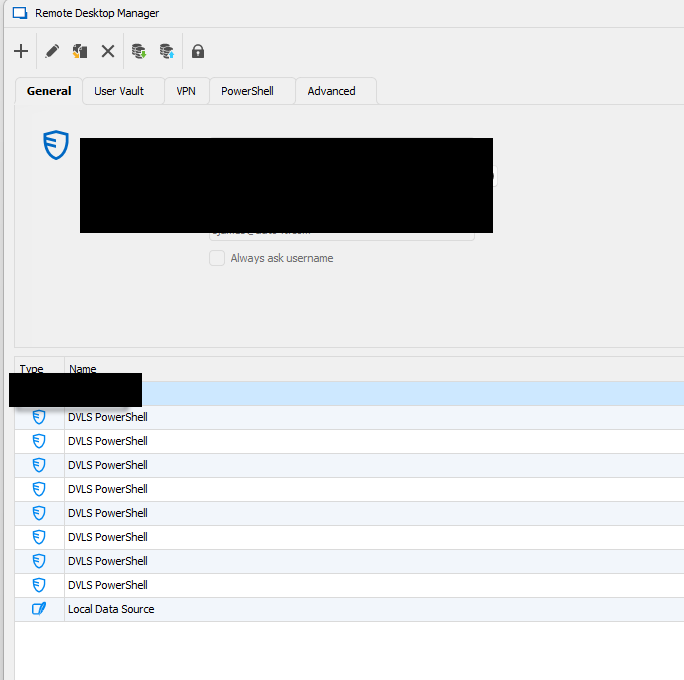
cde40913-bc86-439d-bfb9-6b9feaa872d9.png
Hello,
I noticed in your authentication script that the new data source is being saved twice. This happens first with the 'SetDataSource' parameter in the 'New-RDMDataSource' and again with the 'Set-RDMDataSource' call. You can remove those calls if you do not want to create a data source each time.
$ds = New-RDMDataSource -DVLS -Name $dsname -Server $dsurl -ScriptingTenantID $appkey -ScriptingApplicationPassword $appsecret -WarningAction SilentlyContinue

Set-RDMCurrentDataSource $ds
Additionally, I observed the use of the 'WarningAction' parameter. Could you please clarify which warning message this is suppressing?
Additionally, I'd like to know about the offline mode setting for the DVLS instance. You can find this information in the web UI under Administration -> System Settings -> User Template -> Offline Mode.
Regards,
Maxime
Happy to remove those two. And also the WarningAction parameter. That script was given to me by Devolutions some time ago.
Offline mode is set to read-only
Hello,
I haven't successfully replicated the issue so far. In the 2023.3.6 version of the module, we've upgraded the warning message to an error message, providing additional details within the target object to assist in pinpointing the issue. The target object is a string designed to narrow down the check that did not pass.
Regards,
Maxime