No copy/paste in ssh connection RDM Linux v2023.3.1.4

Copy/paste not working since upgrade to RDM 2023.3.1.4 (Ubuntu 22.04, upgrade from RDM 2023.3.0.8).
ps. After downgrade copy/paste is working
All Comments (15)
Hello,
Thank you for reporting the issue. I will open a case with the developers.
Best regards,
Richard Boisvert
Hello imraar,
We have just released a fixed for this issue, you can now download the 2023.3.1.6 version.
Please let us know if that solve your issue.
Regards,
Gabriel Dubois
I can confirm that version 2023.3.1.6 resolves the issue. Thanks.
Hi there,
I have the same issue with a remote ssh session to a Rocky Linux on RDM 2023.3.37.0 64-bit (Windows).
Hi Nicola,
i would like some, clarifications, are you using RDM on a windows machine connected to a Linux host or
are you on a Linux machine connecting to a windows host ?
Regards,
David Ringuet
Yes,
I'm connected from RDM on Windows 10 to a Rocky Linux SSH session and copy/paste doesn't work.
No problem if I use Windows ssh internal tool from command prompt/powershell.
Thanks.
Hello Nicola,
We'll create a ticket for this on the Windows side and keep you updated on the progress.
Best Regards,
Michaël Beaudin
We'll create a ticket for this on the Windows side and keep you updated on the progress.
Thanks, it's really annoying, as you can imagine.
Hi Nicola,
I will need precise information because I have been unable to reproduce your bug. How do you perform the copy/paste? Eg: are you using mouse buttons or keyboard shortcuts, which ones, is it from the shell or from a shell application like tmux, what is the setting of the "Mouse click mode" on the "Advanced" tab? Are you copying/pasting from the terminal to another windows app, or the reverse?
Thanks and best regards
Denis Vincent
Have to say, honestly, I'm not a bash/ssh/unix user so I was probably confused by Microsoft SSH implementation inside Windows Terminal as it supports CTRL+C and CTRL+V like standard Windows applications.
I understand now that RDM uses Putty as ssh application (at least, I suppose examining my default settings) and so I need to use mouse action interaction for clipboard.
If this is right, can be imaginable to improve RDM in the same way (at least on Windows)?
Moreover, the "paste" button on RDM toolbar doesn't work either.
Thanks for feedback.
Hi,
Shortcuts for copy/paste in a terminal are problematic because servers need those control characters for some functions. It's the case most notably for ctrl+c that is needed to end commands. Not all terminals use the same solution around this problem. In the Windows terminal, they catch ctrl+v for pasting, but let go ctrl+c to the server and perform an auto-copy at each selection. In RDM, we did follow putty's UI and use shift+ctrl+c and shift+ctrl+v, and perform auto-copy on selection as well. By default, you can also right click in the terminal and click the Paste item in the contextual menu, but this behaviour can be changed by the "Mouse click mode" option.
Changing anything to the copy/paste UI at this point is very touchy, as many of our users need the ctrl+v to be sent to the server for their normal operations.
Regards
Denis Vincent
All clear Denis,
I would suggest to hide "paste" button on toolbar then (as it doesn't work, for the same reason you explained).
Thanks.
Hello Nicola,
Do you mean the paste button located in the ribbon, in the home tab?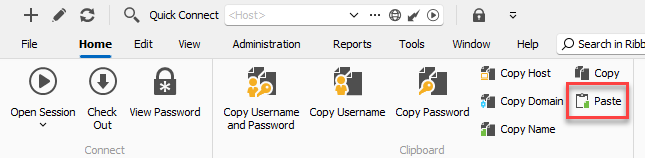
This paste button is linked to the "copy" button right above, which is meant to be used to copy entries. It's the same button as if you right click an entry > Clipboard > Paste. I've tested and it works as expected. This "home" tab is always visible whether the entry is opened or not.
There is also the Action tab which is only visible when the entry is opened, and these actions are directly affecting the entry:
Hopefully this can clear the confusion.
Regards,
Hubert Mireault
0284561b-ad62-43a0-a981-354cade43511.png
c95a4da3-76d4-443d-8deb-d019f8e6773c.png
Thanks Hubert,
so those are for copy/paste entries only. I highly suggest to:
- Rename labels adding "... entry" (f.e. "Copy entry").
- Make "Paste" active only if something to paste is actually available.
Thanks.
Thanks for the feedback, I've opened a ticket so we can clarify the behavior for these buttons.
Regards,
Hubert Mireault