Restrict JIT Privilege Elevation per PA / Efficient setting of PA Permissions
Restrict JIT Privilege Elevation per PA / Efficient setting of PA Permissions
0 vote

Hi
In order to mitigate Pass-The-Hash attacks in our customers Active Directories, we're generally implementing a Tier-Model in AD which divides an AD forest in 3 tiers (Tier 0, 1 and 2). (the Tier-Model is an architecture described by Microsoft in the following paper: https://www.microsoft.com/en-us/download/details.aspx?id=36036)
The model is intended to prevent an escalation of privilege path for an attacker using stolen credentials.
IT staff with responsibilities at multiple tiers will have separate administrative accounts created for each required tier. Any account that currently logs on to multiple tiers will be split into multiple accounts, each of which fits within only one tier definition. These accounts will also be required to have different passwords (in order to have different hashes in the background).
When using your PAM solution (JIT function) this leads to the requirement that a PA should be limited to which elevated role she/he can select when checking out the account (1:1 relation instead of 1:n).
Example:
| User            | Relation   | Elev. Role
---------------------------------------------------
| adm_tier0_usrx  | 1:1        | secgroup_tier0
| adm_tier1_usrx  | 1:1        | secgroup_tier1
| adm_tier2_usrx  | 1:1        | secgroup_tier2
In addition our customers require us to use personal, individual accounts.
Let's assume we have 20 customers and we have 10 employees and each employee has 3 (tier) accounts per customer.
This leads to 600 accounts on which we need to set the permissions within the PAM vault respectively on each PA within the vaults :-(
It would be great if there would be an efficient way to set permissions on multiple accounts (maybe rule-based?).
I hope I could explain the issues we see with your product and would love to see this improved in a future release!
Please don't hesitate to ask if something is not clear.
Regards,
Philipp
All Comments (8)
Hello Philipp,
Thank you for your request. We have a feature on our roadmap to limit roles that could be added during the checkout. For now, you can select all roles defined on the provider, but we plan to add a way to specify which roles can be used on an account. That will help you for sure. What we suggest today is to create different providers with different role list. You could create a provider for your tier0 with elevation role tier0 and same for tier1 and tier2. We know that it is not the best solution, but it is a workaround. But this developpment should be part of our next developpement cycle.
You also wrote that you would like an efficient way to set permissions. I would like to understand more your configuration. I understand that you have 600 accounts and you don't want to edit one by one to set permissions. But what we have already seen is a vault per employee so they have access to their vault, their account but not others. So you have only 10 vaults to manage permission instead of managing permission on the 600 accounts. In futur, we should be able to set permission on folder, so you could use folders in one vault, but it is not possible today. Let me know if it is something that would work for you.
Best regards,
François Dubois
Hello François,
Thanks a lot for your swift reply!
It sounds promising that you're working on a feature for role limitation.
Also your hint regarding the "PAM vault per user" concept sounds like a good idea. Is it possible to configure the user import task with the Devolutions PowerShell module (-> import user and assign it to its corresponding vault)? Because each of the mentioned 600 accounts would have to be assigned to its vault individually, right?
Best regards,
Philipp
Hello Philipp,
Sorry for the delay. I just looked and you could probably import all accounts for a user at the same moment and put them all in the same vault. Here is an example on all accounts from a provider. You could filter to get only account for a specific user. Then you can select them and import them. It will be possible to select the vault where you want to put those accounts. I hope it could help.
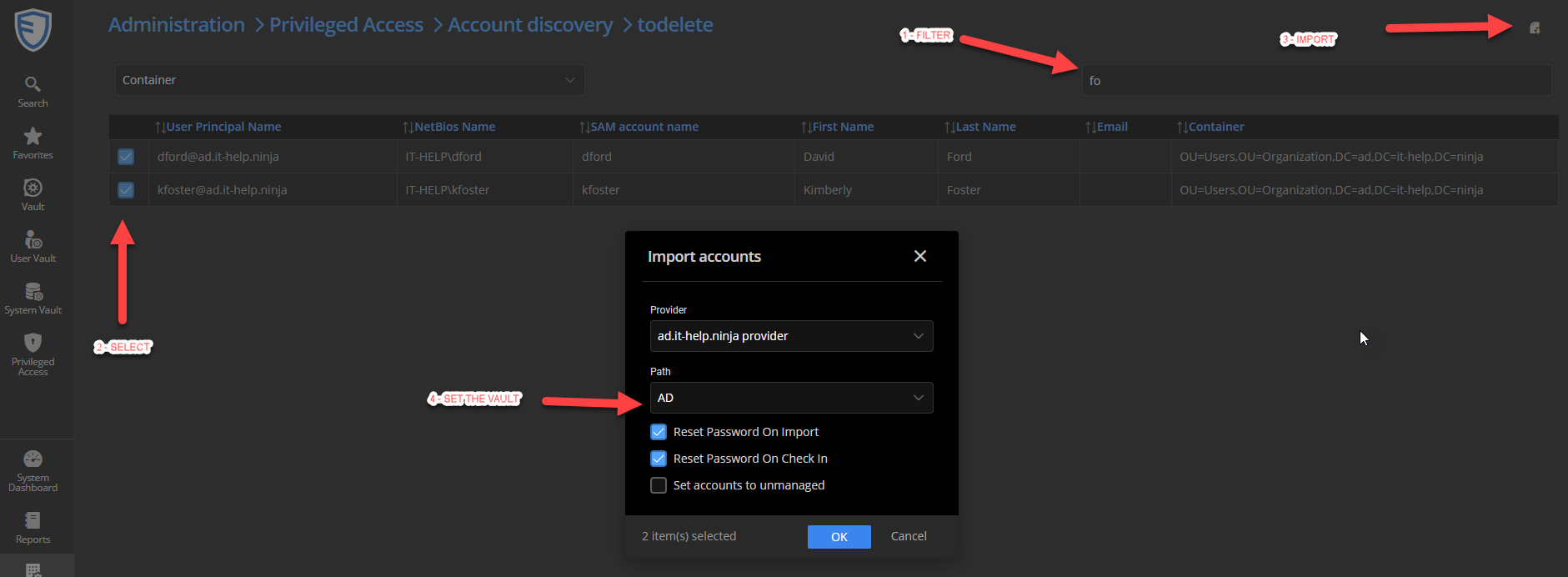
Meanwhile, I will have a look to our powershell module to see if it could be possible to do what you would like to do.
Best regards,
François Dubois
cc2ff4f0-d50b-4ce3-ba52-ce8bc3a7659a.png
Hello Philipp,
I just thought about that and you probably have many providers, one per customer I guess so what I suggested is probably not perfect since you will find 3 accounts (one per tier) per customer for a specific user. So it would be faster than 600 account to place one by one, but you will still have a lot to do.
But I just looked our powershell module. You should be able to useNew-DSPamAccount to add your account. To create an account, you will need the vault ID (folder ID), the provider ID that you can get with Get-DSPamFolders and Get-DSPamProviders So you should be able to create all your account in the right vault.
Don't hesitate if you have more questions
Best regards,
François Dubois
Hi François,
thanks a lot for your feedback and research. I'll try to create an efficient solution with the PS module.
Regarding the feature on the roadmap you mentioned for the role limitation: Can you approx. predict when this will be developed and/or released (is this a question of weeks, months or years...)?
Best regards,
Philipp
Hello Philipp,
We should work on that in our next developpment cycle that is planned to be released in June.
Best regards,
François Dubois
Hi François,
We have meanwhile started testing the PAM function with a trial license.
In a small concept, we have defined that each employee should have their "own" private PAM Vault, as you proposed above. Only the employee in question should be able to check the accounts in and out.
Unfortunately, we have not found how to exclude the Administrator accounts from accessing these private PAM Vaults. According the Dvls technician which supports us during the trial, it's currently not possible to deny access on PAM Vaults for other users and groups. In other words, users which are member of the Administrators groups, which we created, can access the PAM Vaults of other users and check-out/-in those "foreign" accounts (not so nice).
Would you consider this as another feature request?
Best regards,
Philipp
Hello Philipp,
Thank you for your feedback. You are correct, today, there is no way to exclude the Administrator accounts from accessing all PAM vaults. Even if you gave access only to one user, they are not "user vault" like we have for shared vault where all users have a user vault, only for them. In PAM vaults, they are all available by Administrators.
The solution to that will be covered in our work where we want to split the curent Administrator user in many roles/rights. Those users have all rights on all ressources and we would like to add granularity in right assignment to avoid to give all rights. But this feature requires lot of work and it is not planned short term. Meanwhile, I will have internal discussion to see if we could improve that in a different way with a smaller developpment. We could probably remove automatic access to all vaults by administrator, but it would not blocked an administrator to give the right to himself and access it after that. I don't see any solution for that, we will always have a user with enough right to get the right by himself. I have to discuss that internaly, but would it be ok for you ?
Best regards,
François Dubois