How to migrate with limited access to the source

Hi all,
we have a Devo Server on version 2021.1.20.0 running with entries in the default vault. The windows server we are running on needs to be replaced. Since this a old-IT-team legacy we don't have any way to access the server than through the URL https://server/dps.
We have installed the new server, it is up and running and now we need to migrate the date. Through the web we exported the fault to an RDM file, but we have no way to import this on the new server. I tried to connect to the new server with Remote Desktop Manager but I can't because of the errror below. Is there anyway for us to export and import the data to the new server?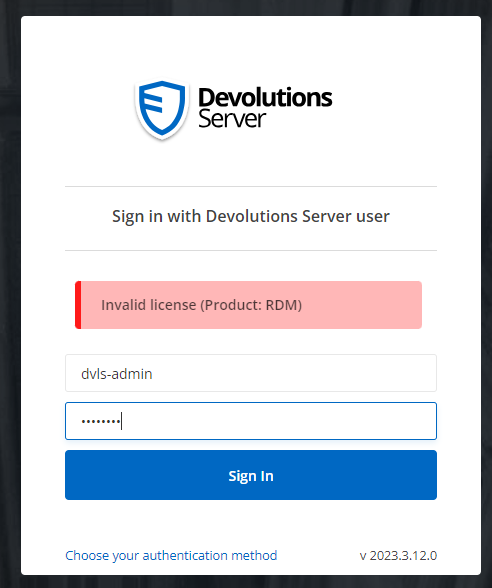
Screenshot 2023-12-15 140725.png
All Comments (5)
Hello,
From this error message, it seems that there is no RDM license added in Administration - Licenses and assigned to the user dvls-admin.
Could you assign an RDM license to this user and try again?
Best regards,
Érica Poirier
Hello,
From this error message, it seems that there is no RDM license added in Administration - Licenses and assigned to the user dvls-admin.
Could you assign an RDM license to this user and try again?
Best regards,
Sorry for the late reply, but I only have one license key. So I have no RDM license (it seems). Isn't there any other way to migrate the data?
King regards.
Hello,
If you connect directly to the DVLS web UI without using RDM, you should be able to import your entries on this new DVLS instance.
Let us know if that helps.
Best regards,
Érica Poirier
Hello,
If you connect directly to the DVLS web UI without using RDM, you should be able to import your entries on this new DVLS instance.
Let us know if that helps.
Best regards,
This is exactly what we try to do. We only ise the DVLS webbased. Is there a guid, or do you know where, this import feature is located? Because for some reason we cannot seem to find it.
Hello,
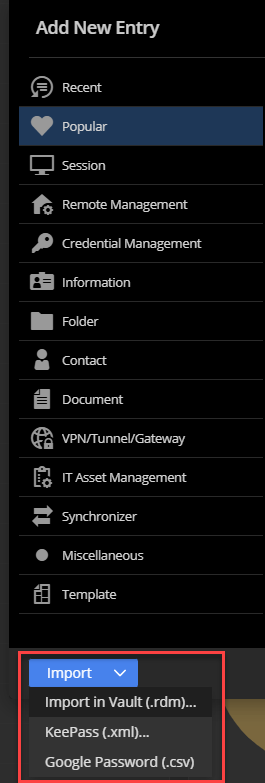
The import feature is found directly in the vault in the web interface. At the bottom, you have a green + sign to add entries. Once there, you can import entries: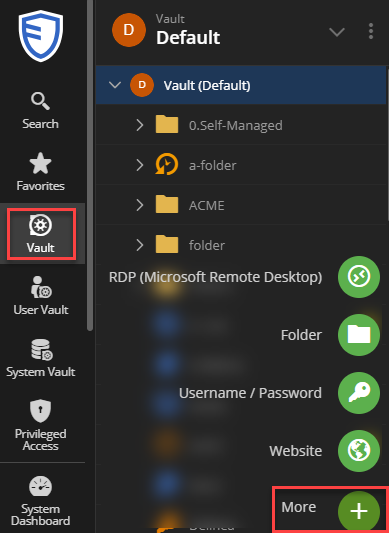
Best regards,
Richard Boisvert
019592c2-39a9-420f-b51c-fa07044b6903.png
c270581b-0736-45c6-9d31-7933e954ac31.png