Devolutions Gateway Port exhaustion

Hello Devolutions
We have a problem with our gateway that stops working at about 57 open sessions.
The problem is not that so many sessions are open at the same time, but that the sessions are never closed.
The problem is mainly with HTTPS, SSH and Tunnel Connections which are still open after several months.
The active sessions can only be closed one at a time, which takes a very long time as you have to wait approx. 3 seconds for each closing process.
Do you have a n solution for this problems?
Kind regards,
All Comments (8)
Hello,
Thank you for reporting this problem.
What DVLS version are you using?
What Gateway version are you using? You can get the information with the Diagnostics report on the DVLS web UI.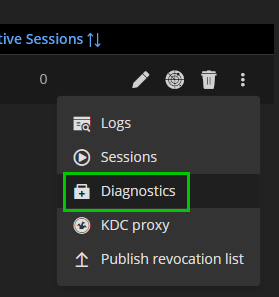
Have you tried restarting the Devolutions Gateway service? This should reset all opened sessions.
To prevent these sessions from staying alive longer than one day, you can enable the Automatically close session after parameter to 1440 minutes (24 hours) in the Administration - System Settings - Application Specific - Type Settings section in RDM. This is a global setting, and all users will be impacted automatically.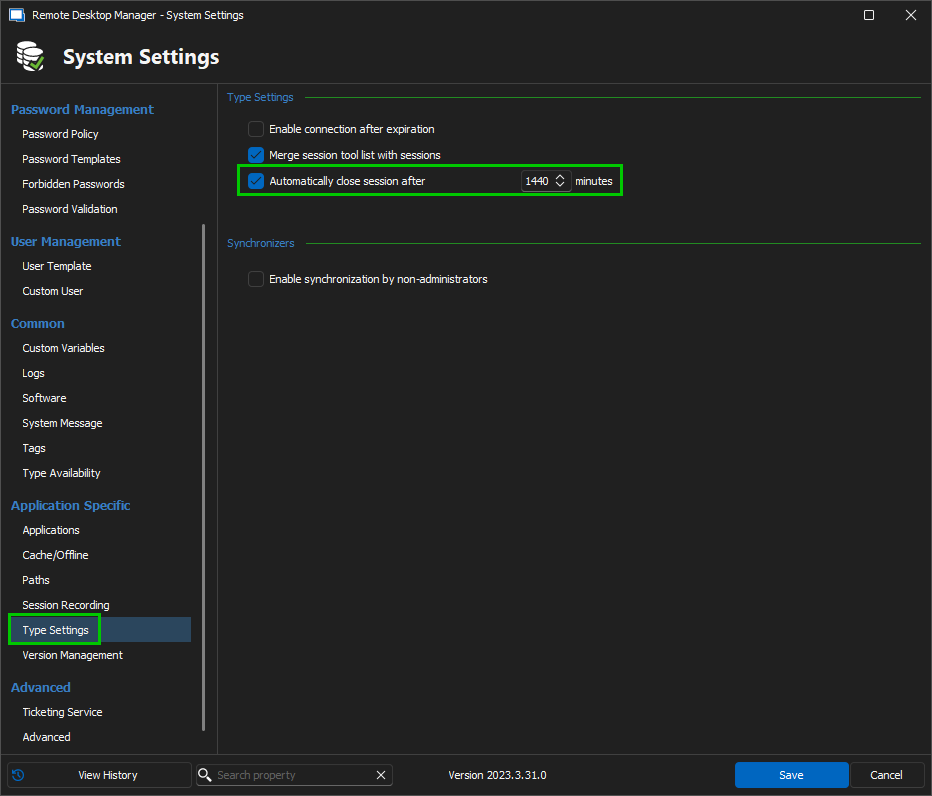
Best regards,
Érica Poirier
7186b9f1-df96-4d2c-b614-41fda248fdb8.png
609b80aa-7532-4fd2-9993-e9fc59f30bb8.png
Hi Erica
I changed the setting as you recommended but still got the same issue on my gateway.
As you can see in the screenshot those sessions are 7 days and older:
Another issue with the gateway is that sometimes there is a session launched by an Unkown User:
Kind regards,
7e45d90a-6462-47ea-8816-5b3bf875065d.png
6227207b-2181-4911-be5c-f676f2e4db78.png
Hello,
What DVLS version are you using?
What Gateway version are you using? You can get the information with the Diagnostics report on the DVLS web UI.
Best regards,
Érica Poirier
Hi Erica
DVLS: 2024.1.13.0
GW: 2024.1.6
RDM: 2024.1.32.0
Kind regards,
Hello,
We're analyzing the situation; we should be back shortly.
Best regards,
Alex Belisle
Hello,
The subject of the forum mentions Port exhaustion. Would it be possible it's a false track? (57 ports is really not that many)
What is the behavior experienced by users when the Gateway stops working?
- Does the "Check Health" also break?
- What would be the error message they see?
Ultimately, what is the resolution of this issue on your side? ()We assume a restart of the Devolutions Gateway service does it...)
Thanks for keeping us posted.
Best regards,
Alex Belisle
Hi Alex
Sorry for my late response.
I'm not sure about the 57 Sessions, this was the last values i saw, maybe it is wrong displayed.
When the issue occurs i can't even connect to the VM itself, when i log on locally i can check through Netstat that all 65,535 Ports are in use.
The resolution would be a reboot or i can sometimes close the old sessions through DVLS Admin, but this process takes very long since I can only close one session at the same time.
Kind regards,
Hello,
Thanks for your patience.
The issue is really odd; no one else reported such behavior with the Gateway.
Could you confirm that those ports are indeed used by Devolutions Gateway?
Please run netstat -anob, as an administrator and review the result.
Feel free to share the pieces of evidence here.
Also, and it's a long shot, latest news we've got you were using Devolutions Gateway 2024.1.6; is it feasible to upgrade it to the latest version?
Thanks for your cooperation.
Best regards,
Alex Belisle