Smart Card for Linux

Greetings! Just discovered this neat product! My main desktop is a RedHat variant, and I'm wondering if I just need to RTFM some more, or if I've simply missed how use smart cards for SSH and RDP connections - or, is that possible in Linux?
On a side note - is there a way to attach to an existing ssh-agent?
Thanks in advance!
All Comments (11)
Hello,
First of all, welcome!
We don't support the use of smart cards for SSH, I'll create a ticket to implement it, but we do for RDP, have a look here. This page is for macOS but should be the same for Linux.
As for the ssh agent, you can edit your SSH connection and go to "SSH Shell -> Advanced" then select "Use SSH authentication agent". Then start the agent by going here: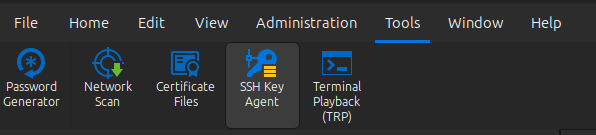
Now it should be able to connect.
I hope this helps and thank you for using our product. Please do not hesitate to contact us if you have any questions!
Best regards,
Simon Duguay Létourneau
ff2d8759-cc52-403d-94a8-43bdd1ccbe6a.png
Simon - thank you!
Got it for RDP, thanks! As for the SSH agent, it makes sense - except when I try to start the agent, since one was started at login, I get an error that another agent is running.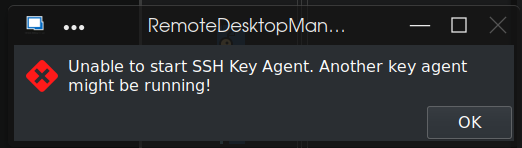
That ssh-agent is currently in a [defunct] state and the associated /tmp/ssh-* directory is removed - that's why I was curious as to the possibility of either attaching to an existing ssh-agent ($SSH_AUTH_SOCK & $SSH_AUTH_PID), or starting a separate ssh-agent (there can be multiple running, even if that's not optimal).
Thank you!
b9f5d4ec-0c16-4bd7-995c-c69887e7ea34.png
We're already using SSH_AUTH_SOCK to connect to the agent. The error you got doesn't describe exactly what's going on. We use this message when we can't connect, for whatever reason.
To identify the problem, you can use the Profiler and set your debug level to 1. Then try starting the agent again and you may get a more accurate error displayed here.
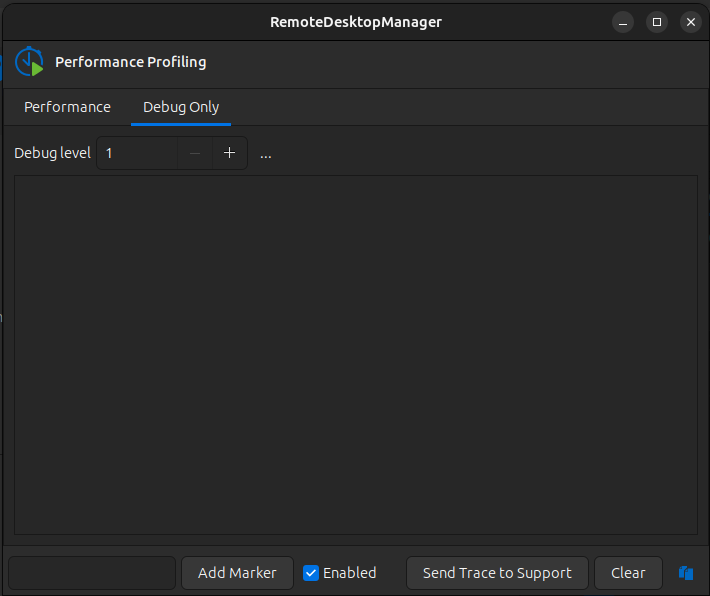
Simon Duguay Létourneau
9b39ea00-52a9-49fa-83c9-761027acbb0d.png
3a0ddde0-b90b-461c-a725-56f13621c976.png
Oh I see!
So I started my own ssh-agent, made sure SSH_AUTH_SOCK was correctly set, and then started remotedesktopmanager from the command line, and now the ssh agent starts up/connects perfectly. I can thus add pkcs11 certs from my smartcard from the command line (ssh-add -s /usr/lib64/opensc_pkcs11.so in my case) , but the GUI doesn't appear to allow adding anything other 'regular' files. The option to add smartcard certs in the GUI would be a fantastic convenience!
The Windows version has these smart card settings. Perhaps it will work for you if we add it for Linux? Personally, I don't know much about smart cards, but we'll see what works for your use case.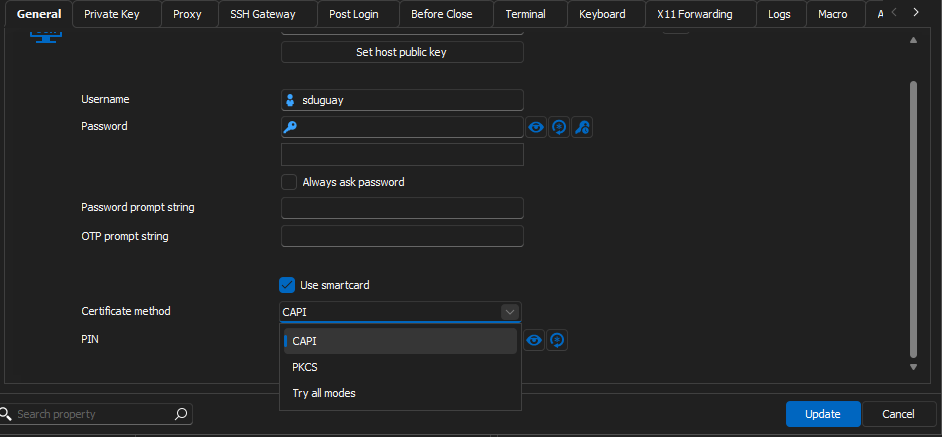
Simon Duguay Létourneau
e4c30f82-9a92-4d97-a63a-689337f1c2a4.png
Simon,
That would be fantastic, and much appreciated!
Hello!
We have added the smart card settings for SSH entries internally. These changes will be effective in the next update (2024.2).
A ticket is still open for RDP entries. We'll let you know once we have any updates on this.
Regards,
Gabriel Dubois
Greetings! Eagerly awaiting the RDP smart card option for Linux (currently running version 2024.2.2.3) - in the meantime I've played around a bit with the SSH smart card, and after adding the certs per above instructions, upon trying to connect to an SSH host, I get the following:
Dynamic lib error: /usr/lib/devolutions/RemoteDesktopManager/opensc-pkcs11: cannot open shared file: No such file or directory
Unable to load PKCS11 lib: /usr/lib/devolutions/RemoteDesktopManager/opensc-pkcs11
Bytes sent: 1320, Bytes received: 1085
Packets sent: 4, Packets received: 5
Kex completed: 1
Plus a modal box that says:
Error: FAIL
Code: -1
I know I have an opensc-pkcs11.so in /usr/lib64, but there isn't one in /usr/lib/devolutions/RemoteDesktopManager - much less one without the .so suffix. Is this path a configurable item?
Thanks!
Hi mick !
Yes in fact you will need to set the path to whichever library you wish to use in the Preferences -> Session type -> Terminal.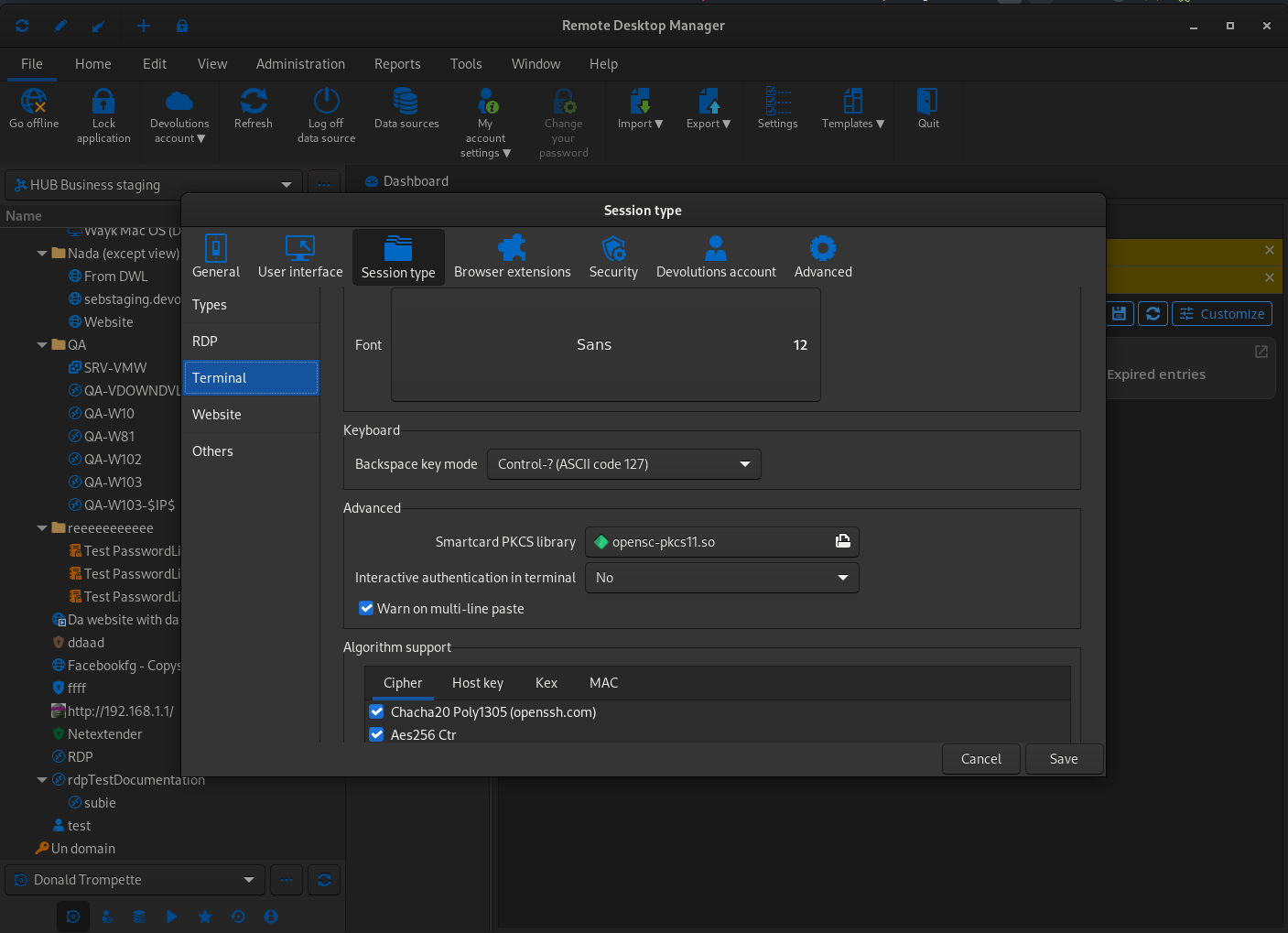
Hope this helps !
David Ringuet
Screenshot from 2024-08-13 11-30-40.png
That was exactly what I needed - thank you kindly!
Hello
Smart card authentication should work for RDP but at this point in time, it has some restrictions. You'll need to (in the RDP session settings):
- Uncheck "Enable Network Level Authentication (NLA)" in the "Authentication" tab
- Check "Enable Transport Layer Security (TLS)" in the "Authentication" tab
- Check "Smart cards" under the "Local Devices and Resources" tab
- Leave the password field empty in the "General" tab
You'll also need to disable the NLA requirement on the server, if it's configured.
When you try to connect, RDM will prompt you for the "missing" password, but just leave the field empty and press "Done". You'll arrive at the Windows logon screen of the remote computer, and (possibly after a short - maybe 20 seconds - wait) you should get the option to authenticate with your smart card.
The requirement to disable NLA does represent a security downgrade and you'll need to decide if that's worth it to use smart card auth. At this point in time, we don't support smart card authentication with NLA on non-Windows platforms. It's something we're working to add - it's often requested on RDM Mac - but it's quite a complicated feature and is taking some time to implemented.
Please, let me know if something isn't clear or you have further questions
Kind regards,
Richard Markievicz