Export script not exporting everything

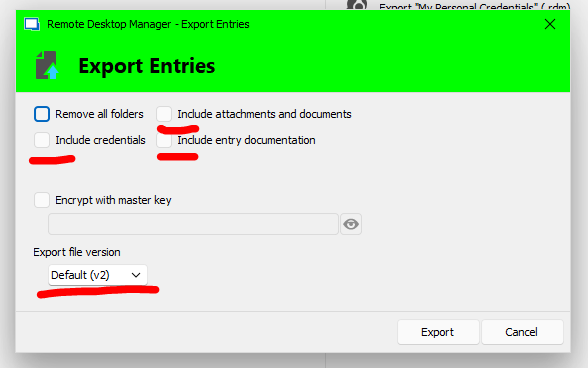 Hello, We've added the '-IncludeAttachements' to the sample export and it runs except we am unable to locate the "Include entry documentation" and "Export file version" switches. When we perform a manual export via the GUI, the .rdm is larger than when we run the script below. I know we're missing something. Thanks to all.
Export-RDMSession -Path "D:\RemoteDesktopManager\Sessions_$reponame.rdm" -Sessions $sessions -IncludeCredentials -IncludeAttachements -XML -Password $passwd
Capture.PNG
All Comments (6)
Hello,
The switches you are looking for do not exist yet for the Export-RDMSession cmdlet.
By default, it will use the latest file version. Do you need to export the sessions in an older file version?
I have submitted a ticket to our developer team. Once they are implemented, we will post them on this thread.
Thank you for your patience.
Best regards,
Érica Poirier
Hello,
In the version 2023.3.3 of the Devolutions.PowerShell module, Export-RDMSession has the additionnal switches IncludeDocumentation and Version.
If you have any questions or need more infomration, please do not hesitate to reach out.
Best regards,
Maxime
Devolutions: that's great news! Thank you for the update.
What is the recommended procedure to update the existing installed version of the Devolutions.PowerShell module to version 2023.3.3 of the Devolutions.PowerShell module that includes the new functionality?
Hello,
You can use the Update-Module cmdlet to update the module to version 2023.3.3 if you have used the Install-Module cmdlet to install it on your machine.
The following command specifically updates to that version.
Update-Module -Name Devolutions.PowerShell -RequiredVersion 2023.3.3.0 -Force
Best regards,
Érica Poirier
Gaak, apparently we did NOT use the Install-Module command :(
This is our result:
PS C:\Windows\System32> Update-Module -Name Devolutions.PowerShell -RequiredVersion 2023.3.3.0 -Force
Update-Module: Module 'Devolutions.PowerShell' was not installed by using Install-Module, so it cannot be updated.
What is the recommended procedure in our case?
Hello,
It's challenging to advise on the update process without understanding how the software was initially installed. Knowing whether it was a manual or automatic installation would be particularly helpful. For manual installations, Microsoft's documentation is usually comprehensive and thorough.
Best regards,
Maxime