Disable Mouse Jiggler for all connections in Vault
0 vote

Is it possible to have the new RDP mouse Jiggler disabled (it looks like it defaults to default on) via a setting on devolutions server for everything in a vault.
It's a security issue allowing users RDP sessions to have a way of never disconnecting, especially when we've created policies on the server to discon/logout the users on inactivity. I've now got people staying connected to servers for hours after they've finshed because they simply just walk away from their PC leaving everything open.
(We also have applocker agents installed that stops non whitelisted apps, like jiggler apps)
All Comments (8)
I've noticed on the other feature request for the jiggler you guys made a GPO for the RDM to disable, however not all our users are on the domain so we can't force policies on them.
Hello,
Could you confirm your version of RDM? The default value was erroneously set to be enabled for the feature. Starting with 2023.3.25.0, it should be disabled by default.
Is this good enough for you or do you need a way to force it to be disabled? I just want to make sure we don't develop a feature if the current behavior works.
Regards,
Hubert Mireault
I was using 2023.3.23.0 and 2023.3.24.0, while having it default to off in .25 is an improvement. For compliance we still need a way to ensure its off for all users and they can't turn it on.
No problem, thank you for the confirmation. I have opened a ticket and we will add a system setting for disabling it as well, which will work on every platform.
Regards,
Hubert Mireault
Hello,
We've added the System Settings: Disable mouse jiggler. You can find it in the Type Settings tab. This should be available for the next 2023 version, but will require an update from DVLS for the setting to save properly.
Regards,
Jafran Majeau
Hello,
The feature should be available with Devolutions Server (DVLS) 2023.3.12.0. Let us know if it works.
Best regards,
François Dubois
Hi Friends,
I've updated devolutions server to 2023.3.12.0, however I'm having a little trouble finding where the setting is, I'm not sure what/where the type settings tab is. Any chance you could get a screenshot?
Hello,
In the Admnistration tab, you can find the System Settings button. From there, in the left section, you can scroll down to Type Settings, and disable the mouse jiggler from there.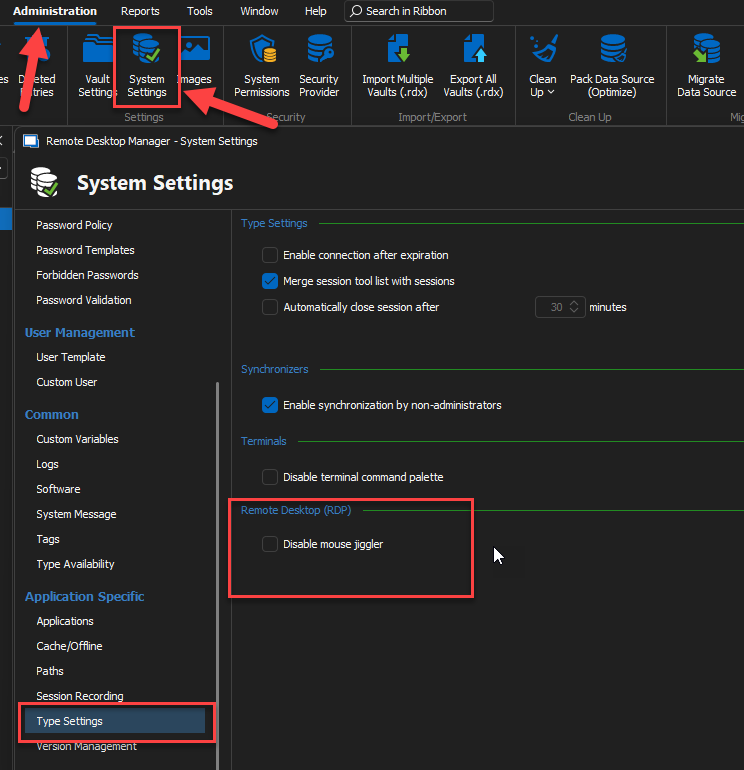
Regards,
Jafran Majeau
86e3fc5e-5a1d-4128-9e40-423ed3a89271.png