Set-RDMEntry: Object reference not set to an instance of an object

Hi.
I wanted to bulk update a property on all RDP connections, but got the error as in the subject. It is just released PowerShell 7.4.0 based on .NET 8 (don't know if it's related). Module version: 2023.3.1. Please fix. Thanks!$s = Get-RDMEntry -Name "10.0.0.72"$s.RDP.ScreenSizingMode = [Devolutions.RemoteDesktopManager.RDPScreenSizingMode]::DynamicResolutionSet-RDMEntry -InputObject $s -Refresh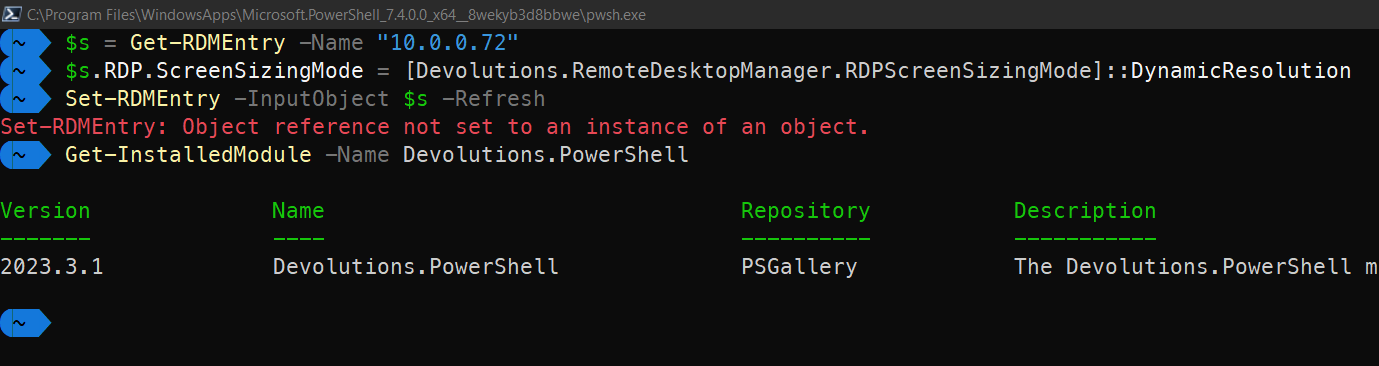
0b431899-2fa2-4c44-9e2e-1fd9aa778b12.png
All Comments (11)
Hello,
Could you please try the following? The ScreenSizingMode property is an array of Object.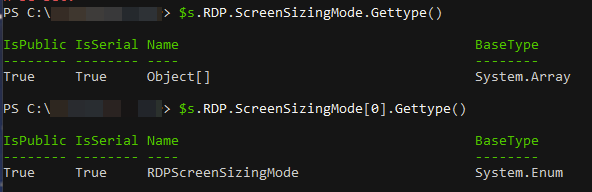
$s.RDP.ScreenSizingMode[0] = "DynamicResolution"
$s.RDP.ScreenSizingMode[1] = "DynamicResolution"
Set-RDMEntry -InputObject $s -Refresh
Let us know if that helps.
Best regards,
Érica Poirier
f16f7a38-a0dd-4aca-85bf-36c0f7433d04.png
Hey Érica !
Thanks for your response.
That's strange, my results are different. That would also seem illogical when it was an array, because there's just one place in UI where you set it for a single session.
Please see my example: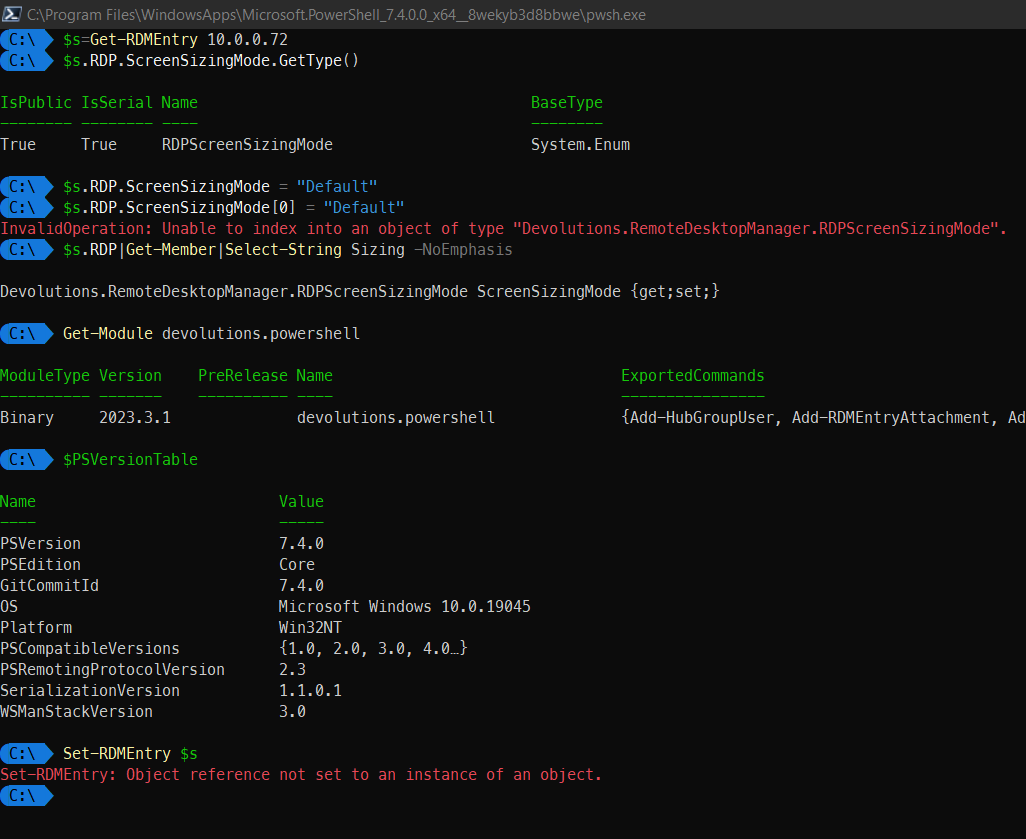
33358d3e-cc35-4811-a105-9e7ff68d273e.png
Hello,
Thank you for your feedback.
The reason why I got an array for this property is that I've used an RDP entry that also has a shortcut in another folder; my mistake!
Sadly, I cannot reproduce your issue.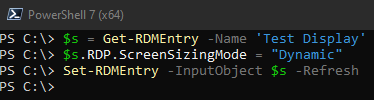
What data source type are you connected to?
What RDM version are you using?
Do you see any relevant error in Help - Application Logs in RDM?
With that information, I will try to reproduce what you get.
Best regards,
Érica Poirier
d8ed8023-4056-4b40-b6f6-17d6baab6289.png
Thank you.
> The reason why I got an array for this property is that I've used an RDP entry that also has a shortcut in another folder; my mistake!
Wow then that's going to be confusing during scripting. Maybe you should make a separate property (I have only rough idea because I don't know the details of which properties are duplicates when you create a link). The same property definitely shouldn't be of 2 different data types on various occasions. Maybe you should have for example "ScreenSizingMode" with only one value, and then "ScreenSizingModes" as an array.
Back to the topic, my data source is a local data source (SQLite) with no password - Connections.db version v.1.147. Data source diagnostic shows 4 green ticks.
RDM is fully updated - 2023.3.25.0 64-bit. Nothing relevant during this timeframe in Application Logs.
If you see the screen below - I can create a new entry then save it, and it's visible in RDM UI.
But when I'm trying to save it again, the error occurs. I also get error on Get / Set, even if I do not change anytihng.
Something becomes `null` and it needs to be fixed :-)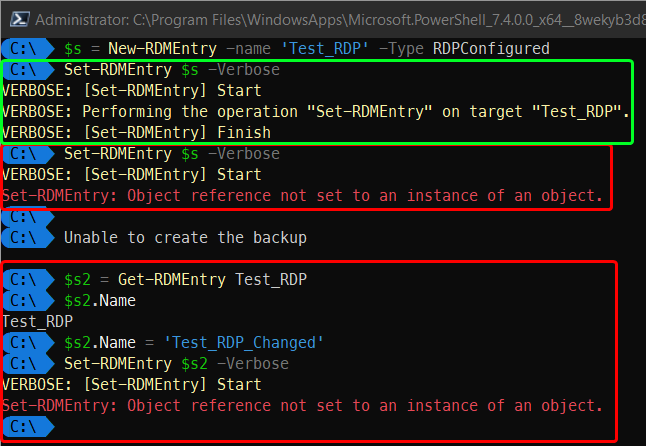
In the meantime I got this "Unable to create the backup" message - no idea why, I'm online.
546ccd34-fa4f-4dbf-81ac-8afc67cd8257.png
Hello,
Thank you for your feedback.
On a Local Data Source, I have been able to reproduce your issue. I have submitted a ticket to our developer team.
Once a fix will be available, we will post it here.
Best regards,
Érica Poirier
Thanks very much! Looking forward for the fix :-)
Hello,
The issue has been solved in the latest Devolutions.PowerShell module version 2023.3.2. It is now available online.
Could you please update your module, and let us know if it works as expected?
Best regards,
Érica Poirier
Yes, I can confirm it doesn't throw the error anymore! Thanks.
There's another related issue that needs fixing. When changing an entry property using PowerShell and Set-RDMEntry, the changes are not immediately reflected in RDM UI. When you go to entry properties, you see old values (from before using Set-RDMEntry). Only when you manually go to File->Refresh, the entries are updated in RDM UI.
This is unexpected, counterintuitive and might cause you to lose changes made earlier in PowerShell back to old values by editing the entry properties via UI. Please fix it by fetching fresh data from data source every time when user accesses entry properties (by right mouse button->Properties or various other places).
Thank you!
Hello,
The refresh can be automated at the data source level by going to Administration > System Settings > Cache/Offline - "Refresh before edit entry". You may want to consider enabling more (or all) of them: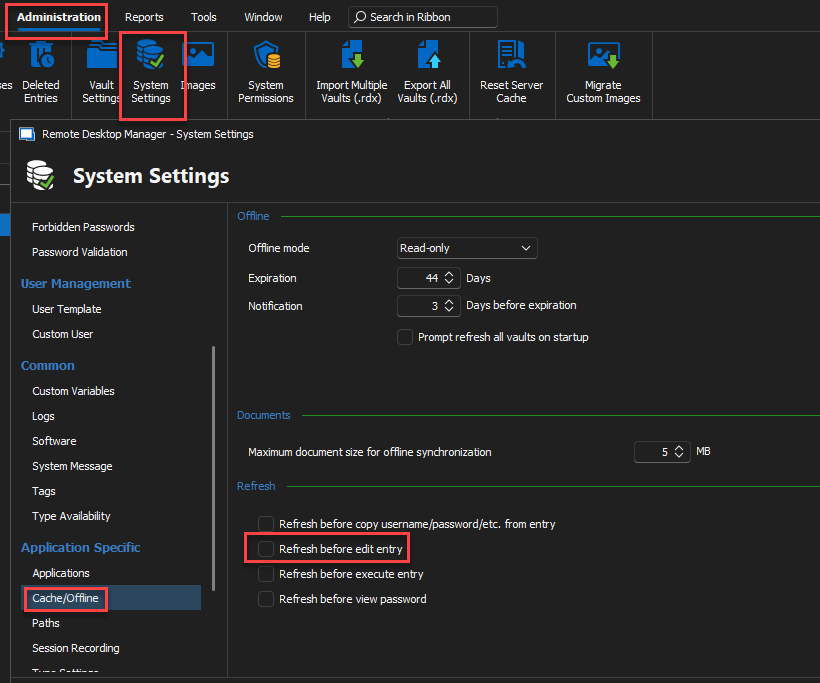
Best regards,
Richard Boisvert
e02420ba-4a6c-4fc5-8142-1d0c65ffb174.png
Thank you very much for the suggestion! Unfortunately my ribbon looks totally different: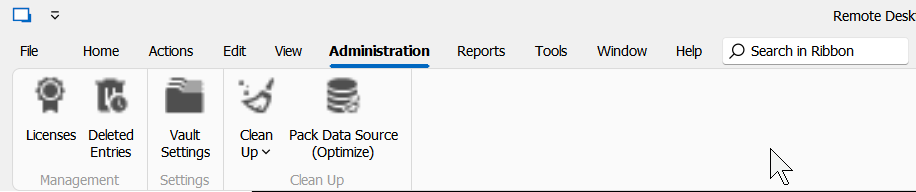
... but fortunately I found this setting in Options :)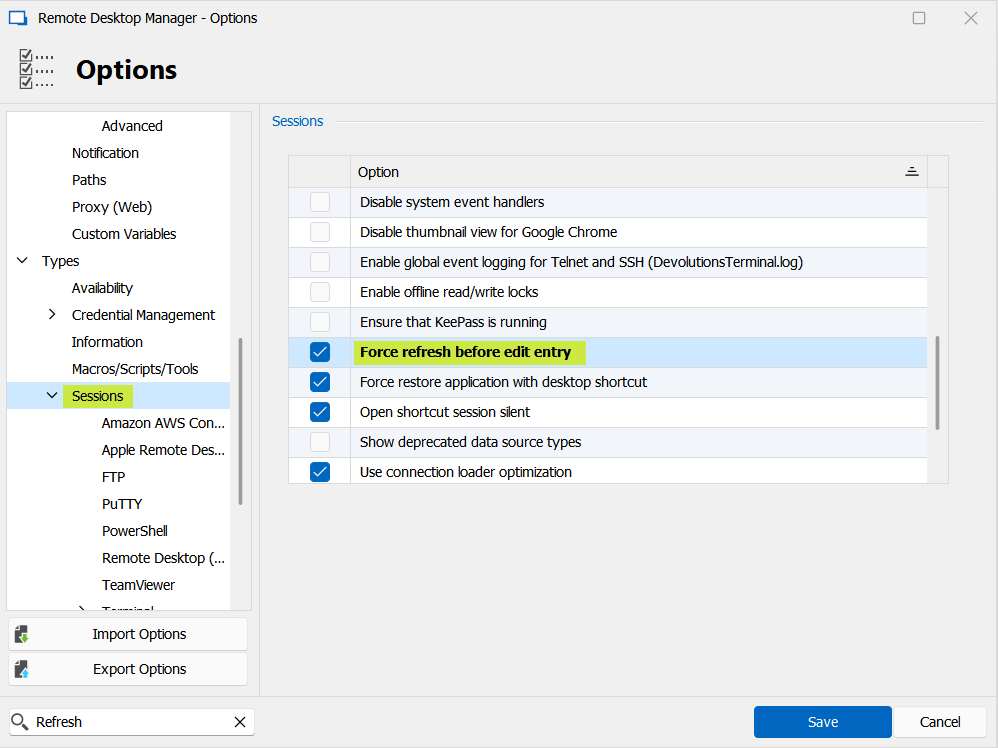
And it works as expected. You may consider making it enabled by default to prevent issues for people editing entries with PowerShell.
Thanks again!
27a31d50-9788-4cf6-9db2-53c797f81e72.png
2372d258-9380-47d4-9e6d-db74aa246f54.png
Hello,
Thank you for your feedback.
The Systeme Settings menu is not visible for a SQLite data source. It's only available on advanced data sources.
Another method is to use the -Refresh switch with the Set-RDMEntry cmdlet.
Set-RDMEntry -InputObject $s -Refresh
Best regards,
Érica Poirier