Rdp not working on linux

Hi,
I can't connect to any host via rdp. System - linux PopOS(base on ubuntu 22.04). RDM Version 2023.3.0.5
Through the debug mode, I see the following error.
(RemoteDesktopManager:14552): Gtk-CRITICAL **: 23:08:14.441: gtk_widget_grab_default: assertion 'gtk_widget_get_can_default (widget)' failed
Unhandled exception. System.NullReferenceException: Object reference not set to an instance of an object.
   at Devolutions.Rpc.Structures.Interface.CreateDefinitionFromInterface(Type)
   at Devolutions.Rpc.Structures.Interface.CreateDefinition(Type)
   at Devolutions.Rpc.Rpc.Client.ResolveProxyInterface(Type, Boolean)
   at Devolutions.Rpc.Rpc.Peer.GetProxyInterface(Type, Boolean)
   at Devolutions.Rpc.Rpc.Peer.RegisterCallee(Object)
   at FreeRDPSandboxed.Program.Main(String[])
What can be done here?
Thanks!
All Comments (13)
Getting the same thing on Endeavour OS using the AUR package. Was working on the previous version but since the most recent update which I ran about 30 mins ago, I can no longer connect to any hosts.
Hello,
I am able to reproduce your issue and working for a fix. In the meantime as a workaround you can disable the sandboxing in Properties -> RDP (Microsoft Remote Desktop) -> Advanced -> Activate sandboxing : No
Please let me know if that helps for the moment.
Regards,
Gabriel Dubois
Thanks for the quick response Gabriel. Can confirm that setting sandboxing to "no" allows RDM to connect to hosts. Thanks for the work around.
Hello,
I am able to reproduce your issue and working for a fix. In the meantime as a workaround you can disable the sandboxing in Properties -> RDP (Microsoft Remote Desktop) -> Advanced -> Activate sandboxing : No
Please let me know if that helps for the moment.
Regards,
Thanks for the quick response Gabriel. The solution you proposed worked.
Hello,
If it helps, in the RDP connection parameters:
- if you enter the hostname (myhost) AND the domain (mydomain.me), RDM immediately reports "Unable to connect to host myhost"
- if you enter the full hostname (myhost.mydomain.me) AND the domain (mydomain.me), RDM crashes
- only if you enter the complete host name (myhost.mydomain.me) and leave the domain field empty will the connection be successful.
Regards
OE42
Hello,
The new version 2023.3.0.7 is now release and the sandboxing issue should be fixed, let me know if that helps.
Regards,
Gabriel Dubois
Hi Gabriel,
Thanks for the response and the fix. The new version has resolved the issue with RDP connections and sandboxing for me.
Upgrading to version 2023.3.0.8 does not seem to have the fix mentioned for 2023.3.07. However disabling sandboxing does allow RDP connections. Version 2023.3.0.5 was the last version that could make RDP connections for me. Which I find odd because the person that opened this thread found the problem with 2023.3.0.5. Thank you for the workaround.
Hi georgecrum,
Do you get an error when you run RDM via a terminal and try to rdp with sandboxing enabled? If so, is it the same error as in the first post in this thread?
Simon Duguay Létourneau
Looks like I get a different error.
(RemoteDesktopManager:59845): Gtk-CRITICAL **: 10:21:47.990: gtk_widget_grab_default: assertion 'gtk_widget_get_can_default (widget)' failed
RDPSandboxed error: Message: Exception has been thrown by the target of an invocation.
Stack:    at System.Reflection.MethodInvoker.Invoke(Object, IntPtr*, BindingFlags)
   at System.Reflection.RuntimeMethodInfo.Invoke(Object, BindingFlags, Binder, Object[], CultureInfo)
   at System.Threading.Tasks.Task`1.InnerInvoke()
   at System.Threading.ExecutionContext.RunFromThreadPoolDispatchLoop(Thread, ExecutionContext, ContextCallback, Object)
--- End of stack trace from previous location ---
   at System.Threading.ExecutionContext.RunFromThreadPoolDispatchLoop(Thread, ExecutionContext, ContextCallback, Object)
   at System.Threading.Tasks.Task.ExecuteWithThreadLocal(Task& currentTaskSlot, Thread threadPoolThread)
--- End of stack trace from previous location ---
   at Devolutions.Rpc.Rpc.Peer.HandleCallMessage(BaseConnection connection, CallMessage message)
========== INNER EXCEPTION ==========
Message: Unable to find an entry point named 'shm_open' in shared library 'libc'.
Stack:    at Devolutions.NativeSessions.SharedMemoryBuffer.shm_open(String name, Int32 openFlags, UInt32 mode)
   at Devolutions.NativeSessions.SharedMemoryBuffer.CreateSharedBuffer(String name, Int32 size)
   at Devolutions.NativeSessions.SharedMemoryBuffer.NewInstanceCreate(String name, Int32 size)
   at Devolutions.NativeSessions.RDPSession.Connect()
   at System.RuntimeMethodHandle.InvokeMethod(Object, Void**, Signature, Boolean)
   at System.Reflection.MethodInvoker.Invoke(Object, IntPtr*, BindingFlags)
Another issue I see is that RDM will crash when I connect to specific Windows servers when sandboxing is disabled.
Can you copy the output of your system diagnostics?
Regarding your second issue, you should create another thread on this forum, to avoid mixing sandboxing issues, and indicate the Windows version installed on these servers, as well as the output obtained in your terminal when you try to connect.
Simon Duguay Létourneau
40bce178-8870-4424-9872-aee04bd2c48a.png
Hi Simon,
It seems the crash event happens when I attempt to connect without credentials and it only happens with 2016 datacenter. I can connect when I open with credentials but only when sandboxing is disabled. I do not see this crash happen when connecting to 2019 datacenter. I don't think I'll persue this problem any further.
Here's a screenshot of Diagnostics.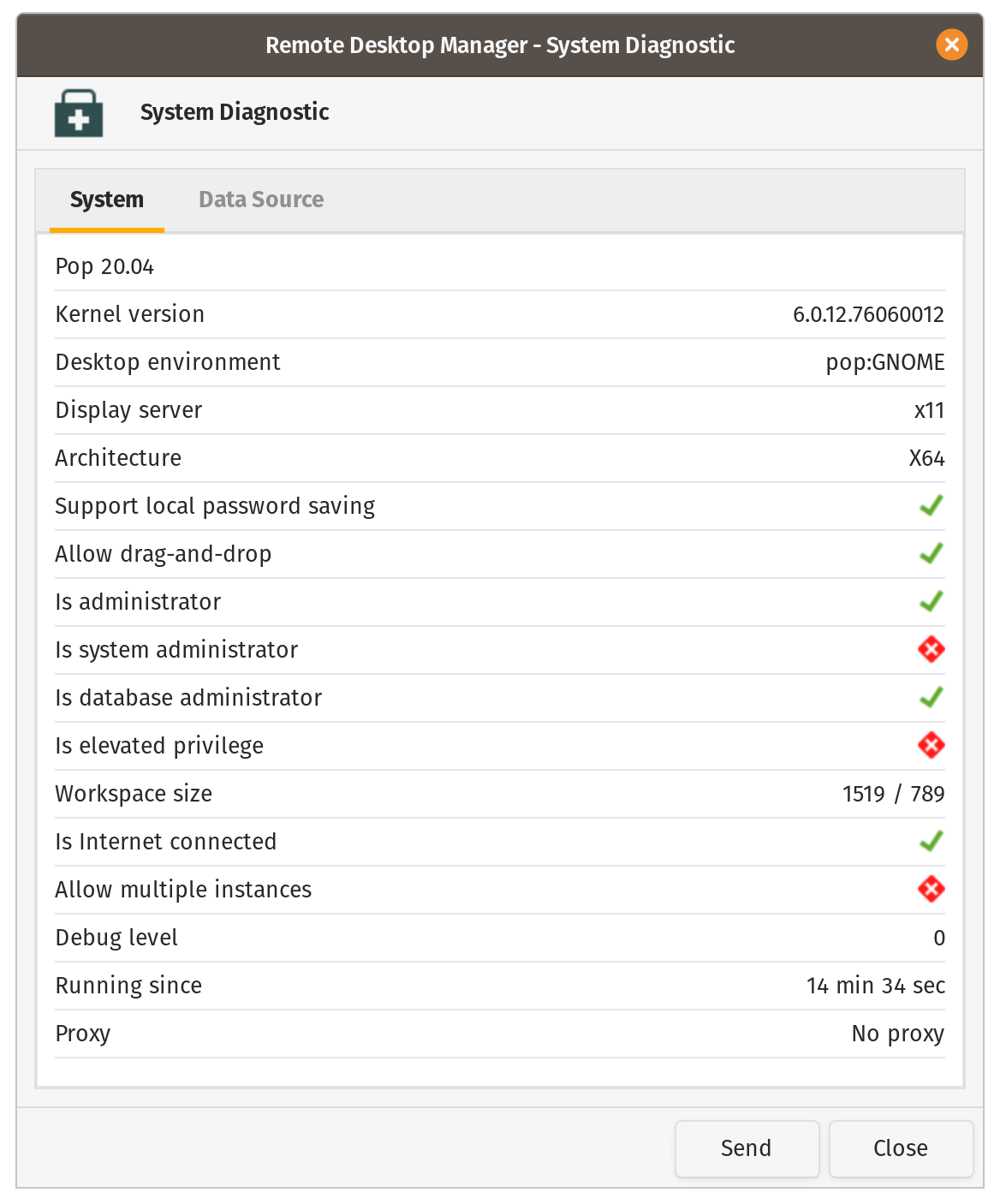
Screenshot from 2023-12-20 10-30-14.png
Hi georgecrum,
I've found the cause of the error you get when the sandbox is activated and I've made a correction.
However, considering that disabling the sandbox works and that we'll be closed during next week, the fix will be available at a later date.
Happy holidays!
Simon Duguay Létourneau