RDM hangs when opening preferences window in 2023.2.2.7

The preferences window opens with title "placeholder" and does not show any content (well it shows a copy of the content that was at the same place just before opening the window). There is no option to close that windows, and as it seems to be modal, I am even not able to close RDM itself, except for killing it.
Distro: openSUSE 15.5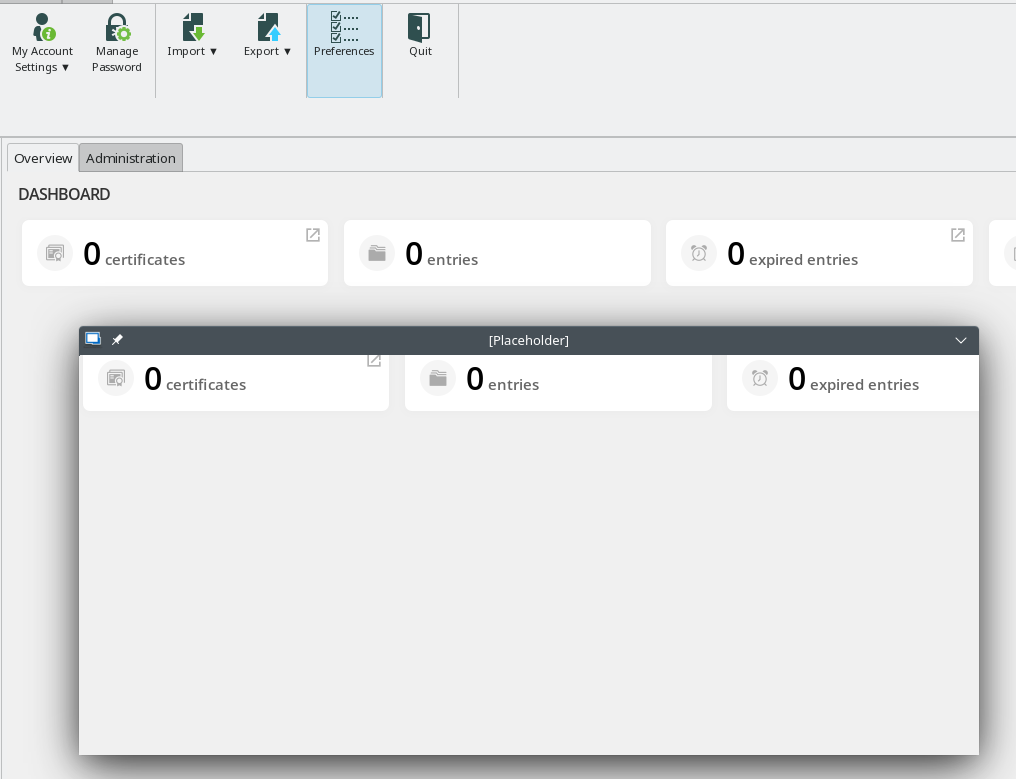
grafik.png
All Comments (11)
Hello Pilot_001,
I'm currently trying to reproduce your problem.
Are there any logs if you launch remotedesktopmanager via your terminal and open the preferences window?
Simon Duguay Létourneau
Hi,
too bad, but no... There is only one log info when starting RDM, giving me an exception because it tries to connect outside via our proxy which needs credentials. But no further output when opening the preferences window.
Regards,
Alexander
Hello,
I have setup an openSUSE machine and can reproduce your problem on my side.
I'll let you know as soon as the problem is solved.
Best regards,
Simon Duguay Létourneau
I found a way to avoid this problem by installing libgnomesu and running
gnomesu remotedesktopmanager
Simon Duguay Létourneau
I should have mentioned: I'm using KDE not Gnome... But I as well I tried your workaround and I have the same problem with it. Even tried running RDM directly as root and with kdesu... no difference.
But I found one thing in the process list:UID PID PPID C STIME TTY TIME CMDuser 11087 8173 9 10:24 pts/1 00:00:09 ./RemoteDesktopManageruser 11130 11087 0 10:24 pts/1 00:00:00 /usr/lib/libwebkit2gtk-4_0-37/WebKitNetworkProcess 7 215user 11134 11087 1 10:24 pts/1 00:00:00 /usr/lib/libwebkit2gtk-4_0-37/WebKitWebProcess 11 215user 11224 11087 0 10:26 pts/1 00:00:00 [bash] <defunct>
The last entry (the bash in defunc state) appeared the moment I pushed the preferences button.
On further investigation, it seems that whenever RDM catches an error, it cannot start an external process on openSUSE.
This caused a problem because it started a process to find all available terminal emulators on your machine when you opened the preferences window and it froze.
The [bash] <defunct> is the process in question.
Simon Duguay Létourneau
Just because I'm curious to know... why does it try to find all available terminal programs? The default terminal program to use should be found in the environment "SHELL", which can be expected to exist.
And AFAIK there is no restriction on /bin/bash to execute it. If I understand you correctly, it just uses the shell to start some other program... Which program and how?
Regards,
Alexander
It attempts to find all available terminal programs, called terminal emulators, such as gnome-terminal, konsole, xterm, etc. It is used in preferences to allow the user to choose the default terminal that RDM will use if you want to launch an external terminal-based session (currently, it is only used for Powershell).
The SHELL variable returns something like /bin/bash, which isn't what we want here.
What we do is go through a list of the most popular terminals like this /bin/bash -c 'command -v konsole' , searching for "konsole" for example.
This is a strange problem because the process starts and runs correctly, but never terminates, leaving a zombie process behind only when RDM has detected an error previously.
That being said, I've found another way of running this process that solves this problem. I'll let you know when the update containing this fix is available.
Regards,
Simon Duguay Létourneau
Hello,
A possible solution to this problem will be available in the next update.
I have come to the conclusion that this problem is caused by a combination of 3 elements.
- RDM catches an exception before the main window is displayed. This is probably the proxy exception you mentioned in your second message.
- After the main window is displayed, we render the dashboard web view.
- Once the web view is loaded, for some unknown reason, RDM is unable to check the exit status of any child processes started.
Therefore, RDM will hang waiting for an exit status that never come and the child process remain in a zombie state waiting to be "reaped".
I've noticed that creating a web view in the first few lines of code, before an exception is thrown, and destroying it immediately, strangely solves this problem.
Hopefully this will work for you too.
Best regards,
Simon Duguay Létourneau
Hello,
The version 2023.3.0.7 is out and should solve your issue.
Regards,
Simon Duguay Létourneau
It does... thank you very much! :-)
Regards,
Alexander