Send Ctrl+Alt+Del?

Perhaps I'm just not seeing it, but how can I send Ctrl-Alt-Del to a session in the Linux version of RDM? It's not in the session tab context menu (like it is in the Windows version), nor is it in the top pane or the machine context menu in the Navigation pane.
All Comments (5)
Hello jefflee,
I assume you're talking about an RDP session? If so, this command doesn't exist on Linux.
One way to remedy this is to change this option in your RDP settings. Change it to "On remote computer" and you should now be able to type Ctrl-Alt-Del with your keyboard, your mouse should be in your RDP view, and it will be managed by the remote computer.
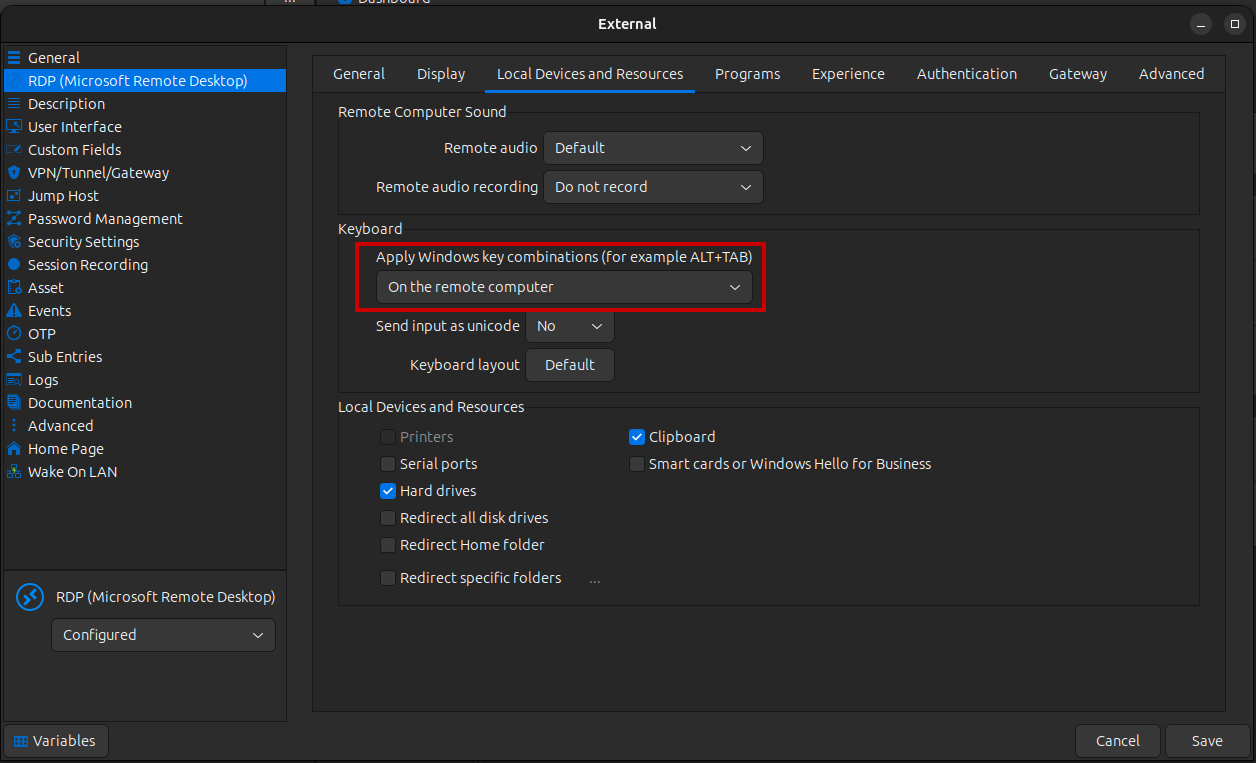
Regards,
Simon Duguay Létourneau
Screenshot from 2023-10-26 12-11-24.png
Hello, Simon.
Yes, in an RDP session. My options were already set to "On the remote computer", but pressing Ctrl-Alt-Del is still handled by my local session manager (it brings up the Sleep/Restart/Shutdown/Logoff options on the computer running RDM). I guess I can unset the Ctrl-Alt-Del mapping in my system settings, or change it to something else, but I was hoping the Linux version of RDM had a way to explicitly send it via the UI, like the Windows version does.
Thanks for your quick response.
Which linux distro are you using?
I'll create a ticket to add this command in the UI.
Regards,
Simon Duguay Létourneau
Ubuntu Studio 23.04
Thanks, that would be great!
-- Jeff
Hello,
I'm glad to inform you that the feature to send Ctrl+Alt+Del through the UI has been implemented in our latest release, version 2024.1.1.2.
Best regards,
Simon Duguay Létourneau
