Certificates for DVLS Gateways
0 vote

Hello,
I would like to request a small feature:
Can you please make Devolutions Gateway compatible with windows certificate store?
It would be great if it could be enough to renew the windows certificate and DVG would simply use it, much like IIS does, without having to do an expert (no matter if manual or powershell).
Thank you
All Comments (6)
Hello srdankostic1,
Thank you for your feature request.
This is not in our current planning, but I've created a ticket to track it on my side.
Unfortunately, this enhancement is not as small as it may seem. Our TLS backend for Devolutions Gateway is rustls, a highly secure TLS library for Rust.
I believe that integrating with the Windows certificate store is not straightforward.
However, I have an idea on how we could achieve this. I'll look into it when I get the chance and get back to you.
Have a great day,
Benoit Cortier
I wanted to provide you with a quick update regarding this feature request.
I'm pleased to inform you that the integration of the Windows Certificate Store was smoother than anticipated.
I was able to integrate it into the TLS backend, and this work has been completed ahead of our next development iteration.
This means that you can look forward to using this feature in the upcoming major release of Devolutions Gateway service, version 2023.3.0.0.
Initially, configuring this option will require the use of the PowerShell module, but we have plans to make this feature easily accessible through the DVLS console in the future.
For your reference, here is the upcoming release schedule for the Devolutions Gateway service:
- This week: 2023.2.4.0
- Next week: 2023.3.0.0
Once this is officially released, I will provide you with detailed steps on how to use it.
If you have any questions or need further assistance, please don't hesitate to reach out.
Best regards,
Benoit Cortier
Dear srdankostic1,
I’m glad to tell you that Devolutions Gateway Version 2023.3.0.0 has been released today.
Let me demonstrate you how you can configure and use the Windows Certificate Store by using the PowerShell module.
On my sample machine, in the "My" (Personal) certificate store in the "Local Computer" location, I have a certificate with the subject name "rdg.ad.it-help.ninja", and the associated private key is readily available, as shown in the image below: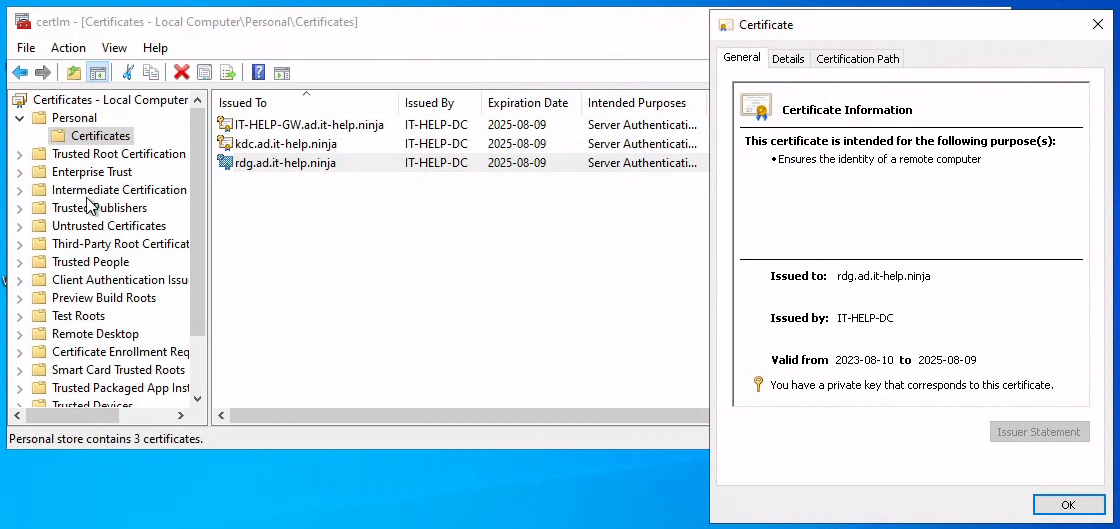
The following PowerShell command will instruct the Devolutions Gateway to use this certificate:
Set-DGatewayConfig -TlsCertificateSource "System" -TlsCertificateSubjectName "rdg.ad.it-help.ninja" -TlsCertificateStoreLocation "LocalMachine" -TlsCertificateStoreName "My"
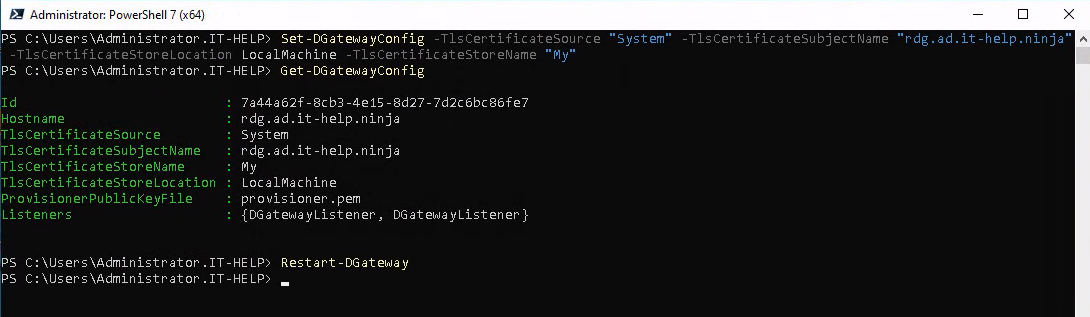
If you inspect the configuration file at C:\ProgramData\Devolutions\Gateway\gateway.json, you should have something similar to this: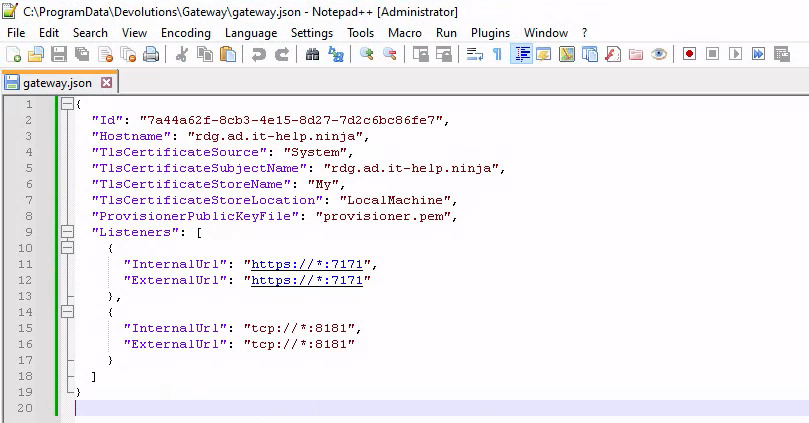
Here is a summary of the new options:
TlsCertificateSourcewill instruct the Devolutions Gateway to retrieve the certificate for TLS from the Windows system certificate store when set to"System"TlsCertificateSubjectNameshould typically match the value ofHostnameTlsCertificateStoreNamespecifies the name of the system certificate store to use; the default value is already"My", although I've included it here for the sake of comprehensiveness.TlsCertificateStoreLocationspecifies the location of the system certificate store to use; the default value isCurrentUser
For information, a comprehensive list of all available options is thoroughly documented on the open-source code repository, at this location: https://github.com/Devolutions/devolutions-gateway#configuration
Restart the Devolutions Gateway service, and confirm that everything is working as intended by accessing the /jet/health endpoint from your browser.
I’m looking forward to your feedback.
Best regards,
Benoit Cortier
34ab01c0-552b-4808-907b-199b499e0b68.png
d1adea1a-8b23-4cc7-b506-979fc9441fa6.png
de31209f-1bf1-4a26-af80-4eb214de8360.png
f375258b-5a38-4a51-89e9-41e30e679f0c.png
Hello,
sorry it took time to test this. I successfully created a certificate and imported it with the script (the .json file has been updated and is looking similar to yours). However, I can't really check for anything, because there is a bug in a Gateway, which prohibits me from opening GW properties (edit functionality), or check health, or ping from the DVLS console... so I first have to wait for you guys to fix that. Currently the gateways are working and I am not keen on tinkering with it, if there already is a bug.
Thanks
Hello,
For the Check Health and the ping issue, a workaround was provided in this thread: https://forum.devolutions.net/topics/40521/after-upgrade-to-devolution-server-to-2023340-en-devolution-gateway-to#183273
Best regards,
Richard Boisvert
Hello,
Thank you for being so patient!
I am pleased to inform you that the feature has been added in the latest Devolutions server version (2026.1.7.0):
https://docs.devolutions.net/server/getting-started/installation/upgrade-server
We also recommend that you first perform the update in a staging/test environment:
https://docs.devolutions.net/server/kb/how-to-articles/create-server-staging-instance
We also offer free upgrade sessions, during which we will update your Devolutions Server instance together. If you are interested in this, please send an email to service@devolutions.net
Best regards,
Maxim Robert