Version 2023.2.9.0 (October 3, 2023)

If you are using RDM as the client, RDM 2023.2 is required for this DVLS version.
FIXES
- Security Fix Core - Fixed vulnerability issue with the PAM propagation script
- Core - Fixed an issue where the Disconnection Data Source settings were not saved properly
- Core - Importing Google password doesn't create a legacy website anymore
## CONSOLE RELEASE NOTES ##
IMPROVEMENTS
- Improve default IIS Application Pool advanced settings when creating a new DVLS instance
Érica Poirier
All Comments (10)
Can we get the custom installers updated quicker?
RDM 2023.2.22.0 is the latest available (7 versions ago released in August)
Hello Stuart,
The latest version for the custom installer is now available locally in File - Devolutions Account - Custom Installer Manager in RDM.
https://docs.devolutions.net/cloud/rdm-online-services/custom-installer/
With this method, we don't have to intervene anymore to publish new versions in the RDM Online Services web portal, and it's already available locally.
Let us know if you have any issues to generate the latest RDM version locally.
Best regards,
Érica Poirier
Hi Erica
Unfortunately this is not the case. Latest version in offline installer is 2023.2.22.0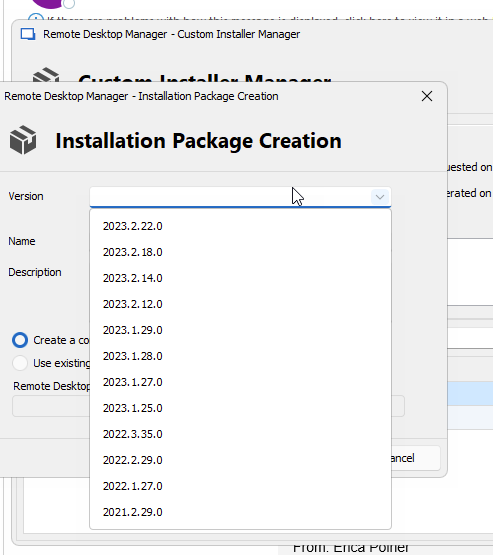
00f7df17-d62c-4880-b602-68e28c54fcd3.png
Hi Stuart,
With RDM 2023.2.22, I can see the latest available version.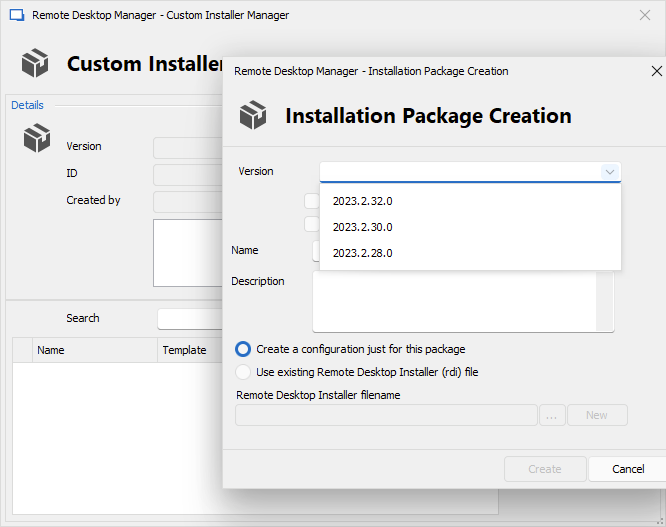
What RDM version are you using?
Could you please update your RDM locally to verify if you can create the latest build from the Custom Installer drop-down menu?
Best regards,
Érica Poirier
f48009bd-3df4-4131-93fd-413669c51f80.png
That's the problem though. I'm on 2023.1.29.0 64-bit. I can't upgrade my RDMS because it won't be able to connect to DVLS 2023.1.5.0.
I need to build the custom installer so that RDMS is ready for everyone to download, use and deploy once we run through the DVLS upgrade process on the weekend.
This has always been a problem for us. I think it would be useful if RDMS was backwards compatible to at least support the last 6 months of DVLS versions. It would be good if detected that DVLS was running on an earlier version and disable those newer features that require the newer version. Then I could get everyone to upgrade their RMDS versions prior to upgrading DVLS. As it stands everytime we do a version upgrade, we have to upgrade DVLS AND 120 different copies of RDMS, all installed on local machines all around the country, all at the very same time. It's this limitation that means we can only really do upgrades every 6 months and when we do it is a MAJOR project.
Hi Stuart,
As this method of locally creating the Custom Installer package has been recently improved, once you update to at least 2023.2.22, RDM should provide the most recent version in the drop-down menu if it has internet access to fetch the new version number. No matter what RDM version you are using and what DVLS is connected to.
In your situation, as the currently used version did not contain that improvement, you could install a portable version of the latest RDM version and then create the Custom Installer. That portable version must have the DVLS data source available for you to properly create the package.
Let me know if you need assistance to achieve this.
Best regards,
Érica Poirier
Hello,
Agreed that RDM needs to be backward compatable with prior major version of DVLS, as it is logistically challenging to similtaneously update the server and RDM on hundreds of workstations, not to mention if a rollback is required.
Thanks
Joe
Thankfully, 2023.2.22 can connect to our DVLS version, so I can use that to generate - thanks Erica - but I get this error when saving to my Downloads directly, yet the MSI is there so I have no idea if there's an error in the built MSI or not.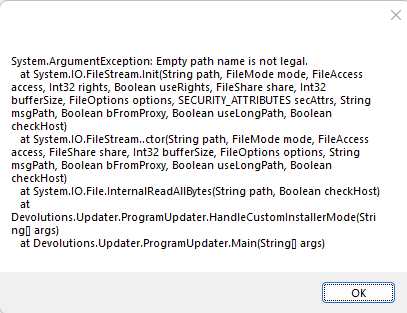
Additionally, on the new version I seem to not have any ability to edit anything.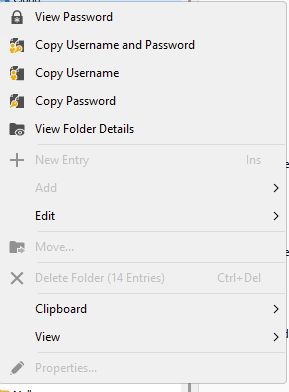
c1c19ad9-e4bd-47f4-9479-55df48ca739e.png
1e0a2434-0305-4b2e-9e0c-5342b9e9ef3a.png
Hi Stuart,
I will ask our developer team about the error you got and get back to you.
For the new version that cannot edit or add entries, it's a new limitation to prevent errors or data inconsistency when connected to a different major version of the data source, DVLS in your case.
EDIT: With that new implementation, users will be able to connect to a different data source version and open entries.
Best regards,
Érica Poirier
Hello,
@Stuart, the error you got in RDM 2023.2.22 should not occur anymore from version 2023.2.32 when you create a new custom installer package. A developer confirmed that this should not occur anymore.
Best regards,
Érica Poirier