Devolutions Server Proxy issue

Hello everyone,
we try to get Devolutions Server up and running but right now, we have a problem as Devolutions Server seems to not use the Systems Web Proxy Settings (Classic Squid SOCKS Proxy, nothing special)
The proxy is configured from IE Settings, from netsh, from environments variables and from Active Directorty (for local user and local mashine).
You can also see no connections from the devolutions server to the Proxy when trying to access Azure AD or haveibeenpwned.
It also works without any problem from Web-Browser, so the proxy aswell as required networking is working in general.
Someone knows how to force "Devolutions Server" to use the Proxy ?
Greetings!
All Comments (9)
Hello Jean Pascal,
You can refer to the following to configure a proxy for the Devolutions Server - https://docs.devolutions.net/kb/devolutions-server/how-to-articles/add-proxy-devolutions-server/
Please let us know if it helps!
Best regards,
Richard Boisvert
Hello Richard,
thanks for the reply.
Apparantly that didn't help.
Still getting an connection error when trying to SSO with Azure AD
Error:
NullReferenceException - Object reference not set to
an instance of an object. at
Devolutions.Server.ExternalAuthentication.MicrosoftAuthenticationProvider.BuildAuthorizationCodeRequest(ExternalProviderAuthLogin
parameters, String authCode, String nonce, LoginSessionMetadata metadata) at
Devolutions.Server.ExternalAuthentication.OAuthExternalProviderService.GetAuthorizationCodeRequest(ExternalProviderAuthLogin
parameters, HttpRequest request) at
Devolutions.Server.Controllers.APIControllers.V2.BackendApiController.LoginWithExternalProvider(ExternalProviderAuthLogin
parameters) at
Microsoft.AspNetCore.Mvc.Infrastructure.ActionMethodExecutor.TaskOfIActionResultExecutor.Execute(IActionResultTypeMapper
mapper, ObjectMethodExecutor executor, Object controller, Object[] arguments)
at
Microsoft.AspNetCore.Mvc.Infrastructure.ControllerActionInvoker.<InvokeActionMethodAsync>g__Awaited|12_0(ControllerActionInvoker
invoker, ValueTask`1 actionResultValueTask) at
Microsoft.AspNetCore.Mvc.Infrastructure.ControllerActionInvoker.<InvokeNextActionFilterAsync>g__Awaited|10_0(ControllerActionInvoker
invoker, Task lastTask, State next, Scope scope, Object state, Boolean
isCompleted) at
Microsoft.AspNetCore.Mvc.Infrastructure.ControllerActionInvoker.Rethrow(ActionExecutedContextSealed
context) at
Microsoft.AspNetCore.Mvc.Infrastructure.ControllerActionInvoker.Next(State&
next, Scope& scope, Object& state, Boolean& isCompleted) at
Microsoft.AspNetCore.Mvc.Infrastructure.ControllerActionInvoker.InvokeInnerFilterAsync()
--- End of stack trace from previous location --- at
Microsoft.AspNetCore.Mvc.Infrastructure.ResourceInvoker.<InvokeNextExceptionFilterAsync>g__Awaited|26_0(ResourceInvoker
invoker, Task lastTask, State next, Scope scope, Object state, Boolean
isCompleted) --- Default
Source:
Devolutions.Server
Hello,
Could you please confirm what version of Devolutions Server you are using?
Could you also confirm the endpoints for the Azure Authentication are available from your proxy? https://docs.devolutions.net/kb/devolutions-server/knowledge-base/internet-endpoints-server/
Best regards,
Richard Boisvert
Hello,
it is the latest Version (updatet 2 days ago) and the proxy (aswell as the servers using the web browser) can reach the endpoints.
It's a load balanced setup and AAD SSO worked for one of the servers for some days (last week) but after a reboot it doesn't work anymore.
The 2nd servers AAD SSO nerver worked und the app pool always crashed when the server was started while the SSO feature was enabled. That issue is now also gone (since that point where the first server stopped working), now it's 2 servers, which can connecto to Microsoft Login and haveibeenpwned by Browser but the Application seems to have problems doing that.
Hello,
It appears to be a configuration on the server side since it was working, and it just stopped working after.
Could you enable the debugging mode by going to the web interface of your Devolutions Server, under Administration --> Server Settings --> Logging - check Log debug information - save? Once enabled, try to access the AAD SSO again.
Could you then send the server logs (on the web interface again, Reports --> Data Source Logs - Export) to service@devolutions.net and reference this forum thread in the email?
You can turn off the debugging after.
Best regards,
Richard Boisvert
Dear Richard,
that was activated the whole time and that's where I got that error message from.
For SSO:
Message
NullReferenceException - Object reference not set to an instance of an object.

at Devolutions.Server.ExternalAuthentication.MicrosoftAuthenticationProvider.BuildAuthorizationCodeRequest(ExternalProviderAuthLogin parameters, String authCode, String nonce, LoginSessionMetadata metadata)
at Devolutions.Server.ExternalAuthentication.OAuthExternalProviderService.GetAuthorizationCodeRequest(ExternalProviderAuthLogin parameters, HttpRequest request)
at Devolutions.Server.Controllers.APIControllers.V2.BackendApiController.LoginWithExternalProvider(ExternalProviderAuthLogin parameters)
at Microsoft.AspNetCore.Mvc.Infrastructure.ActionMethodExecutor.TaskOfIActionResultExecutor.Execute(IActionResultTypeMapper mapper, ObjectMethodExecutor executor, Object controller, Object[] arguments)
at Microsoft.AspNetCore.Mvc.Infrastructure.ControllerActionInvoker.<InvokeActionMethodAsync>g__Awaited|12_0(ControllerActionInvoker invoker, ValueTask`1 actionResultValueTask)
at Microsoft.AspNetCore.Mvc.Infrastructure.ControllerActionInvoker.<InvokeNextActionFilterAsync>g__Awaited|10_0(ControllerActionInvoker invoker, Task lastTask, State next, Scope scope, Object state, Boolean isCompleted)
at Microsoft.AspNetCore.Mvc.Infrastructure.ControllerActionInvoker.Rethrow(ActionExecutedContextSealed context)
at Microsoft.AspNetCore.Mvc.Infrastructure.ControllerActionInvoker.Next(State& next, Scope& scope, Object& state, Boolean& isCompleted)
at Microsoft.AspNetCore.Mvc.Infrastructure.ControllerActionInvoker.InvokeInnerFilterAsync()
--- End of stack trace from previous location ---
at Microsoft.AspNetCore.Mvc.Infrastructure.ResourceInvoker.<InvokeNextExceptionFilterAsync>g__Awaited|26_0(ResourceInvoker invoker, Task lastTask, State next, Scope scope, Object state, Boolean isCompleted)
For Passwords: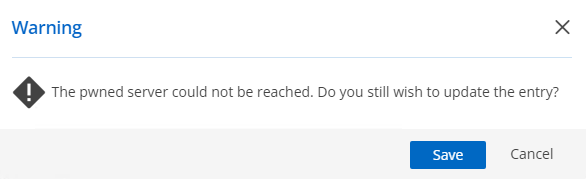
(The DVLS server can't resolve the name without using the proxy server - while the proxy Server can reach it by PowerShell and Browser - just gets an invalid API request error )
Message
AggregateException - One or more errors occurred. (No such host is known. (api.pwnedpasswords.com:443))

at System.Threading.Tasks.Task.ThrowIfExceptional(Boolean includeTaskCanceledExceptions)
at System.Threading.Tasks.Task`1.GetResultCore(Boolean waitCompletionNotification)
at Devolutions.Server.PasswordManager.GetPwnedRangePassword(String hashPassword)
at Devolutions.Server.Controllers.APIControllers.V2.BackendApiController.SearchPwnedByRange(String hashPrefix)

------------------------------------------

HttpRequestException - No such host is known. (api.pwnedpasswords.com:443)

at System.Net.Http.HttpConnectionPool.ConnectToTcpHostAsync(String host, Int32 port, HttpRequestMessage initialRequest, Boolean async, CancellationToken cancellationToken)
at System.Net.Http.HttpConnectionPool.ConnectAsync(HttpRequestMessage request, Boolean async, CancellationToken cancellationToken)
at System.Net.Http.HttpConnectionPool.CreateHttp11ConnectionAsync(HttpRequestMessage request, Boolean async, CancellationToken cancellationToken)
at System.Net.Http.HttpConnectionPool.AddHttp11ConnectionAsync(HttpRequestMessage request)
at System.Threading.Tasks.TaskCompletionSourceWithCancellation`1.WaitWithCancellationAsync(CancellationToken cancellationToken)
at System.Net.Http.HttpConnectionPool.GetHttp11ConnectionAsync(HttpRequestMessage request, Boolean async, CancellationToken cancellationToken)
at System.Net.Http.HttpConnectionPool.SendWithVersionDetectionAndRetryAsync(HttpRequestMessage request, Boolean async, Boolean doRequestAuth, CancellationToken cancellationToken)
at System.Net.Http.DiagnosticsHandler.SendAsyncCore(HttpRequestMessage request, Boolean async, CancellationToken cancellationToken)
at System.Net.Http.RedirectHandler.SendAsync(HttpRequestMessage request, Boolean async, CancellationToken cancellationToken)
at System.Net.Http.HttpClient.GetStringAsyncCore(HttpRequestMessage request, CancellationToken cancellationToken)

------------------------------------------

SocketException - No such host is known.

at System.Net.Sockets.Socket.AwaitableSocketAsyncEventArgs.ThrowException(SocketError error, CancellationToken cancellationToken)
at System.Net.Sockets.Socket.AwaitableSocketAsyncEventArgs.System.Threading.Tasks.Sources.IValueTaskSource.GetResult(Int16 token)
at System.Net.Sockets.Socket.<ConnectAsync>g__WaitForConnectWithCancellation|277_0(AwaitableSocketAsyncEventArgs saea, ValueTask connectTask, CancellationToken cancellationToken)
at System.Net.Http.HttpConnectionPool.ConnectToTcpHostAsync(String host, Int32 port, HttpRequestMessage initialRequest, Boolean async, CancellationToken cancellationToken)

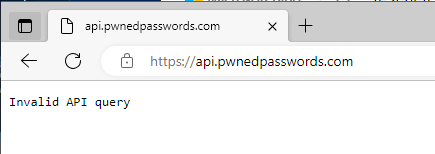
I'll attach that, aswell as the Log4Net Log (DPS_Main.log) to the case, as requested.
ee5c244d-1720-4020-a6c8-d0753b7362f1.png
f16a0484-9884-473d-a6a0-5ca1309397a5.png
b1ec4cb0-118d-4427-8701-06e8632684f2.png
Hello,
We are currently reviewing the information with the Devolutions Server engineering team; we will keep you posted.
Best regards,
Richard Boisvert
Can we use proxy for Devolutions Console to get updates?
Hello,
A proxy cannot be configured in the console, only for the IIS.
That said, if you configure it as an environment variable in Windows, the proxy would also affect the console.
Alternatively, you can download the new versions from our website (console + offline installation) - https://devolutions.net/server/home/download/
Best regards,
Richard Boisvert