Cannot RDP to Any Windows Server from Linux

Hello,
Once the session was opened, prompting for credentials. Once entered session got closed. I don't know were I making mistake.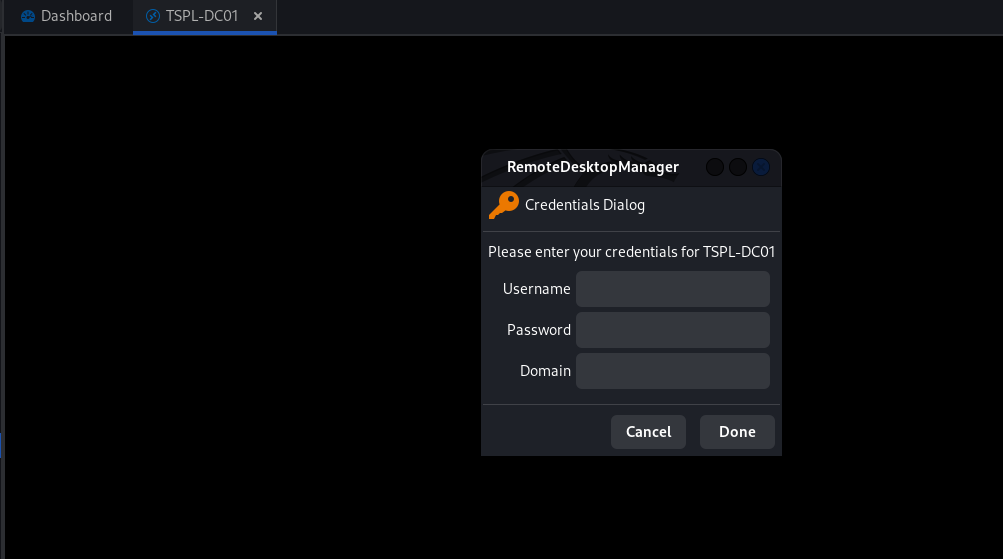
baf5f8af-6167-45e0-9b12-94929c506852.png
e909131f-7ef1-435c-8fc3-32c15b77f56d.png
All Comments (33)

d88d33c3-45c3-4e14-9172-c8705abf5259.png
Hi Woo-Joo,
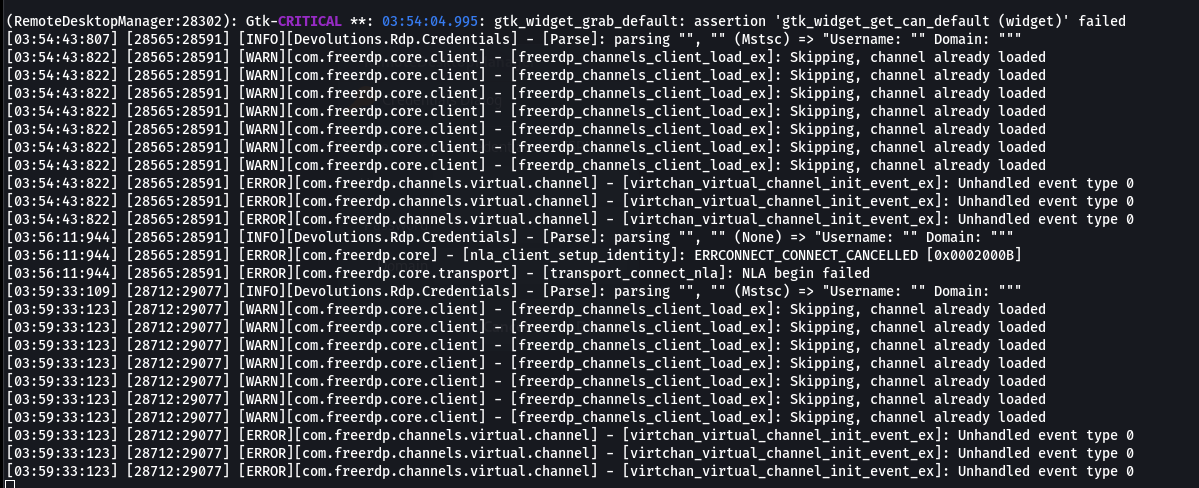
From the screenshot of your last post, I can see 2 unexpected errors 
The first line is related to your time zone, but I doubt that's the problem, the second error is related to the remote audio, go to your connection settings and try to disable it (see screenshot below).
Simon Duguay Létourneau
d88d33c3-45c3-4e14-9172-c8705abf5259.png
Screenshot from 2023-08-16 10-44-39.png
Hello Simon,
Thanks for your response. My issue slightly weird for you.
I'm able to connect to the server via RDM via the SSL VPN. However, I cannot connect the same server to the LAN Network.
The error was enclosed in post as a second screenshot.
Hi,
Can you connect to the server, without VPN, via another application than RDM?
I'm also a bit confused by your screenshots, could you send me a screenshot of your console after connecting to the server via your VPN and another screenshot when you're not using your VPN so I can compare the two?
Finally, take a screenshot of your connection authentication settings (Edit your RDP connection properties -> RDP (Microsoft Remote Desktop) -> "Authentication" tab).
Simon Duguay Létourneau
Hello Simon,
I can connect to server on LAN Network (Office) via another application (i.e., RDP Client, RDM Windows application). But not RDM Linux.
Note: I visit the office once in week. All other time I use VPN to connect my company network.
1) Successful Connection over the VPN.

2) Unsuccessful connection in Non-VPN network (In Office) 
3) Authentication page of the Config

I'm using the RDM windows application since last 4 Months without any issues. But in Linux a lot of issues.
Screenshot from 2023-08-16 23-58-26.png
Screenshot from 2023-08-16 17-08-27.png
Screenshot from 2023-08-16 23-57-55.png
Perfect! Thanks for the information. Everything seems correct in the two screenshots of your console. I'm going to contact the engineer responsible for RDP implementation to look into this further.
Unfortunately, he's on vacation until next week. We'll keep you posted as soon as there's any progress.
I forgot to ask what operating system you and your server use?
Simon Duguay Létourneau
Great! Take your own time. meanwhile, I will use the RDM Windows application.
I use RDM Linux application in Debian (Bookworn) & Kali Linux, and Windows server 2022 & HYPER-V core 2019 as a server.
Hello
I apologize for the wait on getting back to you.
It's hard to say exactly what's going on with the given information. If possible, I'd like you to generate a more verbose log file by setting the environment variable WLOG_LEVEL to "DEBUG" when launching RDM. Ideally you could also redirect the console output to a file.
First, ensure RDM is closed.
Then, in your Terminal:
export WLOG_LEVEL="DEBUG"
remotedesktopmanager > ~/Desktop/rdm.log 2>&1
(Pressing enter after each line).
Now, reproduce the problem and send the ~/Desktop/rdm.log file to me. You can share it via a PM on the forum, or email to support@devolutions.net (mentioning this forum thread).
Please let me know if you have some questions or something is not clear
Thanks and kind regards,
Richard Markievicz
Hello
Have the same problem from linux
rdm log:
(RemoteDesktopManager:4872): Gtk-CRITICAL **: 09:49:47.332: gtk_widget_grab_default: assertion 'gtk_widget_get_can_default (widget)' failed
[09:54:04:386] [4960:4976] [WARN][com.freerdp.core.client] - [freerdp_channels_client_load_ex]: Skipping, channel already loaded
[09:54:04:386] [4960:4976] [WARN][com.freerdp.core.client] - [freerdp_channels_client_load_ex]: Skipping, channel already loaded
[09:54:04:386] [4960:4976] [WARN][com.freerdp.core.client] - [freerdp_channels_client_load_ex]: Skipping, channel already loaded
[09:54:04:386] [4960:4976] [WARN][com.freerdp.core.client] - [freerdp_channels_client_load_ex]: Skipping, channel already loaded
[09:54:04:386] [4960:4976] [WARN][com.freerdp.core.client] - [freerdp_channels_client_load_ex]: Skipping, channel already loaded
[09:54:04:386] [4960:4976] [WARN][com.freerdp.core.client] - [freerdp_channels_client_load_ex]: Skipping, channel already loaded
[09:54:04:386] [4960:4976] [ERROR][com.freerdp.channels.virtual.channel] - [virtchan_virtual_channel_init_event_ex]: Unhandled event type 0
[09:54:04:386] [4960:4976] [ERROR][com.freerdp.channels.virtual.channel] - [virtchan_virtual_channel_init_event_ex]: Unhandled event type 0
[09:54:04:386] [4960:4976] [ERROR][com.freerdp.channels.virtual.channel] - [virtchan_virtual_channel_init_event_ex]: Unhandled event type 0
[09:54:04:386] [4960:4976] [DEBUG][com.freerdp.core] - [freerdp_connect_begin]: resetting error state
[09:54:04:386] [4960:4976] [DEBUG][com.freerdp.client.common.cmdline] - [freerdp_client_load_static_channel_addin]: loading channelEx rdpdr
[09:54:04:386] [4960:4976] [DEBUG][com.freerdp.client.common.cmdline] - [freerdp_client_load_static_channel_addin]: loading channelEx RDMJump
[09:54:04:386] [4960:4976] [DEBUG][com.freerdp.client.common.cmdline] - [freerdp_client_load_static_channel_addin]: loading channelEx RDMCmd
[09:54:04:386] [4960:4976] [DEBUG][com.freerdp.client.common.cmdline] - [freerdp_client_load_static_channel_addin]: loading channelEx RDMLog
[09:54:04:386] [4960:4976] [DEBUG][com.freerdp.client.common.cmdline] - [freerdp_client_load_static_channel_addin]: loading channelEx rdpsnd
[09:54:04:386] [4960:4976] [DEBUG][com.freerdp.channels.drdynvc.client] - [drdynvc_VirtualChannelEntryEx]: VirtualChannelEntryEx
[09:54:04:386] [4960:4976] [DEBUG][com.freerdp.client.common.cmdline] - [freerdp_client_load_static_channel_addin]: loading channelEx drdynvc
[09:54:04:386] [4960:4976] [DEBUG][com.freerdp.client.common.cmdline] - [freerdp_client_load_static_channel_addin]: loading channelEx rdpdr
[09:54:04:386] [4960:4976] [DEBUG][com.freerdp.client.common.cmdline] - [freerdp_client_load_static_channel_addin]: loading channelEx RDMJump
[09:54:04:386] [4960:4976] [DEBUG][com.freerdp.client.common.cmdline] - [freerdp_client_load_static_channel_addin]: loading channelEx RDMCmd
[09:54:04:386] [4960:4976] [DEBUG][com.freerdp.client.common.cmdline] - [freerdp_client_load_static_channel_addin]: loading channelEx RDMLog
[09:54:04:386] [4960:4976] [DEBUG][com.freerdp.client.common.cmdline] - [freerdp_client_load_static_channel_addin]: loading channelEx rdpsnd
[09:54:04:386] [4960:4976] [DEBUG][com.freerdp.client.common.cmdline] - [freerdp_client_load_static_channel_addin]: loading channelEx drdynvc
[09:54:05:566] [4960:4976] [DEBUG][com.freerdp.primitives] - [primitives_autodetect_best]: primitives benchmark result:
[09:54:05:728] [4960:4976] [DEBUG][com.freerdp.primitives] - [primitives_autodetect_best]: * generic= 27
[09:54:05:878] [4960:4976] [DEBUG][com.freerdp.primitives] - [primitives_autodetect_best]: * optimized= 183
[09:54:05:878] [4960:4976] [DEBUG][com.freerdp.primitives] - [primitives_autodetect_best]: primitives autodetect, using optimized
[09:54:05:894] [4960:4976] [DEBUG][com.freerdp.core.nego] - [nego_set_negotiation_enabled]: Enabling security layer negotiation: TRUE
[09:54:05:894] [4960:4976] [DEBUG][com.freerdp.core.nego] - [nego_set_restricted_admin_mode_required]: Enabling restricted admin mode: FALSE
[09:54:05:894] [4960:4976] [DEBUG][com.freerdp.core.nego] - [nego_enable_rdp]: Enabling RDP security: TRUE
[09:54:05:894] [4960:4976] [DEBUG][com.freerdp.core.nego] - [nego_enable_tls]: Enabling TLS security: TRUE
[09:54:05:894] [4960:4976] [DEBUG][com.freerdp.core.nego] - [nego_enable_nla]: Enabling NLA security: TRUE
[09:54:05:894] [4960:4976] [DEBUG][com.freerdp.core.nego] - [nego_enable_ext]: Enabling NLA extended security: FALSE
[09:54:05:894] [4960:4976] [DEBUG][com.freerdp.core.nego] - [nego_enable_rdstls]: Enabling RDSTLS security: FALSE
[09:54:05:894] [4960:4976] [DEBUG][com.freerdp.core.nego] - [nego_enable_aad]: Enabling RDS AAD security: FALSE
[09:54:05:894] [4960:4976] [DEBUG][com.freerdp.core.connection] - [rdp_client_transition_to_state]: CONNECTION_STATE_INITIAL --> CONNECTION_STATE_NEGO
[09:54:05:894] [4960:4976] [DEBUG][com.freerdp.core.nego] - [nego_connect]: state: NEGO_STATE_NLA
[09:54:05:894] [4960:4976] [DEBUG][com.freerdp.core.nego] - [nego_attempt_nla]: Attempting NLA security
[09:54:05:894] [4960:4976] [DEBUG][com.freerdp.core] - [freerdp_tcp_is_hostname_resolvable]: resetting error state
[09:54:05:894] [4960:4976] [DEBUG][com.freerdp.core] - [freerdp_tcp_default_connect]: resetting error state
[09:54:05:894] [4960:[09:54:10:485] [4960:4976] [ERROR][com.freerdp.core] - [nla_client_setup_identity]: ERRCONNECT_CONNECT_CANCELLED [0x0002000B]
[09:54:10:485] [4960:4976] [ERROR][com.freerdp.core.transport] - [transport_connect_nla]: NLA begin failed
Hello
I'm sorry to hear that you're having trouble connecting.
The log doesn't give a specific reason beyond a cancellation on the client side at the authentication step.
Are you getting prompted for your credentials, or do you have them entered in the connection settings?
What's the server you're connecting to? Is it a Windows server, or some Linux RDP server (xrdp etc)?
Please let me know if something isn't clear or you have further questions.
Thanks and kind regards,
Richard Markievicz
Hello Richard,
I'm sorry, because I figure out the solution, but I failed to update in post.
In Windows client application, prompted for the credentials while connecting to server via RDP.
In Linux application, it won't prompt for the credentials and connection got closed.
But if we saved the credentials while creating a new entry in application. Its work's, and it's not good security practice.
Kindly look into this bug, escalate to concern team.
Here more log
16:44:18:965] [4612:4625] [DEBUG][com.freerdp.core] - [freerdp_connect_begin]: resetting error state
[16:44:18:965] [4612:4625] [DEBUG][com.freerdp.client.common.cmdline] - [freerdp_client_load_static_channel_addin]: loading channelEx rdpdr
[16:44:18:965] [4612:4625] [DEBUG][com.freerdp.client.common.cmdline] - [freerdp_client_load_static_channel_addin]: loading channelEx RDMJump
[16:44:18:965] [4612:4625] [DEBUG][com.freerdp.client.common.cmdline] - [freerdp_client_load_static_channel_addin]: loading channelEx RDMCmd
[16:44:18:965] [4612:4625] [DEBUG][com.freerdp.client.common.cmdline] - [freerdp_client_load_static_channel_addin]: loading channelEx RDMLog
[16:44:18:965] [4612:4625] [DEBUG][com.freerdp.client.common.cmdline] - [freerdp_client_load_static_channel_addin]: loading channelEx rdpsnd
[16:44:18:965] [4612:4625] [DEBUG][com.freerdp.channels.drdynvc.client] - [drdynvc_VirtualChannelEntryEx]: VirtualChannelEntryEx
[16:44:18:965] [4612:4625] [DEBUG][com.freerdp.client.common.cmdline] - [freerdp_client_load_static_channel_addin]: loading channelEx drdynvc
[16:44:18:965] [4612:4625] [WARN][com.freerdp.core.client] - [freerdp_channels_client_load_ex]: Skipping, channel already loaded
[16:44:18:965] [4612:4625] [DEBUG][com.freerdp.client.common.cmdline] - [freerdp_client_load_static_channel_addin]: loading channelEx rdpdr
[16:44:18:965] [4612:4625] [WARN][com.freerdp.core.client] - [freerdp_channels_client_load_ex]: Skipping, channel already loaded
[16:44:18:965] [4612:4625] [DEBUG][com.freerdp.client.common.cmdline] - [freerdp_client_load_static_channel_addin]: loading channelEx RDMJump
[16:44:18:965] [4612:4625] [WARN][com.freerdp.core.client] - [freerdp_channels_client_load_ex]: Skipping, channel already loaded
[16:44:18:965] [4612:4625] [DEBUG][com.freerdp.client.common.cmdline] - [freerdp_client_load_static_channel_addin]: loading channelEx RDMCmd
[16:44:18:965] [4612:4625] [WARN][com.freerdp.core.client] - [freerdp_channels_client_load_ex]: Skipping, channel already loaded
[16:44:18:965] [4612:4625] [DEBUG][com.freerdp.client.common.cmdline] - [freerdp_client_load_static_channel_addin]: loading channelEx RDMLog
[16:44:18:965] [4612:4625] [WARN][com.freerdp.core.client] - [freerdp_channels_client_load_ex]: Skipping, channel already loaded
[16:44:18:965] [4612:4625] [DEBUG][com.freerdp.client.common.cmdline] - [freerdp_client_load_static_channel_addin]: loading channelEx rdpsnd
[16:44:18:965] [4612:4625] [WARN][com.freerdp.core.client] - [freerdp_channels_client_load_ex]: Skipping, channel already loaded
[16:44:18:965] [4612:4625] [DEBUG][com.freerdp.client.common.cmdline] - [freerdp_client_load_static_channel_addin]: loading channelEx drdynvc
[16:44:18:965] [4612:4625] [ERROR][com.freerdp.channels.virtual.channel] - [virtchan_virtual_channel_init_event_ex]: Unhandled event type 0
[16:44:18:965] [4612:4625] [ERROR][com.freerdp.channels.virtual.channel] - [virtchan_virtual_channel_init_event_ex]: Unhandled event type 0
[16:44:18:965] [4612:4625] [ERROR][com.freerdp.channels.virtual.channel] - [virtchan_virtual_channel_init_event_ex]: Unhandled event type 0
[16:44:18:147] [4612:4625] [DEBUG][com.freerdp.primitives] - [primitives_autodetect_best]: primitives benchmark result:
[16:44:18:305] [4612:4625] [DEBUG][com.freerdp.primitives] - [primitives_autodetect_best]: * generic= 26
[16:44:18:455] [4612:4625] [DEBUG][com.freerdp.primitives] - [primitives_autodetect_best]: * optimized= 181
[16:44:18:455] [4612:4625] [DEBUG][com.freerdp.primitives] - [primitives_autodetect_best]: primitives autodetect, using optimized
[16:44:18:472] [4612:4625] [DEBUG][com.freerdp.core.nego] - [nego_set_negotiation_enabled]: Enabling security layer negotiation: TRUE
[16:44:18:472] [4612:4625] [DEBUG][com.freerdp.core.nego] - [nego_set_restricted_admin_mode_required]: Enabling restricted admin mode: FALSE
[16:44:18:472] [4612:4625] [DEBUG][com.freerdp.core.nego] - [nego_enable_rdp]: Enabling RDP security: TRUE
[16:44:18:472] [4612:4625] [DEBUG][com.freerdp.core.nego] - [nego_enable_tls]: Enabling TLS security: TRUE
[16:44:18:472] [4612:4625] [DEBUG][com.freerdp.core.nego] - [nego_enable_nla]: Enabling NLA security: TRUE
[16:44:18:472] [4612:4625] [DEBUG][com.freerdp.core.nego] - [nego_enable_ext]: Enabling NLA extended security: FALSE
[16:44:18:472] [4612:4625] [DEBUG][com.freerdp.core.nego] - [nego_enable_rdstls]: Enabling RDSTLS security: FALSE
[16:44:18:472] [4612:4625] [DEBUG][com.freerdp.core.nego] - [nego_enable_aad]: Enabling RDS AAD security: FALSE
[16:44:18:472] [4612:4625] [DEBUG][com.freerdp.core.connection] - [rdp_client_transition_to_state]: CONNECTION_STATE_INITIAL --> CONNECTION_STATE_NEGO
[16:44:18:472] [4612:4625] [DEBUG][com.freerdp.core.nego] - [nego_connect]: state: NEGO_STATE_NLA
[16:44:18:472] [4612:4625] [DEBUG][com.freerdp.core.nego] - [nego_attempt_nla]: Attempting NLA security
[16:44:18:472] [4612:4625] [DEBUG][com.freerdp.core] - [freerdp_tcp_is_hostname_resolvable]: resetting error state
[16:44:18:472] [4612:4625] [DEBUG][com.freerdp.core] - [freerdp_tcp_default_connect]: resetting error state
[16:44:18:472] [4612:4625] [DEBUG][com.freerdp.core] - [freerdp_tcp_default_connect]: connecting to peer 172.20.33.130
[16:44:18:478] [4612:4625] [DEBUG][com.freerdp.core.nego] - [nego_send_negotiation_request]: RequestedProtocols: 3
[16:44:18:495] [4612:4625] [DEBUG][com.freerdp.core.nego] - [nego_process_negotiation_response]: RDP_NEG_RSP::flags = { [0x1f] |EXTENDED_CLIENT_DATA_SUPPORTED|DYNVC_GFX_PROTOCOL_SUPPORTED|RDP_NEGRSP_RESERVED|RESTRICTED_ADMIN_MODE_SUPPORTED|REDIRECTED_AUTHENTICATION_MODE_SUPPORTED }
[16:44:18:495] [4612:4625] [DEBUG][com.freerdp.core.nego] - [nego_recv]: selected_protocol: 2
[16:44:18:495] [4612:4625] [DEBUG][com.freerdp.core.nego] - [nego_attempt_nla]: state: NEGO_STATE_FINAL
[16:44:18:495] [4612:4625] [DEBUG][com.freerdp.core.nego] - [nego_connect]: Negotiated NLA security
[16:44:18:495] [4612:4625] [DEBUG][com.freerdp.core.nego] - [nego_try_connect]: nego_security_connect with PROTOCOL_HYBRID
[16:44:18:519] [4612:4625] [DEBUG][com.freerdp.core.nla] - [nla_set_state]: -- NLA_STATE_INITIAL --> NLA_STATE_INITIAL
[16:44:18:519] [4612:4625] [DEBUG][com.winpr.sspi] - [InitSecurityInterfaceExA]: InitSecurityInterfaceExA
[16:44:18:519] [4612:4625] [DEBUG][com.freerdp.core.auth] - [credssp_auth_init]: Using package: Negotiate (cbMaxToken: 12256 bytes)
[16:44:18:519] [4612:4625] [DEBUG][com.winpr.utils] - [SamOpen]: Could not open SAM file!
[16:44:20:474] [4612:4625] [INFO][Devolutions.Rdp.Credentials] - [Parse]: parsing "*.f*********", "r*********" (None) => "Username: "*.f*********" Domain: "r*********""
[16:44:20:474] [4612:4625] [ERROR][com.freerdp.core] - [nla_client_setup_identity]: ERRCONNECT_CONNECT_CANCELLED [0x0002000B]
[16:44:20:474] [4612:4625] [ERROR][com.freerdp.core.transport] - [transport_connect_nla]: NLA begin failed
[16:44:20:474] [4612:4625] [DEBUG][com.freerdp.core.nego] - [nego_connect]: Failed to connect with NLA security
[16:44:20:475] [4612:4625] [DEBUG][com.freerdp.core.rdp] - [rdp_finalize_reset_flags]: [CONNECTION_STATE_NEGO] reset finalize_sc_pdus
[16:44:20:475] [4612:4625] [DEBUG][com.freerdp.core.connection] - [rdp_client_transition_to_state]: CONNECTION_STATE_NEGO --> CONNECTION_STATE_INITIAL
I think the reason is
[16:44:18:519] [4612:4625] [DEBUG][com.winpr.utils] - [SamOpen]: Could not open SAM file!
when connecting, there is no offer to accept the certificate of the remote node
as is usually the case on all other clients.
And yes, other clients are working and connecting, but this one is my favorite and it doesn't work
can I give some more input data so that you can understand what the reason is?
Hello
Thanks for the log data, it's helpful.
Is it correct that you don't have the credentials saved in the connection entry, but instead you want RDM to prompt you for the credentials at connection time? Is the credential prompt shown (it seems like it is, based on the log file)?
If the credentials aren't provided in advance, the RDP component calls back to RDM and asks it to prompt the user. As with Woo Joo's comment earlier in this thread, it seems something is not working quite right with the credential prompt and the connection is getting cancelled at that point.
I've passed the ticket back to the RDM Linux team so they can confirm if there is a bug in the credential prompt. If not, there might be a regression on the RDP side (which is my responsibility).
So - I confirm we understand the problem and we're working on that. I'll post back in this thread once I have an update on this. In the meantime, if you have further questions or comments please don't hesitate to post back, and I thank you for your patience.
Kind regards,
Richard Markievicz
the data entry request appears, but after entering password , it appears again. After I click cancel already, since it's useless
I tried to save the login domain password But there is an error connecting to the host
Here the log of this:
[17:16:36:724] [8989:9002] [DEBUG][com.freerdp.core] - [freerdp_connect_begin]: resetting error state
[17:16:36:724] [8989:9002] [DEBUG][com.freerdp.client.common.cmdline] - [freerdp_client_load_static_channel_addin]: loading channelEx rdpdr
[17:16:36:724] [8989:9002] [DEBUG][com.freerdp.client.common.cmdline] - [freerdp_client_load_static_channel_addin]: loading channelEx RDMJump
[17:16:36:724] [8989:9002] [DEBUG][com.freerdp.client.common.cmdline] - [freerdp_client_load_static_channel_addin]: loading channelEx RDMCmd
[17:16:36:724] [8989:9002] [DEBUG][com.freerdp.client.common.cmdline] - [freerdp_client_load_static_channel_addin]: loading channelEx RDMLog
[17:16:36:724] [8989:9002] [DEBUG][com.freerdp.client.common.cmdline] - [freerdp_client_load_static_channel_addin]: loading channelEx rdpsnd
[17:16:36:724] [8989:9002] [DEBUG][com.freerdp.channels.drdynvc.client] - [drdynvc_VirtualChannelEntryEx]: VirtualChannelEntryEx
[17:16:36:724] [8989:9002] [DEBUG][com.freerdp.client.common.cmdline] - [freerdp_client_load_static_channel_addin]: loading channelEx drdynvc
[17:16:36:724] [8989:9002] [WARN][com.freerdp.core.client] - [freerdp_channels_client_load_ex]: Skipping, channel already loaded
[17:16:36:724] [8989:9002] [DEBUG][com.freerdp.client.common.cmdline] - [freerdp_client_load_static_channel_addin]: loading channelEx rdpdr
[17:16:36:724] [8989:9002] [WARN][com.freerdp.core.client] - [freerdp_channels_client_load_ex]: Skipping, channel already loaded
[17:16:36:724] [8989:9002] [DEBUG][com.freerdp.client.common.cmdline] - [freerdp_client_load_static_channel_addin]: loading channelEx RDMJump
[17:16:36:724] [8989:9002] [WARN][com.freerdp.core.client] - [freerdp_channels_client_load_ex]: Skipping, channel already loaded
[17:16:36:724] [8989:9002] [DEBUG][com.freerdp.client.common.cmdline] - [freerdp_client_load_static_channel_addin]: loading channelEx RDMCmd
[17:16:36:724] [8989:9002] [WARN][com.freerdp.core.client] - [freerdp_channels_client_load_ex]: Skipping, channel already loaded
[17:16:36:724] [8989:9002] [DEBUG][com.freerdp.client.common.cmdline] - [freerdp_client_load_static_channel_addin]: loading channelEx RDMLog
[17:16:36:724] [8989:9002] [WARN][com.freerdp.core.client] - [freerdp_channels_client_load_ex]: Skipping, channel already loaded
[17:16:36:724] [8989:9002] [DEBUG][com.freerdp.client.common.cmdline] - [freerdp_client_load_static_channel_addin]: loading channelEx rdpsnd
[17:16:36:724] [8989:9002] [WARN][com.freerdp.core.client] - [freerdp_channels_client_load_ex]: Skipping, channel already loaded
[17:16:36:724] [8989:9002] [DEBUG][com.freerdp.client.common.cmdline] - [freerdp_client_load_static_channel_addin]: loading channelEx drdynvc
[17:16:36:724] [8989:9002] [ERROR][com.freerdp.channels.virtual.channel] - [virtchan_virtual_channel_init_event_ex]: Unhandled event type 0
[17:16:36:724] [8989:9002] [ERROR][com.freerdp.channels.virtual.channel] - [virtchan_virtual_channel_init_event_ex]: Unhandled event type 0
[17:16:36:724] [8989:9002] [ERROR][com.freerdp.channels.virtual.channel] - [virtchan_virtual_channel_init_event_ex]: Unhandled event type 0
[17:16:36:922] [8989:9002] [DEBUG][com.freerdp.primitives] - [primitives_autodetect_best]: primitives benchmark result:
[17:16:36:080] [8989:9002] [DEBUG][com.freerdp.primitives] - [primitives_autodetect_best]: * generic= 25
[17:16:36:231] [8989:9002] [DEBUG][com.freerdp.primitives] - [primitives_autodetect_best]: * optimized= 181
[17:16:36:231] [8989:9002] [DEBUG][com.freerdp.primitives] - [primitives_autodetect_best]: primitives autodetect, using optimized
[17:16:36:249] [8989:9002] [DEBUG][com.freerdp.core.nego] - [nego_set_negotiation_enabled]: Enabling security layer negotiation: TRUE
[17:16:36:249] [8989:9002] [DEBUG][com.freerdp.core.nego] - [nego_set_restricted_admin_mode_required]: Enabling restricted admin mode: FALSE
[17:16:36:249] [8989:9002] [DEBUG][com.freerdp.core.nego] - [nego_enable_rdp]: Enabling RDP security: TRUE
[17:16:36:249] [8989:9002] [DEBUG][com.freerdp.core.nego] - [nego_enable_tls]: Enabling TLS security: TRUE
[17:16:36:249] [8989:9002] [DEBUG][com.freerdp.core.nego] - [nego_enable_nla]: Enabling NLA security: FALSE
[17:16:36:249] [8989:9002] [DEBUG][com.freerdp.core.nego] - [nego_enable_ext]: Enabling NLA extended security: FALSE
[17:16:36:249] [8989:9002] [DEBUG][com.freerdp.core.nego] - [nego_enable_rdstls]: Enabling RDSTLS security: FALSE
[17:16:36:249] [8989:9002] [DEBUG][com.freerdp.core.nego] - [nego_enable_aad]: Enabling RDS AAD security: FALSE
[17:16:36:249] [8989:9002] [DEBUG][com.freerdp.core.connection] - [rdp_client_transition_to_state]: CONNECTION_STATE_INITIAL --> CONNECTION_STATE_NEGO
[17:16:36:249] [8989:9002] [DEBUG][com.freerdp.core.nego] - [nego_connect]: state: NEGO_STATE_TLS
[17:16:36:249] [8989:9002] [DEBUG][com.freerdp.core.nego] - [nego_attempt_tls]: Attempting TLS security
[17:16:36:249] [8989:9002] [DEBUG][com.freerdp.core] - [freerdp_tcp_is_hostname_resolvable]: resetting error state
[17:16:36:249] [8989:9002] [DEBUG][com.freerdp.core] - [freerdp_tcp_default_connect]: resetting error state
[17:16:36:250] [8989:9002] [DEBUG][com.freerdp.core] - [freerdp_tcp_default_connect]: connecting to peer 172.20.33.130
[17:16:36:255] [8989:9002] [DEBUG][com.freerdp.core.nego] - [nego_send_negotiation_request]: RequestedProtocols: 1
[17:16:36:269] [8989:9002] [DEBUG][com.freerdp.core.nego] - [nego_process_negotiation_failure]: RDP_NEG_FAILURE
[17:16:36:269] [8989:9002] [WARN][com.freerdp.core.nego] - [nego_process_negotiation_failure]: Error: HYBRID_REQUIRED_BY_SERVER
[17:16:36:269] [8989:9002] [DEBUG][com.freerdp.core.nego] - [nego_connect]: state: NEGO_STATE_RDP
[17:16:36:269] [8989:9002] [DEBUG][com.freerdp.core.nego] - [nego_attempt_rdp]: Attempting RDP security
[17:16:36:269] [8989:9002] [DEBUG][com.freerdp.core] - [freerdp_tcp_is_hostname_resolvable]: resetting error state
[17:16:36:269] [8989:9002] [DEBUG][com.freerdp.core] - [freerdp_tcp_default_connect]: resetting error state
[17:16:36:269] [8989:9002] [DEBUG][com.freerdp.core] - [freerdp_tcp_default_connect]: connecting to peer 172.20.33.130
[17:16:36:273] [8989:9002] [DEBUG][com.freerdp.core.nego] - [nego_send_negotiation_request]: RequestedProtocols: 0
[17:16:36:287] [8989:9002] [ERROR][com.freerdp.core.transport] - [transport_read_layer]: BIO_read returned a system error 104: Connection reset by peer
[17:16:36:287] [8989:9002] [ERROR][com.freerdp.core] - [transport_read_layer]: ERRCONNECT_CONNECT_TRANSPORT_FAILED [0x0002000D]
[17:16:36:288] [8989:9002] [DEBUG][com.freerdp.core.rdp] - [rdp_finalize_reset_flags]: [CONNECTION_STATE_NEGO] reset finalize_sc_pdus
[17:16:36:288] [8989:9002] [DEBUG][com.freerdp.core.connection] - [rdp_client_transition_to_state]: CONNECTION_STATE_NEGO --> CONNECTION_STATE_INITIAL
Hello
Thanks for confirmation, we're looking into the password prompt issue.
For your connection with the saved login - is it the complete log? Did you change any other setting? The server is saying that is requires NLA (Network Level Authentication) on the client; this is a checkbox inside the Authentication options of the connection settings.
If you unchecked that option, re-enable it and try again.
If that option is _already_ checked, my guess would be that the log information isn't complete? RDM will sometimes try toggling that option automatically in case of connection failure as it's a common misconfiguration.
Please let me know if something isn't clear or you have further questions
Kind regards,
Richard Markievicz
Screenshot 2023-09-06 at 11.21.35.png
Good day
Yes - NLA enable
Full log:
Gtk-CRITICAL **: 12:06:29.738: gtk_widget_grab_default: assertion 'gtk_widget_get_can_default (widget)' failed
[12:06:45:937] [10544:10555] [INFO][Devolutions.Rdp.Credentials] - [Parse]: parsing "*.a*********", "d*********" (Mstsc) => "Username: "*.a*********" Domain: "d*********""
[12:06:45:947] [10544:10555] [DEBUG][com.freerdp.core] - [freerdp_connect_begin]: resetting error state
[12:06:45:947] [10544:10555] [DEBUG][com.freerdp.client.common.cmdline] - [freerdp_client_load_static_channel_addin]: loading channelEx rdpdr
[12:06:45:947] [10544:10555] [DEBUG][com.freerdp.client.common.cmdline] - [freerdp_client_load_static_channel_addin]: loading channelEx RDMJump
[12:06:45:947] [10544:10555] [DEBUG][com.freerdp.client.common.cmdline] - [freerdp_client_load_static_channel_addin]: loading channelEx RDMCmd
[12:06:45:947] [10544:10555] [DEBUG][com.freerdp.client.common.cmdline] - [freerdp_client_load_static_channel_addin]: loading channelEx RDMLog
[12:06:45:947] [10544:10555] [DEBUG][com.freerdp.client.common.cmdline] - [freerdp_client_load_static_channel_addin]: loading channelEx rdpsnd
[12:06:45:947] [10544:10555] [DEBUG][com.freerdp.channels.channels.cliprdr.client] - [cliprdr_VirtualChannelEntryEx]: VirtualChannelEntryEx
[12:06:45:947] [10544:10555] [DEBUG][com.freerdp.client.common.cmdline] - [freerdp_client_load_static_channel_addin]: loading channelEx cliprdr
[12:06:45:947] [10544:10555] [DEBUG][com.freerdp.channels.drdynvc.client] - [drdynvc_VirtualChannelEntryEx]: VirtualChannelEntryEx
[12:06:45:947] [10544:10555] [DEBUG][com.freerdp.client.common.cmdline] - [freerdp_client_load_static_channel_addin]: loading channelEx drdynvc
[12:06:45:947] [10544:10555] [WARN][com.freerdp.core.client] - [freerdp_channels_client_load_ex]: Skipping, channel already loaded
[12:06:45:947] [10544:10555] [DEBUG][com.freerdp.client.common.cmdline] - [freerdp_client_load_static_channel_addin]: loading channelEx rdpdr
[12:06:45:947] [10544:10555] [WARN][com.freerdp.core.client] - [freerdp_channels_client_load_ex]: Skipping, channel already loaded
[12:06:45:947] [10544:10555] [DEBUG][com.freerdp.client.common.cmdline] - [freerdp_client_load_static_channel_addin]: loading channelEx RDMJump
[12:06:45:947] [10544:10555] [WARN][com.freerdp.core.client] - [freerdp_channels_client_load_ex]: Skipping, channel already loaded
[12:06:45:947] [10544:10555] [DEBUG][com.freerdp.client.common.cmdline] - [freerdp_client_load_static_channel_addin]: loading channelEx RDMCmd
[12:06:45:947] [10544:10555] [WARN][com.freerdp.core.client] - [freerdp_channels_client_load_ex]: Skipping, channel already loaded
[12:06:45:947] [10544:10555] [DEBUG][com.freerdp.client.common.cmdline] - [freerdp_client_load_static_channel_addin]: loading channelEx RDMLog
[12:06:45:947] [10544:10555] [WARN][com.freerdp.core.client] - [freerdp_channels_client_load_ex]: Skipping, channel already loaded
[12:06:45:947] [10544:10555] [DEBUG][com.freerdp.client.common.cmdline] - [freerdp_client_load_static_channel_addin]: loading channelEx rdpsnd
[12:06:45:947] [10544:10555] [WARN][com.freerdp.core.client] - [freerdp_channels_client_load_ex]: Skipping, channel already loaded
[12:06:45:947] [10544:10555] [DEBUG][com.freerdp.client.common.cmdline] - [freerdp_client_load_static_channel_addin]: loading channelEx cliprdr
[12:06:45:947] [10544:10555] [WARN][com.freerdp.core.client] - [freerdp_channels_client_load_ex]: Skipping, channel already loaded
[12:06:45:947] [10544:10555] [DEBUG][com.freerdp.client.common.cmdline] - [freerdp_client_load_static_channel_addin]: loading channelEx drdynvc
[12:06:45:947] [10544:10555] [ERROR][com.freerdp.channels.virtual.channel] - [virtchan_virtual_channel_init_event_ex]: Unhandled event type 0
[12:06:45:947] [10544:10555] [ERROR][com.freerdp.channels.virtual.channel] - [virtchan_virtual_channel_init_event_ex]: Unhandled event type 0
[12:06:45:947] [10544:10555] [ERROR][com.freerdp.channels.virtual.channel] - [virtchan_virtual_channel_init_event_ex]: Unhandled event type 0
[12:06:45:156] [10544:10555] [DEBUG][com.freerdp.primitives] - [primitives_autodetect_best]: primitives benchmark result:
[12:06:45:320] [10544:10555] [DEBUG][com.freerdp.primitives] - [primitives_autodetect_best]: * generic= 22
[12:06:45:471] [10544:10555] [DEBUG][com.freerdp.primitives] - [primitives_autodetect_best]: * optimized= 170
[12:06:45:471] [10544:10555] [DEBUG][com.freerdp.primitives] - [primitives_autodetect_best]: primitives autodetect, using optimized
[12:06:45:481] [10544:10555] [DEBUG][com.freerdp.core.nego] - [nego_set_negotiation_enabled]: Enabling security layer negotiation: TRUE
[12:06:45:481] [10544:10555] [DEBUG][com.freerdp.core.nego] - [nego_set_restricted_admin_mode_required]: Enabling restricted admin mode: FALSE
[12:06:45:481] [10544:10555] [DEBUG][com.freerdp.core.nego] - [nego_enable_rdp]: Enabling RDP security: TRUE
[12:06:45:481] [10544:10555] [DEBUG][com.freerdp.core.nego] - [nego_enable_tls]: Enabling TLS security: TRUE
[12:06:45:481] [10544:10555] [DEBUG][com.freerdp.core.nego] - [nego_enable_nla]: Enabling NLA security: TRUE
[12:06:45:481] [10544:10555] [DEBUG][com.freerdp.core.nego] - [nego_enable_ext]: Enabling NLA extended security: FALSE
[12:06:45:481] [10544:10555] [DEBUG][com.freerdp.core.nego] - [nego_enable_rdstls]: Enabling RDSTLS security: FALSE
[12:06:45:481] [10544:10555] [DEBUG][com.freerdp.core.nego] - [nego_enable_aad]: Enabling RDS AAD security: FALSE
[12:06:45:481] [10544:10555] [DEBUG][com.freerdp.core.connection] - [rdp_client_transition_to_state]: CONNECTION_STATE_INITIAL --> CONNECTION_STATE_NEGO
[12:06:45:481] [10544:10555] [DEBUG][com.freerdp.core.nego] - [nego_connect]: state: NEGO_STATE_NLA
[12:06:45:481] [10544:10555] [DEBUG][com.freerdp.core.nego] - [nego_attempt_nla]: Attempting NLA security
[12:06:45:481] [10544:10555] [DEBUG][com.freerdp.core] - [freerdp_tcp_is_hostname_resolvable]: resetting error state
[12:06:45:481] [10544:10555] [DEBUG][com.freerdp.core] - [freerdp_tcp_default_connect]: resetting error state
[12:06:45:481] [10544:10555] [DEBUG][com.freerdp.core] - [freerdp_tcp_default_connect]: connecting to peer 172.20.33.130
[12:06:45:496] [10544:10555] [DEBUG][com.freerdp.core.nego] - [nego_send_negotiation_request]: RequestedProtocols: 3
[12:06:45:528] [10544:10555] [DEBUG][com.freerdp.core.nego] - [nego_process_negotiation_response]: RDP_NEG_RSP::flags = { [0x1f] |EXTENDED_CLIENT_DATA_SUPPORTED|DYNVC_GFX_PROTOCOL_SUPPORTED|RDP_NEGRSP_RESERVED|RESTRICTED_ADMIN_MODE_SUPPORTED|REDIRECTED_AUTHENTICATION_MODE_SUPPORTED }
[12:06:45:528] [10544:10555] [DEBUG][com.freerdp.core.nego] - [nego_recv]: selected_protocol: 2
[12:06:45:528] [10544:10555] [DEBUG][com.freerdp.core.nego] - [nego_attempt_nla]: state: NEGO_STATE_FINAL
[12:06:45:528] [10544:10555] [DEBUG][com.freerdp.core.nego] - [nego_connect]: Negotiated NLA security
[12:06:45:528] [10544:10555] [DEBUG][com.freerdp.core.nego] - [nego_try_connect]: nego_security_connect with PROTOCOL_HYBRID
[12:06:45:554] [10544:10555] [DEBUG][com.freerdp.core.nla] - [nla_set_state]: -- NLA_STATE_INITIAL --> NLA_STATE_INITIAL
[12:06:45:554] [10544:10555] [DEBUG][com.winpr.sspi] - [InitSecurityInterfaceExA]: InitSecurityInterfaceExA
[12:06:45:554] [10544:10555] [DEBUG][com.freerdp.core.auth] - [credssp_auth_init]: Using package: Negotiate (cbMaxToken: 12256 bytes)
[12:06:45:554] [10544:10555] [DEBUG][com.winpr.utils] - [SamOpen]: Could not open SAM file!
I think the problem in cert.
NLA is required
, it cannot be activated, because it cannot receive or open the certificate file, as it seems to me
And after i cancel
12:10:49:435] [10544:10555] [INFO][Devolutions.Rdp.Credentials] - [Parse]: parsing "*.a*********", "d*********" (None) => "Username: "*.a*********" Domain: "d*********""
[12:10:49:435] [10544:10555] [ERROR][com.freerdp.core] - [nla_client_setup_identity]: ERRCONNECT_CONNECT_CANCELLED [0x0002000B]
[12:10:49:435] [10544:10555] [ERROR][com.freerdp.core.transport] - [transport_connect_nla]: NLA begin failed
[12:10:49:435] [10544:10555] [DEBUG][com.freerdp.core.nego] - [nego_connect]: Failed to connect with NLA security
[12:10:49:437] [10544:10555] [DEBUG][com.freerdp.core.rdp] - [rdp_finalize_reset_flags]: [CONNECTION_STATE_NEGO] reset finalize_sc_pdus
[12:10:49:437] [10544:10555] [DEBUG][com.freerdp.core.connection] - [rdp_client_transition_to_state]: CONNECTION_STATE_NEGO --> CONNECTION_STATE_INITIAL

5555a966-fe97-4c75-9a9e-c83b84ee21cb.png
Hello
I've tried reproducing the problem but so far, I haven't been able to.
The issue is not related to the server certificate or the log entry pertaining to the SAM file.
the data entry request appears, but after entering password , it appears again. After I click cancel already, since it's useless
Can you provide me a complete log output showing this? Don't try to edit the log or choose the parts that seem relevant, just send the whole thing (you can attach as a file either here or by PM if it's easier).
i.e. Try your connection, enter your credentials at the prompt, press OK, get prompted again, press cancel. The log should show this whole sequence.
Next, I also asked that you try saving the credentials in the connection entry and trying again (so we can compare to the OP problem). The log you sent from this showed that NLA was disabled in the client. The last log you sent shows NLA enabled but without saved credentials.
Can you please try saving your credentials in the connection entry, ensuring that NLA is enabled, and connecting to the server? If it doesn't work, again, send a complete unedited log showing this.
Since I can't reproduce, it's important to have a good understanding of what is failing on your side and I can only do that with all the data.
Please let me know if something isn't clear or you have further questions
Kind regards,
Richard Markievicz
Good afternoon, I answered in a personal account with all the log files.
I have connected to Windows 10 multiple machines successfully today.
Perhaps after yesterday's system update.
There is a question only with the old Windows 7.
I don't really understand it yet,
Hello
Thank you for the detailed message and log information.
For your Windows 7 connection; in the "Advanced" tab - do you have sandboxing enabled? If so, and you disable it, does it change something (beware that this might change your connection "freeze" into an RDM crash, so make sure your work is in a state where a crash will not be too disruptive)?
Please let me know if something isn't clear
Thanks and kind regards,
Richard Markievicz
good day
enabling and disabling the sandbox did not give a result. But after closing all windows (applications) on windows 7, the connection works.
Total: everything works, only asks for the password always twice.
Thank you very much! Your tool is the best for working with Windows RDP, especially from under Linux.
Hello
Thanks for the feedback.
I set up a Windows 7 VM in Hyper-V and made some tests on my side, I did find a bug that I think is specifically causing this problem. I've updated the ticket on our side and notified the RDM Linux team about my findings. Once the fix is available, we will post back on this forum thread to let you know. Unfortunately I don't have any workaround until that fix is available.
Thank you for your patience, and please let me know if something isn't clear or if you have further questions
Kind regards
Richard Markievicz
Hello,
A fix for this issue is available in the latest version
Let us know if this solve your issue.
Simon Duguay Létourneau
Hello Simon,
Good Day, I hope you are doing great. The latest update were fixed my issue.
1) Log of Session with Saved credentials - Success
(RemoteDesktopManager:5113): Gtk-CRITICAL **: 03:10:45.722: gtk_widget_grab_default: assertion 'gtk_widget_get_can_default (widget)' failed
[03:10:55:390] [5233:5250] [INFO][Devolutions.Rdp.Credentials] - [Parse]: parsing "R**", "T**********" (Mstsc) => "Username: "R**" Domain: "T**********""
[03:10:55:427] [5233:5250] [WARN][com.freerdp.core.client] - [freerdp_channels_client_load_ex]: Skipping, channel already loaded
[03:10:55:427] [5233:5250] [WARN][com.freerdp.core.client] - [freerdp_channels_client_load_ex]: Skipping, channel already loaded
[03:10:55:427] [5233:5250] [WARN][com.freerdp.core.client] - [freerdp_channels_client_load_ex]: Skipping, channel already loaded
[03:10:55:427] [5233:5250] [WARN][com.freerdp.core.client] - [freerdp_channels_client_load_ex]: Skipping, channel already loaded
[03:10:55:427] [5233:5250] [WARN][com.freerdp.core.client] - [freerdp_channels_client_load_ex]: Skipping, channel already loaded
[03:10:55:427] [5233:5250] [WARN][com.freerdp.core.client] - [freerdp_channels_client_load_ex]: Skipping, channel already loaded
[03:10:55:427] [5233:5250] [WARN][com.freerdp.core.client] - [freerdp_channels_client_load_ex]: Skipping, channel already loaded
[03:10:55:428] [5233:5250] [ERROR][com.freerdp.channels.virtual.channel] - [virtchan_virtual_channel_init_event_ex]: Unhandled event type 0
[03:10:55:428] [5233:5250] [ERROR][com.freerdp.channels.virtual.channel] - [virtchan_virtual_channel_init_event_ex]: Unhandled event type 0
[03:10:55:428] [5233:5250] [ERROR][com.freerdp.channels.virtual.channel] - [virtchan_virtual_channel_init_event_ex]: Unhandled event type 0
[03:10:56:542] [5233:5250] [INFO][com.winpr.timezone] - [winpr_detect_windows_time_zone]: tzid: Asia/Kolkata
[03:10:56:543] [5233:5250] [ERROR][com.winpr.timezone] - [winpr_detect_windows_time_zone]: Unable to find a match for unix timezone: Asia/Kolkata
[03:10:56:550] [5233:5250] [WARN][com.freerdp.core.license] - [license_read_binary_blob_data]: license binary blob::type BB_ERROR_BLOB, length=0, skipping.
[03:10:56:595] [5233:5250] [INFO][com.freerdp.gdi] - [gdi_init_ex]: Local framebuffer format PIXEL_FORMAT_BGRX32
[03:10:56:595] [5233:5250] [INFO][com.freerdp.gdi] - [gdi_init_ex]: Remote framebuffer format PIXEL_FORMAT_BGRA32
[03:10:56:623] [5233:5250] [INFO][com.freerdp.channels.rdpsnd.client] - [rdpsnd_load_device_plugin]: [static] Loaded pulse backend for rdpsnd
[03:10:56:624] [5233:5250] [INFO][com.freerdp.channels.drdynvc.client] - [dvcman_load_addin]: Loading Dynamic Virtual Channel ainput
[03:10:56:624] [5233:5250] [INFO][com.freerdp.channels.drdynvc.client] - [dvcman_load_addin]: Loading Dynamic Virtual Channel rdpsnd
[03:10:56:624] [5233:5250] [INFO][com.freerdp.channels.drdynvc.client] - [dvcman_load_addin]: Loading Dynamic Virtual Channel rdpgfx
[03:10:56:864] [5233:5296] [INFO][com.freerdp.channels.rdpsnd.client] - [rdpsnd_load_device_plugin]: [dynamic] Loaded pulse backend for rdpsnd
[03:10:57:036] [5233:5292] [ERROR][com.freerdp.channels.rdpdr.client] - [rdpdr_state_check]: channel [RDPDR] received PAKID_CORE_CLIENTID_CONFIRM, expected state RDPDR_CHANNEL_STATE_CLIENT_CAPS but have state RDPDR_CHANNEL_STATE_NAME_REQUEST, aborting.
[03:10:57:036] [5233:5292] [ERROR][com.freerdp.channels.rdpdr.client] - [rdpdr_state_check]: channel [RDPDR] received PAKID_CORE_SERVER_CAPABILITY, expected state RDPDR_CHANNEL_STATE_NAME_REQUEST but have state RDPDR_CHANNEL_STATE_INITIAL, aborting.
2) Log of Session with Non-Saved credentials - Success
RemoteDesktopManager:6655): Gtk-CRITICAL **: 03:19:21.014: gtk_widget_grab_default: assertion 'gtk_widget_get_can_default (widget)' failed
[03:19:30:540] [6774:6811] [INFO][Devolutions.Rdp.Credentials] - [Parse]: parsing "", "" (Mstsc) => "Username: "" Domain: """
[03:19:30:575] [6774:6811] [WARN][com.freerdp.core.client] - [freerdp_channels_client_load_ex]: Skipping, channel already loaded
[03:19:30:575] [6774:6811] [WARN][com.freerdp.core.client] - [freerdp_channels_client_load_ex]: Skipping, channel already loaded
[03:19:30:575] [6774:6811] [WARN][com.freerdp.core.client] - [freerdp_channels_client_load_ex]: Skipping, channel already loaded
[03:19:30:575] [6774:6811] [WARN][com.freerdp.core.client] - [freerdp_channels_client_load_ex]: Skipping, channel already loaded
[03:19:30:575] [6774:6811] [WARN][com.freerdp.core.client] - [freerdp_channels_client_load_ex]: Skipping, channel already loaded
[03:19:30:575] [6774:6811] [WARN][com.freerdp.core.client] - [freerdp_channels_client_load_ex]: Skipping, channel already loaded
[03:19:30:575] [6774:6811] [WARN][com.freerdp.core.client] - [freerdp_channels_client_load_ex]: Skipping, channel already loaded
[03:19:30:575] [6774:6811] [ERROR][com.freerdp.channels.virtual.channel] - [virtchan_virtual_channel_init_event_ex]: Unhandled event type 0
[03:19:30:575] [6774:6811] [ERROR][com.freerdp.channels.virtual.channel] - [virtchan_virtual_channel_init_event_ex]: Unhandled event type 0
[03:19:30:575] [6774:6811] [ERROR][com.freerdp.channels.virtual.channel] - [virtchan_virtual_channel_init_event_ex]: Unhandled event type 0
[03:19:42:865] [6774:6811] [INFO][Devolutions.Rdp.Credentials] - [Parse]: parsing "R**", "T**********" (None) => "Username: "R**" Domain: "T**********""
[03:19:43:042] [6774:6811] [INFO][com.winpr.timezone] - [winpr_detect_windows_time_zone]: tzid: Asia/Kolkata
[03:19:43:043] [6774:6811] [ERROR][com.winpr.timezone] - [winpr_detect_windows_time_zone]: Unable to find a match for unix timezone: Asia/Kolkata
[03:19:43:060] [6774:6811] [WARN][com.freerdp.core.license] - [license_read_binary_blob_data]: license binary blob::type BB_ERROR_BLOB, length=0, skipping.
[03:19:43:117] [6774:6811] [INFO][com.freerdp.gdi] - [gdi_init_ex]: Local framebuffer format PIXEL_FORMAT_BGRX32
[03:19:43:117] [6774:6811] [INFO][com.freerdp.gdi] - [gdi_init_ex]: Remote framebuffer format PIXEL_FORMAT_BGRA32
[03:19:43:146] [6774:6811] [INFO][com.freerdp.channels.rdpsnd.client] - [rdpsnd_load_device_plugin]: [static] Loaded pulse backend for rdpsnd
[03:19:43:148] [6774:6811] [INFO][com.freerdp.channels.drdynvc.client] - [dvcman_load_addin]: Loading Dynamic Virtual Channel ainput
[03:19:43:148] [6774:6811] [INFO][com.freerdp.channels.drdynvc.client] - [dvcman_load_addin]: Loading Dynamic Virtual Channel rdpsnd
[03:19:43:148] [6774:6811] [INFO][com.freerdp.channels.drdynvc.client] - [dvcman_load_addin]: Loading Dynamic Virtual Channel rdpgfx
[03:19:43:868] [6774:6846] [INFO][com.freerdp.channels.rdpsnd.client] - [rdpsnd_load_device_plugin]: [dynamic] Loaded pulse backend for rdpsnd
Hello,
That's great! I'm glad to hear it.
Kind regards,
Simon Duguay Létourneau
Hello,
Running RDM on Debian 12, previously imported all my RDP connections from RDM on Windows 11. Also had errors to connect to ANY Windows Server 2016-2022. Disabling "Sandboxing" mode solved the problem. Now I have to set this on each rdp connection (about 40) manually.
Woould be great if this option is set on "No" in future updates: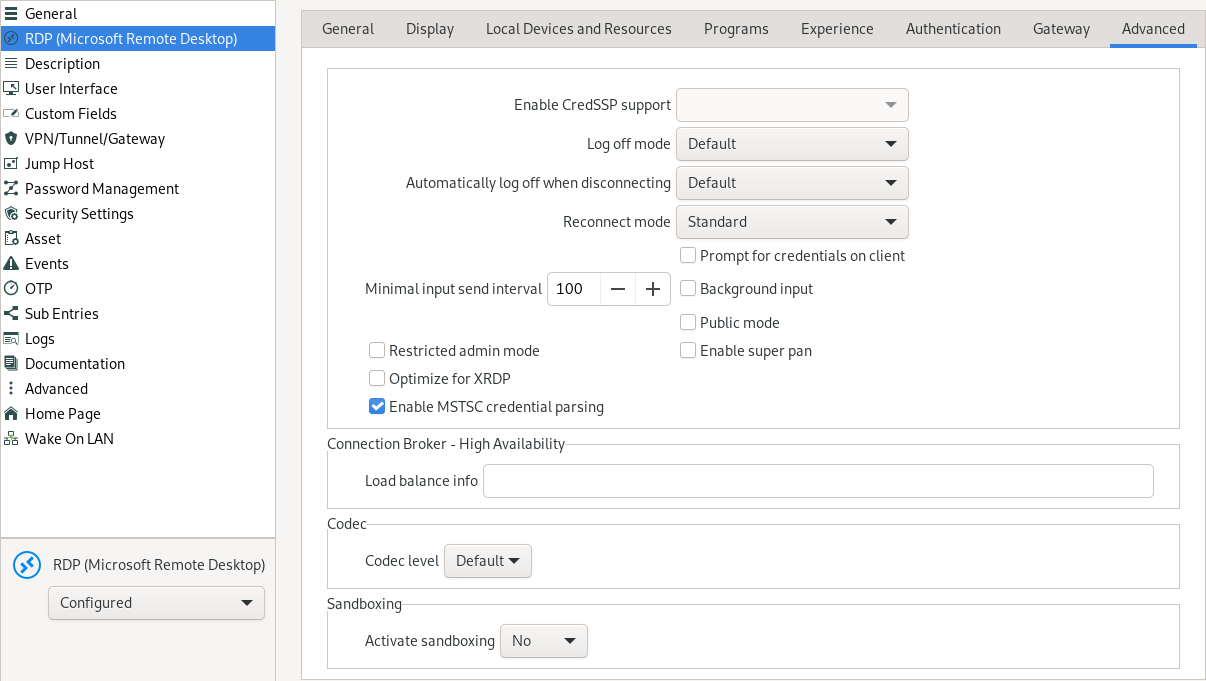
Thank you!
c0a9c4a0-61f4-4e85-9865-c89a9b9f398b.png
Hello Artióm,
Sorry for the delay, I hadn't noticed your message earlier.
This problem should be corrected in our latest version 2023.3.0.7.
Best regards,
Simon Duguay Létourneau
Hi everyone,
I was almost giving up on using RDM, but since I really like the program, and it works perfectly well on Windows, I decided to come to this forum and found this thread.
I am experiencing the same issue as the colleague above, however, I tried to change the settings, in an attempt to replicate what worked for him, but unfortunately, I can't access my Windows servers from the software in any way.
I thought my problem might be with Linux, so I downloaded a software called Remmina to test, and voilà, it worked. I didn't make any changes to my host. It just worked.
I will send some data about my host, and if you need anything more, I am entirely at your disposal to help.
Thank you very much.
Operating System: Ubuntu 23.10 (Trully is Kubuntu)
Kernel: Linux 6.5.0-14-generic
Architecture: x86-64
plasmashell 5.27.8
Qt: 5.15.10
KDE Frameworks: 5.110.0
kf5-config: 1.0
remotedesktopmanager 2023.3.0.8 (installed via .deb package)
Hi everyone,
I was almost giving up on using RDM, but since I really like the program, and it works perfectly well on Windows, I decided to come to this forum and found this thread.
I am experiencing the same issue as the colleague above, however, I tried to change the settings, in an attempt to replicate what worked for him, but unfortunately, I can't access my Windows servers from the software in any way.
I thought my problem might be with Linux, so I downloaded a software called Remmina to test, and voilà, it worked. I didn't make any changes to my host. It just worked.
I will send some data about my host, and if you need anything more, I am entirely at your disposal to help.
Thank you very much.
Hello
I'm sorry to hear it's not working right for you. Both RDM and Remmina use FreeRDP for RDP connectivity, so there must be something "off" in the configuration or a bug in the RDM side.
I'd like to ask some more information.
First, please disable sandboxing in the "Advanced" tab of the RDP session options.
Next, generate a debug log by following these steps:
- ensure RDM is closed.
- in your Terminal:
export WLOG_LEVEL="DEBUG"remotedesktopmanager > ~/Desktop/rdm.log 2>&1
(Pressing enter after each line).
- Reproduce the problem and send the ~/Desktop/rdm.log file to me. You can share it via a PM on the forum, or email to support@devolutions.net (mentioning this forum thread).
It could also be important to know the server OS you are connecting to (e.g. Windows Server 2022, xrdp on Ubuntu, etc)
Please let me know if you have questions or something isn't clear.
Richard Markievicz
As soon as I sent this message, I decided to do some more tests, creating different combinations. To my surprise, I managed to find one that worked, as follows:
- Do not use RD Gateway server - Selected
- Activated sandboxing - No
And I ended up discovering other issues:
Automatically log off when disconnecting: any options
Log off mode: any options
Any of the options, for the above settings, do not have any effect.
Richard, your response was faster than the refresh of my screen, haha...
During the tests I did, it only works with those two options I mentioned:
- Do not use RD Gateway server - Selected
- Activated sandboxing - No
Anyway, would you like me to do any other tests? I'm at your disposal.
Hello
Thanks for the information.
I'm surprised about the RD Gateway setting - I'm not sure on non-Windows platforms that there's a difference between the default ("Automatically detect RD Gateway server settings") and "Do not use RD Gateway server". I can think of various reasons why the sandboxing mode might break things however; possibly there is some strange interaction between these settings.
For these and the other issues you mentioned, I'll make sure the RDM Linux team sees your post and can provide feedback (my area of expertise is more around the core RDP integration).
But just to confirm: now you've found the right balance of settings, the RDP connection is working well for you?
Thanks and kind regards,
Richard Markievicz
Richard, everything is working now as I mentioned. Thank you.
Hello Daniel,
Automatically log off when disconnecting: any options
Log off mode: any options
I'll have a look at this issue and get back to you when it's fixed.
Do not use RD Gateway server - Selected
Activated sandboxing - No
I can confirm what Richard said, the RD Gateway setting shouldn't be a problem here. Setting it to "Do not use" should have the same effect as "Detect automatically" under Linux.
Can you check again whether the "Do not use RD Gateway server" option actually plays a role here? Try leaving the sandboxing to "No" and set the gateway settings to "Automatically detect RD Gateway server settings". This will help us pinpoint the problem to the sandbox only.
Finally, what version of Windows do you use on your Windows servers?
Best regards,
Simon Duguay Létourneau