RDM closes while starting [Manjaro]

Hi there,
I'm using 2023.1.1.3. Since this version, when I start remote desktop manager crash suddenly. Sometimes it get the splash screen. Running from console, I get the following error:
(RemoteDesktopManager:1729): Gtk-CRITICAL **: 23:38:22.564: gtk_widget_grab_default: assertion 'gtk_widget_get_can_default (widget)' failed
zsh: segmentation fault (core dumped)  remotedesktopmanager
On dmesg:
[  267.483398] RemoteDesktopMa[1729]: segfault at 560e603c21e8 ip 00007f68ca29e48f sp 00007ffd1112e508 error 4 in SQLite.Interop.dll[7f68ca28f000+149000] likely on CPU 2 (core 1, socket 0)
[  267.483411] Code: 48 8b 55 d8 8b 0a ba 00 00 00 00 f7 f1 89 55 ec 48 8b 45 d8 48 8b 40 10 8b 55 ec 48 c1 e2 04 48 01 d0 48 89 45 f8 48 8b 45 f8 <48> 8b 40 08 48 89 45 f0 48 8b 45 f8 8b 00 89 45 e8 eb 1d c7 45 ec
My system is:
Operating System: Manjaro Linux
Distrib release: 23.0.0
Kernel: Linux 6.1.41-1-MANJARO
Architecture: x86-64
All Comments (12)
Hi gregorioaranda,
We recently discovered that some operating systems and flatpak have problems with SQLite data source.
Are you using Flatpak?
Simon Duguay Létourneau
Thanks for your answer. I use the GUI pamac, with the AUR repository. On the info page said packager unknown, so, not so sure about how the program get installed.
Hi, can you provide any kind of help in this issue?
Hi,
Sorry to keep you waiting, we're waiting for our SQLite implementation engineer, who's away until tomorrow.
In the meantime, go to your RDM folder located in your home folder (~/.rdm) then open the RemoteDesktopManager.cfg file with a text editor and look for this value "PromptOnboardingOnStartUp".
If it's present in your file, replace its value with "true".
If it's not present in your file, copy this line <PromptOnboardingOnStartUp>true</PromptOnboardingOnStartUp> and paste it into your file just below "<Option>".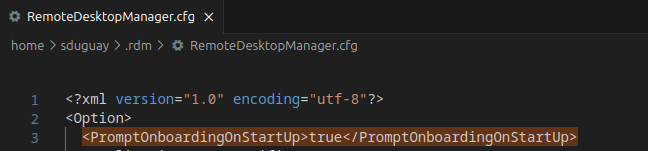
Now, when you start RDM, you'll see the onboarding window where you can configure a different type of data source. Choose between an "online" data source (Devolutions Hub Personal) or a team data source. 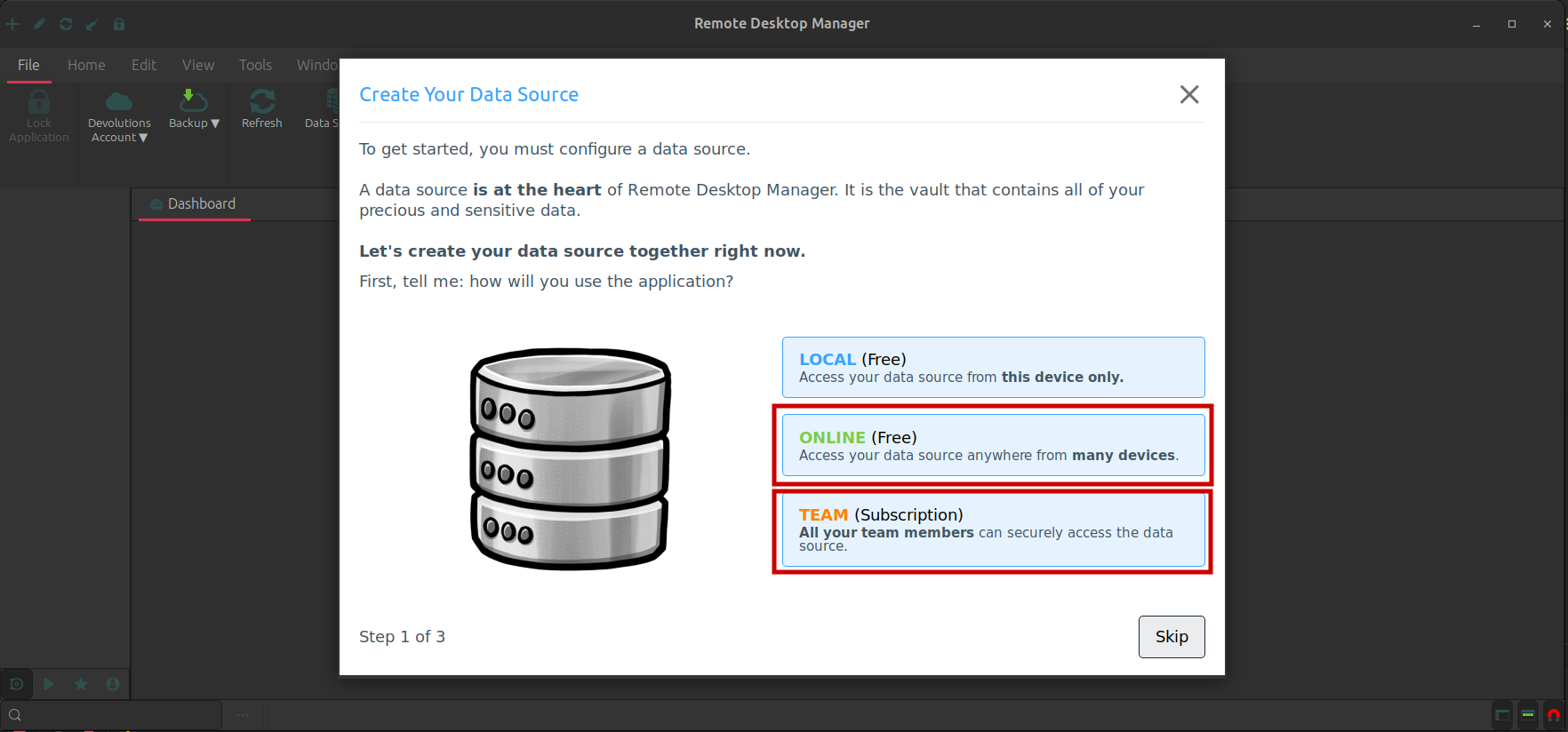
Once you've completed the onboarding process, RDM should now be able to use the newly created data source without any problems.
I'll post an update once we've fixed SQLite.
Simon Duguay Létourneau
Screenshot from 2023-08-03 10-20-34.png
Screenshot from 2023-08-21 09-49-04.png
That Update also broke my instance completely:
[872189.548848] RemoteDesktopMa[720400] bad frame in rt_sigreturn frame:0000000061a58da6 ip:7f2cfde8548f sp:7ffd7369eee8 orax:ffffffffffffffff in SQLite.Interop.dll[7f2cfde76000+149000]
[872808.137972] RemoteDesktopMa[723143]: segfault at 562e3f8ee538 ip 00007f31c7e8348f sp 00007fff113b9d08 error 4 in SQLite.Interop.dll[7f31c7e74000+149000] likely on CPU 14 (core 7, socket 0)
[872808.137984] Code: 48 8b 55 d8 8b 0a ba 00 00 00 00 f7 f1 89 55 ec 48 8b 45 d8 48 8b 40 10 8b 55 ec 48 c1 e2 04 48 01 d0 48 89 45 f8 48 8b 45 f8 <48> 8b 40 08 48 89 45 f0 48 8b 45 f8 8b 00 89 45 e8 eb 1d c7 45 ec
Sadly it is no option for me to rerun the DataSource wizard, cause all my connections are in the SQLite which can't be accessed.
Hello
I'm not sure why the SQLite library we're distributing is causing a core dump on your system. Since we dynamically link the library, it's hard for me to get anything meaningful out of your error message. I'll need to debug this on my side to understand what's going on.
I just wanted to give an update that we are working on this, and I'll post back here once I have some more information.
I do appreciate your patience in the meantime.
Kind regards,
Richard Markievicz
Hello
I'm not sure why the SQLite library we're distributing is causing a core dump on your system. Since we dynamically link the library, it's hard for me to get anything meaningful out of your error message. I'll need to debug this on my side to understand what's going on.
I just wanted to give an update that we are working on this, and I'll post back here once I have some more information.
I do appreciate your patience in the meantime.
Kind regards,
Hi Richard,
Thanks for your time. I'm totally available if you need to connect to my computer in order to get values from the source.
Best regards
Pd. Forgot to tell you all the problems start since next version of 2023.1.1.3-1 rollout
That Update also broke my instance completely:
[872189.548848] RemoteDesktopMa[720400] bad frame in rt_sigreturn frame:0000000061a58da6 ip:7f2cfde8548f sp:7ffd7369eee8 orax:ffffffffffffffff in SQLite.Interop.dll[7f2cfde76000+149000]
[872808.137972] RemoteDesktopMa[723143]: segfault at 562e3f8ee538 ip 00007f31c7e8348f sp 00007fff113b9d08 error 4 in SQLite.Interop.dll[7f31c7e74000+149000] likely on CPU 14 (core 7, socket 0)
[872808.137984] Code: 48 8b 55 d8 8b 0a ba 00 00 00 00 f7 f1 89 55 ec 48 8b 45 d8 48 8b 40 10 8b 55 ec 48 c1 e2 04 48 01 d0 48 89 45 f8 48 8b 45 f8 <48> 8b 40 08 48 89 45 f0 48 8b 45 f8 8b 00 89 45 e8 eb 1d c7 45 ecSadly it is no option for me to rerun the DataSource wizard, cause all my connections are in the SQLite which can't be accessed.
Hi Andrea,
You can run in your terminal this command:
pacman -S remote-desktop-manager=2023.1.1.3-1
It "solves" my issue (it's a workaround, ok?, not solved really). The problem start in versions greater than this one, so you can use on this version and execute the program.
Hello again
I wanted to let you know that I believe I found the issue here: GTK is preloading the system installed sqlite; despite loading our own copy of the library the symbols from the first are used (where they match). There is a version incompatibility and that causes the crash.
I've proposed a fix to the RDM Linux team; we will have to integrate that and validate it on our side. But just to let you know this is being worked on. We will update this post once a fix is generally available.
In the meantime, please don't hesitate if you have further questions or comments.
Kind regards,
Richard Markievicz
Hello,
Our update 2023.2.1.6 is now available on our website. It contains Richard's suggested fix and should resolve the SQLite issue.
As we are not the maintainers of the AUR repository, we cannot say when it will be updated.
Simon Duguay Létourneau
As we are not the maintainers of the AUR repository, we cannot say when it will be updated.
You could be, when an update comes out all I do is update the version and sha256sum, recreate SRCINFO and push to the repo. Or you could email me, I'm sure Devolutions has my email address.
Hello,
Our update 2023.2.1.6 is now available on our website. It contains Richard's suggested fix and should resolve the SQLite issue.
As we are not the maintainers of the AUR repository, we cannot say when it will be updated.
OK, Solved!!! Thank you very much to you and your team for the support.