Azure Groups and Users + Auto create

Hello.
I have just installed Devolutions Server with Team licenses.
I have integrated Azure AD for authentication and it works as I can create groups and users from Azure AD.
Then, I have several groups in the console but there have no members. I am absolutely sure that there are a few users within the groups.
So, why can't I see any users in the groups?
And, I think it is quite normal if DVLS sees no users within groups, the auto create functionality linked to a specific group is not working either.
As I discover the product, maybe I do many things bad.
Could somebody give me clues or advice about that?
Thanks by advance.
Regards,
Alexandre
All Comments (10)
Hello,
The Azure Groups we import in DVLS will only list the users that are imported in DVLS. It will not list all users from Azure.
The Auto Create functionality will work on the first login attempt of a user that doesn't exist yet in DVLS (Administration - Users).
Let us know if you have further questions about this.
Best regards,
Érica Poirier
Hello Érica.
Thank you for your feedback.
I tried to create an Azure user but I have an error :
Error:
ArgumentException - Customized cultures cannot
be passed by LCID, only by name. (Parameter 'culture')
When I enter the user UPN, there is a green check mark in the console then I have the error.
Plus, I can't select the Azure AD group I have created to make the user member of it.
If I try to connect with an Azure user I also have another error :
Could not login to Devolutions Server. Please contact your administrator.
Have you got any explanation?
Regards,
Alexandre Diez
Hello Alexandre,
Did you tried to manually create the user?
If so, please try to import it instead with the Import button.
About the group membership, as DVLS fully integrate Azure AD, you cannot bind the users to any group in the DVLS web UI. DVLS will resolve it from Azure AD automatically.
Let us know if that helps.
Best regards,
Érica Poirier
671624cf-3788-4ee8-bea1-efdd0d08a739.png
Hello Érica.
Yes, indeed, I tried to create the user manually.
I try, now, to import users but I have an error :
Value cannot be null. (Parameter 'source')
Error:
ArgumentNullException - Value cannot be null.
(Parameter 'source') at
System.Linq.ThrowHelper.ThrowArgumentNullException(ExceptionArgument argument)
at System.Linq.Enumerable.Select[TSource,TResult](IEnumerable`1 source, Func`2
selector) at
Devolutions.Server.Controllers.APIControllers.V2.BackendApiController.GetAzureDomainUsers(String
groupId, AzureUserSearchParameters parameters) --- DirectoryServices
Maybe, I had done something wrong while configuring the Azure Auth.
I followed the following procedure : Azure Portal Configuration Guide Microsoft Authentication - Devolutions
Regards,
Alexandre Diez
Hello Érica.
Update about the import problem.
Culture is all about language. Name, LCID and so on.
I have done the import test with a dummy user and it worked. The difference was mainly do to a lack of information in the on-premises AD account.
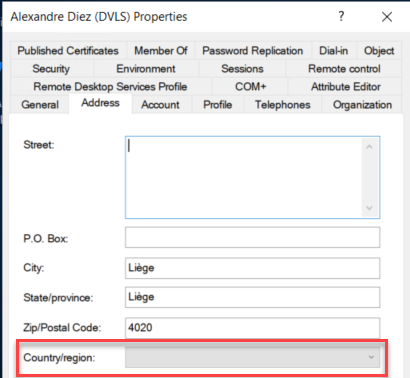
I deleted the values in the "c" and "co" attributes (see screenshots) of my AD Account and synchronized to Azure. Then, I was able to import the user within DVLS. For information, the "c" attribute is "BE" and the "co" attribute is "Belgium".
Well...it is a workaround but not a solution.
I, then, modified back the attributes to there original value and it is still working. I can authenticate with Azure and access DVLS via RDM.
Have you ever heard about that?
For the groups, you were right. I am now able to see members in the DVLS groups when the users are imported.
Regards,
Alexandre Diez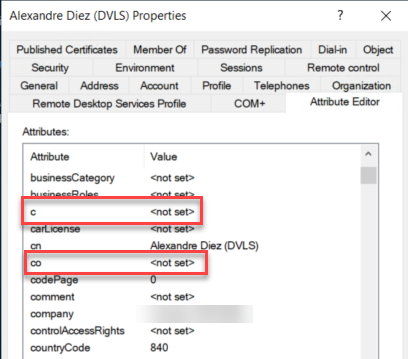
DVLS_Auth01.png
DVLS_Auth02.png
Hello Alexandre,
That's interesting about these properties. I presume that if you try to import an account that these properties are still existing, the user won't be able to connect?
I will ask our engineering if they have an idea about this problem and will get back to you.
Best regards,
Érica Poirier
Hello,
For your import issue because of the c and co attributes, a ticket has been submitted to our engineering team. Once a fix will be available, we will post it here.
Thank you for your patience.
Best regards,
Érica Poirier
Hello Érica.
I have done another test of creation/importation for a production user and the problem is exactly the same. It doesn't work because of a source problem.
I can now create or import modified users but there is a corollary to the aforementioned behavior.
The search in the import window is not working.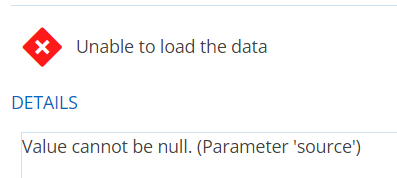
As you can imagine, I have a lot of users and I will not go through all the pages to find the one I want to import.
I'm sure the fix will resolve this too.
Thank you for having done the necessary internally to handle the problem.
I wait for your feedback.
Regards,
Alexandre Diez
2eb80697-7cbb-4f53-8b1b-dff016bac388.png
Hello Alexandre,
Thank you for your feedback and your collaboration.
The fix will surely help to solve this problem.
Best regards,
Érica Poirier
Hello,
A fix has been made and it's in the latest DVLS version 2023.2.5 that is available for download.
Once your DVLS updated, could you please confirm that the issue no longer exists?
Let us know if you need assistance for Upgrading Devolutions Server.
Thank you for your collaboration.
Best regards,
Érica Poirier