How to get all folders in a folder

Hi!
Using
RDM 2022.3.31.0 64-Bit
RemoteDesktopManager modul 2022.3.1.8
How can I retrieve all entries within a folder? Not only sessions but also folders.
$f = "path\to\folder";
Get-RDMSession -Group $f
gives me only sessions, but not folder.
In fact, I only want all folders within a folder. How can I do this?
CU,
Timo
All Comments (7)
Hello,
This command should provide the folder entries located in the given folder.
$s = Get-RDMSession | where {$_.Group -like 'path\to\folder\*' -and $_.ConnectionType -eq 'Group'}
Let us know if that helps.
Best regards,
Érica Poirier
Hi!
Unfortunately this does not work. Something similar was my first attempt, but this returns all folders recursively an I only need the folders direct in 'path\to\folder'
CU,
Timo
Hello,
The following method should work. Maybe there is a more efficient one but it works. Ensure to set the number of backslashes according to the number of folder's levels you are looking for in this section ([regex]::Matches($_.Group, "\\" )).count -eq 3 of the condition.
$s = Get-RDMSession | where {$_.Group -like 'path\to\folder\*' -and ([regex]::Matches($_.Group, "\\" )).count -eq 3 -and $_.ConnectionType -eq 'Group'}
Let us know if that helps.
Best regards,
Érica Poirier
This is way to complicated.
I noticed, the group property of a folder is alwas the group property of the containing folder following by the name property of the folder.
For a sessions the group property is always the group property of the containing folder.
My solutions:
To get the folders in a folder
Get-RDMSession -Group $Folder -IncludeSubFolders | where {($_.Group -eq $Folder + "\" + $_.Name) -and ($_.ConnectionType -eq 'Group')}
To get the sessions in a folder
Get-RDMSession -Group $Folder -IncludeSubFolders | where {($_.Group -eq $Folder) -and ($_.ConnectionType -ne 'Group')}Hello,
Thank you for your solution. It's definitely less complicated than what I provided!
Best regards,
Érica Poirier
Unfortunately I noticed right now this does not always work. I have some "virtual"(?) folders: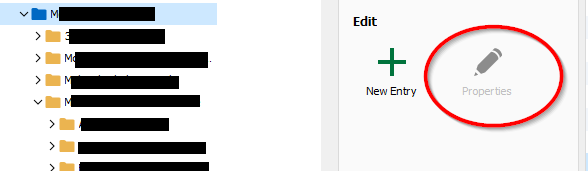
These folders are not listet even I get all session with Get-RDMSession
I think I have to examiname the level in the Group property. That is really annoying... :(
ae99df76-74e3-47c8-a960-26a011dbb1ec.png
Hello,
For the Virtual folders, you can run the following script to convert them to existing folder entries in the data source.
https://github.com/Devolutions/RDMSamples-ps/blob/main/module/entries/MassEdits/ConvertVirtualFolders.ps1
Best regards,
Érica Poirier